
BLAZEVIDEO BVDLXJGRAY
BLAZEVIDEO 2-Pack Game & Trail Camera Instruction Manual
Model: BVDLXJGRAY
Product Overview
The BLAZEVIDEO Game & Trail Camera is designed for capturing high-quality images and videos of wildlife, monitoring outdoor areas, and enhancing yard security. Its robust, waterproof design ensures reliable performance in various environmental conditions.

Figure 1: Two BLAZEVIDEO Game & Trail Cameras, showcasing their compact, camouflage design.
Key Features:
- High-Resolution Imaging: Captures up to 64MP still photos and 1296P 20fps H.264 MP4/MOV video clips.
- Advanced PIR Sensor: 70° PIR sensor detects motion up to 75ft (23m) with a quick 0.3-second trigger time.
- No-Glow Night Vision: Equipped with 940nm infrared LEDs for clear night vision without visible flash, ensuring animals are not disturbed.
- Durable & Weatherproof: IP66 waterproof rating ensures functionality in harsh outdoor environments, including deserts and tropical rainforests.
- Time-Lapse Function: Allows for automatic capture of images/videos at specified intervals, ideal for observing slow processes like plant growth.
- Security Features: Password protection and serial number function for camera security and location identification.
- User-Friendly Interface: Features an embedded 2.4-inch LCD screen and intuitive button controls for easy setup and menu navigation.
Product Components
Each BLAZEVIDEO Game & Trail Camera package includes the following:
- Trail Camera Unit
- Mounting Strap
- DC Adapter
- USB Cable

Figure 2: Labeled diagram of the camera's external and internal components.
- Display Screen
- Operation Button
- OFF/ON/SET Switch
- MENU Button
- IR LEDs
- Lens
- PIR Motion Sensor
- Tripod Thread
- SD Card Slot
- USB Jack
- DC Port
Setup Instructions
1. Powering the Camera
The camera operates on 8 AA batteries (not included) or an external 6V DC power supply. If using rechargeable batteries, they must be charged externally as the camera does not have a charging function.
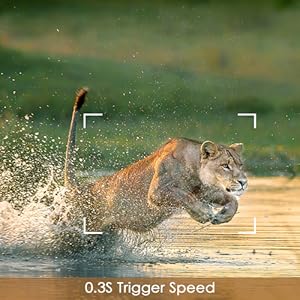
Figure 3: Batteries and SD card are not included with the camera.
2. Inserting the SD Card
Insert an SD card (up to 128GB, not included) into the designated slot. Ensure the card is correctly oriented before insertion.
3. Mounting the Camera
The camera can be mounted using the included strap around a tree or by utilizing the tripod thread for other mounting options. Ensure the camera is securely positioned to capture the desired area.

Figure 4: The camera is IP66 waterproof, suitable for outdoor use in various weather conditions.
Operating Instructions
1. Basic Operation
Use the embedded 2.4-inch LCD screen and operation buttons to navigate the menu and adjust settings. The camera features a simple menu for ease of use.
2. Image and Video Capture
The camera captures high-quality images (up to 64MP) and 1296P 20fps video. In "Cam + Video" mode, both images and videos are captured upon trigger. The trigger time is 0.3 seconds, and the detection distance is up to 75ft (23m).

Figure 5: The camera offers exceptional 64MP photo and 1296P video resolution.

Figure 6: Capture every moment with a rapid 0.3-second trigger speed.
3. Night Vision
The camera automatically activates its 940nm no-glow infrared LEDs for night vision, allowing it to capture clear photos and videos in low light or dark environments without producing a visible glow that might deter animals.

Figure 7: Clear night vision captures details even in dark environments.
4. Time-Lapse Function
Utilize the time-lapse feature to record events over extended periods, such as plant growth or animal habits, by setting the camera to take pictures or videos at specified intervals.

Figure 8: The time-lapse function allows observation of long-term processes.
5. Password Protection & Serial Number
Set a password to prevent unauthorized access to your camera. The serial number function allows you to code locations in photos, which is useful for identifying the origin of images when using multiple cameras.
Maintenance
Cleaning the PIR Sensor
To ensure optimal performance, regularly clean the PIR sensor using a soft and clean cloth. Avoid abrasive materials that could scratch the sensor.
Battery Life Management
The camera's battery life is approximately one month when running 12 hours a day. If using night vision frequently, battery consumption will be higher. Consider using an external power supply for continuous operation without relying on batteries.
Troubleshooting
SD Card Full
By default, the camera stops saving when the SD card is full. To enable continuous recording that overwrites older files, change this setting in the camera's menu.
No Sound in Videos
This camera model does not record sound. Videos will only contain visual content.
Connecting to TV
The camera cannot be directly connected to a TV for viewing. To view captured images and videos, connect the camera to a computer using the provided USB cable.
Specifications
| Feature | Specification |
|---|---|
| Still Photo Resolution | Up to 64 MP |
| Video Resolution | 1296P @ 20fps (H.264 MP4/MOV) |
| Night Vision | 940nm No-Glow IR LEDs, up to 75ft (23m) |
| PIR Sensor Angle | 70 Degrees |
| Trigger Speed | 0.3 Seconds |
| SD Card Support | Up to 128GB (SD Flash Memory Type) |
| Power Source | 8 x AA Batteries or 6V DC External Power |
| Water Resistance | IP66 Waterproof |
| Operating Temperature | -4°F to +140°F (-20°C to +60°C) |
| Display Screen | 2.4-inch LCD |
| Dimensions | 5 x 3 x 2 inches |
| Material | Acrylonitrile Butadiene Styrene (ABS) |
| Connectivity | Wired, USB |
Warranty & Support
The BLAZEVIDEO Game & Trail Camera comes with a one-year manufacturer's warranty covering manufacturing defects.
For detailed instructions, troubleshooting, or warranty claims, please refer to the complete User Manual PDF available online:
Download Full User Manual (PDF)
You can also visit the official BLAZEVIDEO store for additional support and product information:
Related documentsBVDLXJGRAY


Ask a question about this manual
Ask about setup, troubleshooting, compatibility, parts, safety, or missing instructions. Manuals+ will review the question and use this page’s manual context to help answer it.