
1. Safety Information
Please read this manual carefully before assembly and use. Keep this manual for future reference.
- Do not exceed the maximum weight capacity of 110 lbs for the TV mount and 10 lbs for each media shelf.
- Ensure all screws are securely tightened before use. Periodically check for loose connections.
- This product is designed for indoor use only.
- Keep children and pets away from the assembly area.
- Use caution when adjusting the TV height or swivel to prevent injury or damage.
2. Package Contents
Verify that all components are present and undamaged before beginning assembly. If any parts are missing or damaged, please contact customer support.
- TV Stand Base (Wood)
- Vertical Support Pole (Alloy Steel)
- TV Mounting Bracket
- Flexible Media Shelves (2)
- Mounting Hardware Kit (various screws, washers, spacers)
- Assembly Tools (e.g., Allen wrench)
- Instruction Manual
3. Product Specifications
| Feature | Specification |
|---|---|
| Mounting Type | Floor Mount |
| Movement Type | Swivel (±30°) |
| Brand | Rfiver |
| Material | Alloy Steel & Wood |
| Color | Black |
| Minimum Supported Screen Size | 40 Inches |
| Maximum Supported Screen Size | 77 Inches |
| VESA Compatibility | 100x100mm to 600x400mm |
| TV Weight Capacity | Up to 110 lbs |
| Shelf Weight Capacity | Up to 10 lbs per shelf |
| Height Adjustment Range | 50 inches to 56 inches (24 levels) |
| Base Dimensions (W x D) | 25.6 x 15.7 inches |
4. Setup and Assembly
Follow the detailed instructions provided in the included manual for step-by-step assembly. Ensure you have adequate space and all necessary tools.
4.1 VESA Compatibility Check
Before assembly, confirm your TV's VESA bolt pattern falls within the range of 100(h)mm x 100(w)mm up to 600(h)mm x 400(w)mm. This stand is suitable for most 40" - 77" LCD, LED, OLED, QLED, Plasma, and Smart TVs.

Image: Height adjustment options for the TV stand, illustrating the range from 50 to 56 inches.

Image: The Rfiver floor TV stand with a television mounted, demonstrating its appearance and functionality in a home environment.
4.2 Assembly Overview
The assembly process typically takes about 10 minutes with the provided instructions. The stand features a high-quality wood base for enhanced stability and safety, especially in households with children.

Image: Detailed view of the stand's wooden base, emphasizing its robust construction, and other features like cable management and adjustable shelves.
4.3 Pre-Assembly Video Guide
For a visual guide and important considerations before starting assembly, watch this video:
Video: An informational video titled "Watch Before Buying This Rfiver Swivel TV Stand" provides an overview of the product and its features, useful before beginning the assembly process.
5. Operating Instructions
5.1 Height Adjustment
The TV stand offers two modes of height adjustment for optimal viewing: 3 levels on the mounting bracket and 8 levels on the metal pole support, totaling 24 possible height settings from 50 to 56 inches.
5.2 Swivel Function
The TV can be swiveled ±30° to the left or right, allowing you to achieve the best viewing angle from various positions in your room.

Image: Visual representation of the TV stand's swivel feature, highlighting its ability to rotate for flexible viewing angles.
5.3 Media Shelves
The two flexible metal shelves and the hardwood base provide storage for A/V components, cable boxes, DVD players, or gaming systems. The height of these shelves can be adjusted to suit your needs.

Image: Detail of the adjustable storage shelves on the TV stand, designed for organizing media components.
5.4 Wire Management
Integrated wire storage at the back of the bracket helps to hide and organize cables, maintaining a clean and tidy appearance in your living space.
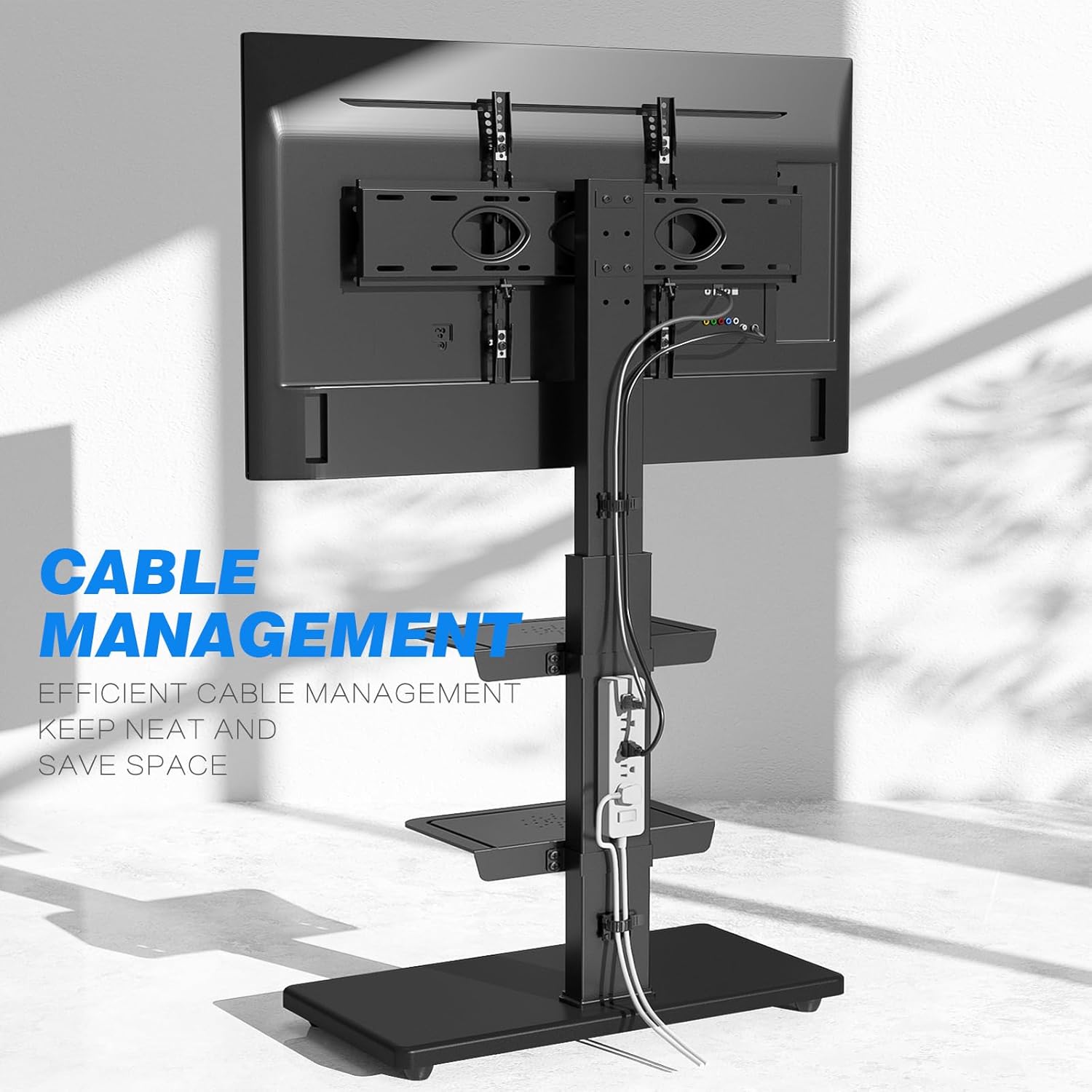
Image: The cable management feature of the TV stand, showing how wires can be efficiently organized.
5.5 Product Demonstration Video
View this video for a demonstration of the TV stand's features and ease of use:
Video: A product demonstration video titled "Much easier than finding a TV console.." showcasing the functionality and benefits of the TV stand.
6. Maintenance
To ensure the longevity and proper function of your Rfiver TV stand, follow these maintenance guidelines:
- Cleaning: Wipe surfaces with a soft, damp cloth. Avoid abrasive cleaners or harsh chemicals that may damage the finish.
- Inspection: Periodically check all bolts and screws to ensure they remain tight. Re-tighten if necessary.
- Weight Limits: Always adhere to the specified weight limits for the TV mount and shelves to prevent structural damage or instability.
7. Troubleshooting
If you encounter any issues with your TV stand, refer to the following common problems and solutions:
- TV is not stable: Ensure all mounting screws are securely fastened to the TV and the stand. Verify that the TV's weight and VESA pattern are within the product's specifications.
- Difficulty adjusting height or swivel: Check for any obstructions or loose components. Ensure adjustment mechanisms are properly engaged. Do not force adjustments.
- Missing parts: Refer to the 'Package Contents' section. If parts are missing, contact Rfiver customer service for assistance.
8. Warranty Information
All Rfiver products are covered by a 5-year manufacturer warranty from the date of purchase. This warranty covers defects in materials and workmanship under normal use. Please retain your proof of purchase for warranty claims.
9. Contact Information
For customer service, technical support, or warranty inquiries, please visit the official Rfiver website or contact our local customer service team. Refer to the product packaging or official website for the most current contact details.

