
1. Introduction
This manual provides detailed instructions for the installation, operation, and maintenance of your Eaglerich SX-119 Car Stereo Radio. Please read this manual thoroughly before using the product to ensure proper functionality and to prevent damage.
2. Product Overview
The Eaglerich SX-119 is a 2 DIN car stereo radio featuring a 7-inch HD touch screen. It supports various audio sources and connectivity options for an enhanced in-car entertainment experience.
Key Features:
- Built-in Bluetooth for hands-free calls and advanced audio transmission.
- High-quality digital stereo FM radio with 18 preset stations (FM1-FM2-FM3).
- Support for USB and TF/SD card readers for MP3/WMA/WAV audio formats.
- Front AUX audio input and rear L/R RCA audio output.
- Support for breakpoint memory and ID3 play.
- Rotary electronic volume control and multiple EQ scenario modes (rock, pop, classical).
- 4-track high-power output (60W*4).
- Includes a remote control for convenient operation.
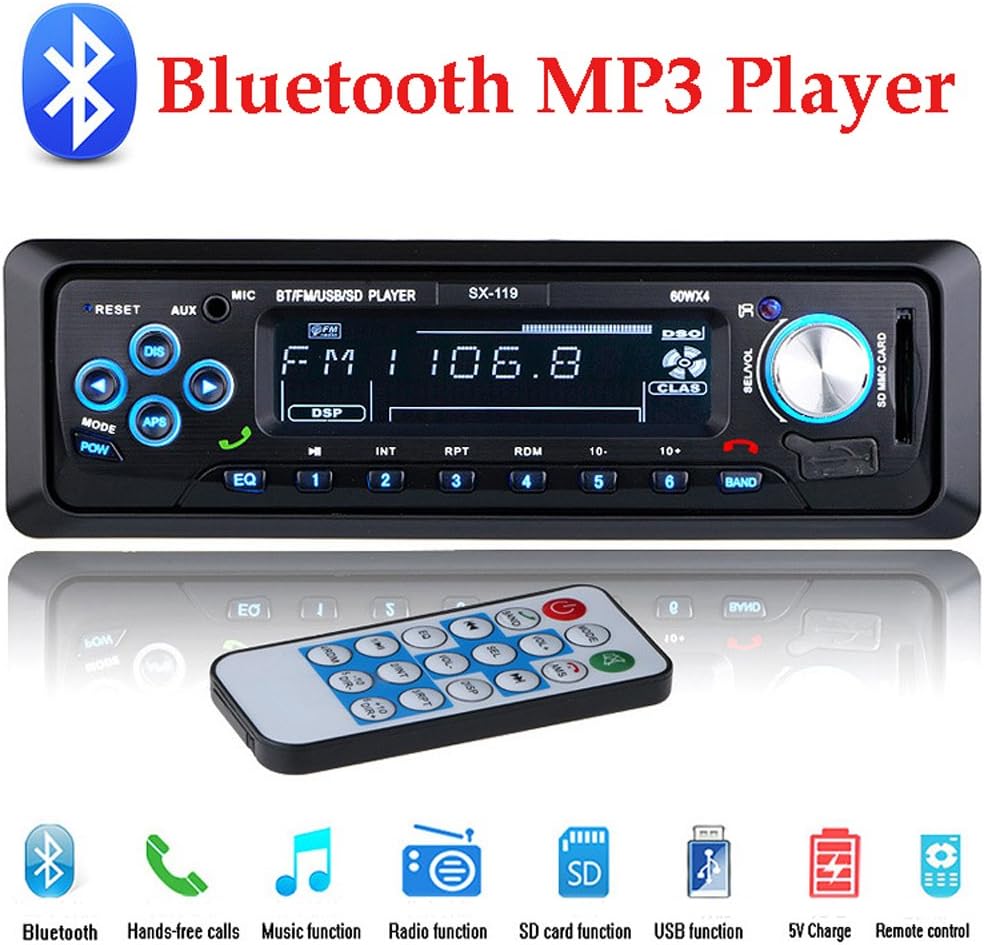
Image: Front view of the Eaglerich SX-119 car stereo radio, displaying its screen, buttons, and a remote control.
3. Package Contents
Verify that all items are present in the package before proceeding with installation.
- 1 x Car MP3 Player (Eaglerich SX-119)
- 1 x Remote Controller
- 1 x Power Cable
- 2 x Install Keys
- 1 x English User Manual (this document)

Image: The Eaglerich SX-119 car stereo, remote control, wiring harness, and installation keys, alongside its retail packaging, illustrating the included components.
4. Installation
Proper installation is crucial for optimal performance. If you are unsure about any steps, consult a professional installer.
4.1 Installation Dimensions
Ensure your vehicle's dashboard opening matches the following dimensions:
- Panel Size: 188mm (width) * 58mm (height)
- Metal Frame Installation Size: 182mm (width) * 52mm (height) * 120mm (depth)
- Body Installation Size: 178mm (width) * 50mm (height) * 120mm (depth)

Image: A diagram illustrating the precise dimensions for the Eaglerich SX-119 car stereo unit, its metal frame, and the front panel, crucial for proper installation.
4.2 Wiring Connections
Refer to the wiring diagram provided with the power cable. Connect the power, ground, speaker, and antenna wires correctly. Incorrect wiring can cause damage to the unit or vehicle electrical system.

Image: Rear view of the Eaglerich SX-119 car stereo, showing the various ports and connectors for power, speakers, antenna, and RCA outputs.
5. Operating Instructions
5.1 Basic Controls
- Power/Mode Button: Press to turn on/off or switch between modes (FM, USB, SD, AUX, Bluetooth).
- Volume Knob: Rotate to adjust volume. Press to access audio settings (Bass, Treble, Balance, Fader, EQ).
- Reset Button: Use a pointed object to press the small 'RESET' button to restore factory settings.
- EQ Button: Cycle through preset equalizer modes (Rock, Pop, Classical, etc.).
5.2 FM Radio Operation
The unit supports three FM bands (FM1, FM2, FM3) with 18 preset stations (6 per band). The radio frequency range is 87.5-108MHz.
- Press the 'MODE' button to select FM mode.
- Press the 'BAND' button to switch between FM1, FM2, and FM3.
- Automatic Search: Press and hold the 'APS' button to automatically search and store stations.
- Manual Search: Press the 'DIS' (seek down) or 'APS' (seek up) buttons briefly to manually tune to the next available station.
- Preset Stations: Press buttons 1-6 to select a stored station. To store a station, tune to the desired frequency, then press and hold one of the 1-6 buttons until you hear a beep.

Image: The Eaglerich SX-119 car stereo display showing FM radio mode with a frequency of 103.8 MHz, indicating high-quality digital stereo reception.
5.3 USB/SD Card Playback
The unit supports USB drives and SD/TF cards for playing MP3, WMA, and WAV audio files. It supports large capacity storage devices.
- Insert a USB drive into the USB port or an SD/TF card into the SD card slot.
- The unit will automatically switch to USB/SD mode and begin playback. If not, press the 'MODE' button.
- Use the track buttons (◀◀ / ▶▶) to skip tracks.
- Use the 'RPT' (repeat) and 'RDM' (random) buttons for playback options.
- The USB port also supports 5V charging for digital products.

Image: The Eaglerich SX-119 car stereo with a USB flash drive inserted into its USB port and an SD card in its slot, demonstrating its media playback capabilities.
5.4 Bluetooth Operation
The built-in Bluetooth module allows for hands-free calling and wireless audio streaming.
- Press the 'MODE' button to select Bluetooth mode. The display will show 'BT'.
- On your mobile device, search for Bluetooth devices and select 'CAR BT' or a similar name.
- Once paired, you can make/receive calls and stream audio wirelessly.
- Use the green call button on the unit or remote to answer calls, and the red button to end calls.
5.5 AUX Audio Input
Connect external audio devices such as smartphones, MP3 players, or navigation units via the front 3.5mm AUX input.
- Connect your external device to the AUX input using a 3.5mm audio cable.
- Press the 'MODE' button to select AUX mode. The display will show 'AUX'.
- Audio from your external device will now play through the car's speakers.

Image: The Eaglerich SX-119 car stereo with a smartphone connected via a 3.5mm audio cable to its front AUX input, demonstrating external audio playback.
5.6 RCA Audio Output
The rear RCA output allows connection to external amplifiers or subwoofers for enhanced audio performance.
- Connect RCA cables from the unit's rear L/R RCA output holes to your external amplifier or subwoofer.
- Ensure proper gain and crossover settings on your external audio equipment.

Image: The rear panel of the Eaglerich SX-119 car stereo, highlighting the RCA audio output ports for connecting to external amplifiers or subwoofers.
6. Specifications
| Feature | Specification |
|---|---|
| Model Number | SX-119 |
| Brand | Eaglerich |
| Connectivity Technology | Auxiliary, Bluetooth, RCA, USB |
| Controller Type | Android (compatible) |
| Special Features | Equalizer, Touchscreen |
| Compatible Devices | Smartphone, Speaker |
| Connector Type | 3.5mm Jack, RCA, USB |
| Audio Output Mode | Stereo |
| Output Power | 60 Watts x 4 Channels |
| Work Voltage | DC12V-14.4V |
| FM Radio Frequency | 87.5-108MHz |
| Body Size | 178mm (Width) * 50mm (Height) * 120mm (Depth) |
| Panel Size | 188mm (Width) * 58mm (Height) |
7. Troubleshooting
If you encounter issues, refer to the following common problems and solutions:
- No Power:
- Check power cable connections (yellow to constant 12V, red to ignition 12V, black to ground).
- Verify vehicle's fuse for the stereo.
- Ensure the unit is properly seated in its mounting sleeve.
- No Sound:
- Check speaker wire connections.
- Ensure volume is not at minimum or muted.
- Verify audio source (FM, USB, AUX, BT) is correctly selected and playing.
- Bluetooth Connection Issues:
- Ensure Bluetooth is enabled on both the stereo and your mobile device.
- Delete previous pairings on your mobile device and try pairing again.
- Move your mobile device closer to the stereo.
- USB/SD Card Not Reading:
- Ensure the USB drive or SD card is formatted to a compatible file system (e.g., FAT32).
- Check that audio files are in supported formats (MP3, WMA, WAV).
- Try a different USB drive or SD card.
8. Maintenance
To ensure the longevity and optimal performance of your car stereo, follow these maintenance guidelines:
- Cleaning: Use a soft, dry cloth to wipe the unit's display and buttons. Avoid abrasive cleaners or solvents.
- Temperature: Avoid exposing the unit to extreme temperatures, direct sunlight for prolonged periods, or high humidity.
- Connections: Periodically check all wiring connections to ensure they are secure.
9. Warranty and Support
Specific warranty information for the Eaglerich SX-119 Car Stereo Radio is not provided in this manual. For details regarding warranty coverage, technical support, or service, please contact the seller or retailer from whom you purchased the product. Keep your purchase receipt as proof of purchase.