
1. Introduction
The AKK BA3 is an all-in-one (AIO) FPV camera and video transmitter (VTX) designed for micro RC aircraft and FPV drones. It integrates a 600TVL 1/3 CMOS camera, a 5.8GHz 40-channel VTX, and a brass dipole antenna into a compact and lightweight unit. This manual provides essential information for the proper setup, operation, and maintenance of your AKK BA3 unit.
Key Features:
- AIO FPV camera, transmitter, and brass dipole antenna in one compact unit.
- Switchable output power: 25mW, 50mW, and 200mW.
- Compatible with 5.8GHz FPV goggles and monitors.
- Requires 1S LiPo battery for operation.
- Upgraded low-light condition performance for improved visibility in dim environments.
- Designed for both indoor and outdoor flying applications.
2. Product Overview and Components
Familiarize yourself with the components of your AKK BA3 FPV camera and transmitter.

Figure 2.1: AKK BA3 FPV Camera and Transmitter general view.

Figure 2.2: Labeled components of the AKK BA3 unit, including the button, power input, antenna, and camera lens.
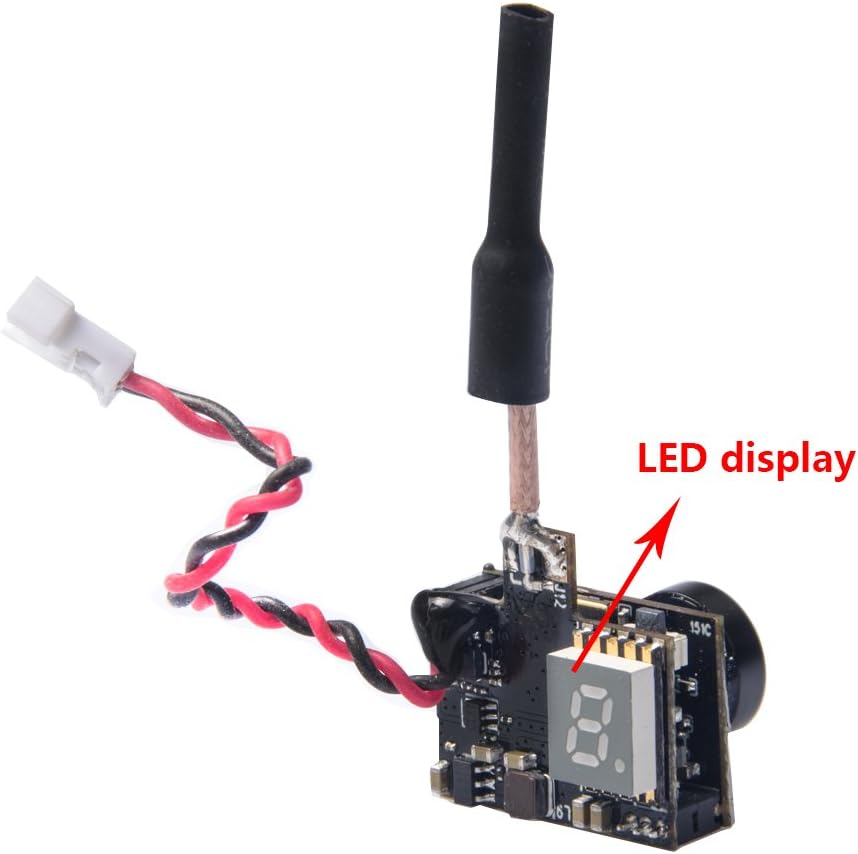
Figure 2.3: Close-up view of the AKK BA3's LED display, which indicates current settings.

Figure 2.4: Dimensions of the AKK BA3 FPV Camera and Transmitter.
Package Contents:
- 1x AKK BA3 AIO FPV Camera
- 1x Cable
3. Setup Instructions
3.1 Wiring
Connect the AKK BA3 to your drone's power source. Refer to Figure 2.2 for connection points.
- GND: Connect the black wire to the ground (negative) terminal of your power source.
- 3.3-5.5V: Connect the red wire to the positive terminal of your power source. The unit requires a 1S LiPo battery (3.3V to 5.5V DC input).
Ensure correct polarity to prevent damage to the unit.
3.2 Initial Power-On
After connecting the power, the unit will power on. The LED display (Figure 2.3) will illuminate, showing the current channel and band settings.
4. Operating Instructions
4.1 Changing Channels and Bands
The AKK BA3 features a single button for controlling channel, band, and power output. Refer to Figure 2.2 for the button location.
- Short Press: A short press of the button will cycle through the available channels (CH1-CH8) within the current band. The LED display will update to show the new channel.
- Long Press (2 seconds): A long press of the button will cycle through the available frequency bands (A, B, E, F, R). The LED display will update to show the new band.
4.2 Changing Power Output
To change the video transmitter's power output (25mW, 50mW, 200mW):
- Very Long Press (5 seconds): Press and hold the button for approximately 5 seconds. The LED display will briefly show 'P1', 'P2', or 'P3' indicating 25mW, 50mW, or 200mW respectively. Release the button when the desired power level is displayed.
Ensure your FPV receiver (goggles or monitor) is set to the same frequency and band as the AKK BA3 for proper video reception.
5. Maintenance
Proper maintenance ensures the longevity and optimal performance of your AKK BA3 unit.
- Cleaning: Gently clean the camera lens with a soft, lint-free cloth. Avoid using harsh chemicals.
- Storage: Store the unit in a dry, cool environment away from direct sunlight and extreme temperatures.
- Handling: Handle the unit with care to avoid damaging the delicate electronic components and the antenna.
- Power: Always disconnect power when not in use or during maintenance.
6. Troubleshooting
If you encounter issues with your AKK BA3, refer to the following common problems and solutions:
| Problem | Possible Cause | Solution |
|---|---|---|
| No video signal | Incorrect frequency/band on receiver; Power issue; Damaged antenna | Verify receiver frequency/band matches VTX; Check power connections; Inspect antenna for damage. |
| Poor video quality (static, lines) | Interference; Low power output; Weak signal; Damaged camera lens | Change VTX channel/band; Increase power output; Reduce distance to receiver; Clean camera lens. |
| Unit does not power on | No power; Incorrect wiring; Faulty unit | Check battery connection and charge; Verify wiring polarity; Contact support if unit is faulty. |
7. Specifications
Detailed technical specifications for the AKK BA3 FPV Camera and Transmitter.
| Feature | Detail |
|---|---|
| Brand | AKK |
| Model Name | BA3 5.8G |
| Special Feature | Compact AIO FPV camera and transmitter, switchable power level, upgraded low-light condition |
| Color | Black |
| Video Capture Resolution | 900x504 |
| Connectivity Technology | 5.8GHz |
| Included Components | BA3 AIO FPV Camera, Cable |
| Skill Level | Intermediate |
| Item Weight | 0.03 Kilograms |
| Video Capture Format | NTSC |
| Remote Control Technology | Radio Frequency |
| Control Type | Remote Control |
| Wireless Communication Technology | 5.8GHz |
| Battery Cell Composition | Lithium Polymer |
| Are batteries included? | No |
| Supported Image Format | JPEG |
| Video Output Resolution | 525 pixels |
| Includes Remote? | No |
| Optical Sensor Technology | CMOS |
| Includes Rechargeable Battery | No |
| Media Type | Micro SD |
| UPC | 649762389994 |
| Model Number | 4332024466 |
| Part Number | K-BA3 |
| ASIN | B06Y5D8SPZ |
| Material | Plastic |
| GTIN | 649762389994 |
8. Warranty and Support
This product is covered by a standard manufacturer's warranty. For specific warranty terms, duration, and support inquiries, please refer to the official AKK website or contact your retailer.
For technical assistance or further questions, please visit the AKK support page or contact their customer service directly.