
1. Product Overview
The TEKCOPLUS SLM25TK Decibel Meter is a professional sound level meter designed for accurate noise monitoring. It features an auto-ranging function, wide frequency response, and data logging capabilities, making it suitable for various environmental and industrial applications. This device is CE certified and RoHS compliant.
2. Key Features
- Effortless Measurement: Auto-ranging function ensures accurate readings across different sound levels.
- Wide Frequency Response: Captures frequencies from 31.5Hz to 8.5KHz for comprehensive sound analysis.
- Calibration: Built-in sound source provides a reliable 94dB at 1kHz for precise calibration.
- Certified Quality: CE certified and RoHS compliant for safety and environmental standards.
- AC/DC Function: Offers flexibility with both AC and DC power options for indoor and outdoor use.
- Data Logging: Records up to 32,000 readings with included CD software for analysis.
- Backlit LCD Display: Ensures clear visibility in various lighting conditions.
- Max Hold Function: Freezes the maximum measured value on the display.
- Fast/Slow Time Weighting: Allows selection between fast and slow response speeds.
- A/C Frequency Weighting: Provides options for A and C frequency weighting.

Figure 1: LCD Digital Display and Features. The display shows auto ranging, A/C frequency weighting, fast/slow time weighting, Max Hold function, bar graph display, time and date, auto-off, backlight, and low battery indicator.

Figure 2: Device Components. This image highlights the Sponge Ball, Display with backlight, A/C Button, MAX Button, REC button, Power on/off switch, Fast/Slow Button, Backlight Button, AC output, DC output, and USB port.
3. Setup
3.1 Battery Installation
The device requires 4 AA batteries. Open the battery compartment on the back of the meter, insert the batteries according to the polarity markings, and close the compartment securely.
3.2 Powering the Device
The meter can be powered by 4 AA batteries or via USB connection. For continuous power, connect the USB cable to an adapter (6V-9V) and plug it into a socket, or connect to a PC/laptop for power and data transfer.

Figure 3: USB Connection for Power Supply and Data Transfer. The image shows the USB port on the device and how to connect it to an outlet adapter or a PC/laptop.
3.3 Software Installation
Insert the included CD software into your computer's CD drive. Follow the on-screen instructions to install the 'NoiseLogger Communication Tool' software. The software is compatible with Windows 11, 10, 8, 7, Vista, and XP. Alternatively, download the software from www.cd50.net/25.

Figure 4: Data Logger CD Software. The image shows the included CD and USB cable for connecting the sound level meter to a computer for data logging and analysis.
4. Operating Instructions
4.1 Basic Measurement
- Press the power button to turn on the device.
- The meter will display real-time sound levels.
- Use the F/S button to switch between Fast and Slow response speeds.
- Press the A/C button to select between A-weighting (dBA) and C-weighting (dBC).
- Press the MAX button to activate the maximum value hold function, which freezes the highest reading on the screen. Press again to exit.
- Press the backlight button (light bulb icon) to turn the display backlight on or off for better visibility in dark environments.
4.2 Auto Power Off
To enable the auto power off function, hold the F/S button and then press the power on/off switch. An auto-off symbol will appear on the display, indicating the function is active.
Video 1: TEKCOPLUS SLM25TK Sound Level Meter Features. This video demonstrates the backlight, fast/slow response, max hold, A/C frequency weighting, and auto power off functions of the sound level meter.
5. Data Logging with Software
- Install the 'NoiseLogger Communication Tool' software on your computer (refer to Section 3.3).
- Connect the sound level meter to your computer using the provided USB cable.
- Open the NoiseLogger software.
- In the software, go to 'Communication' and click 'Connect'. The software will detect the device.
- Before recording, set the desired parameters (e.g., sample interval, noise alarm levels) in the 'Set Param' section of the software.
- Press the 'REC' button on the meter to start logging noise levels. The software will display live measurements and begin recording data.
- To stop recording, click 'Stop Recording' in the software.
- To retrieve recorded data, click 'Data Download' in the software. You can then save the data as a record file (e.g., .WRec) and view it within the software, including log time, noise levels, and a bar graph display.
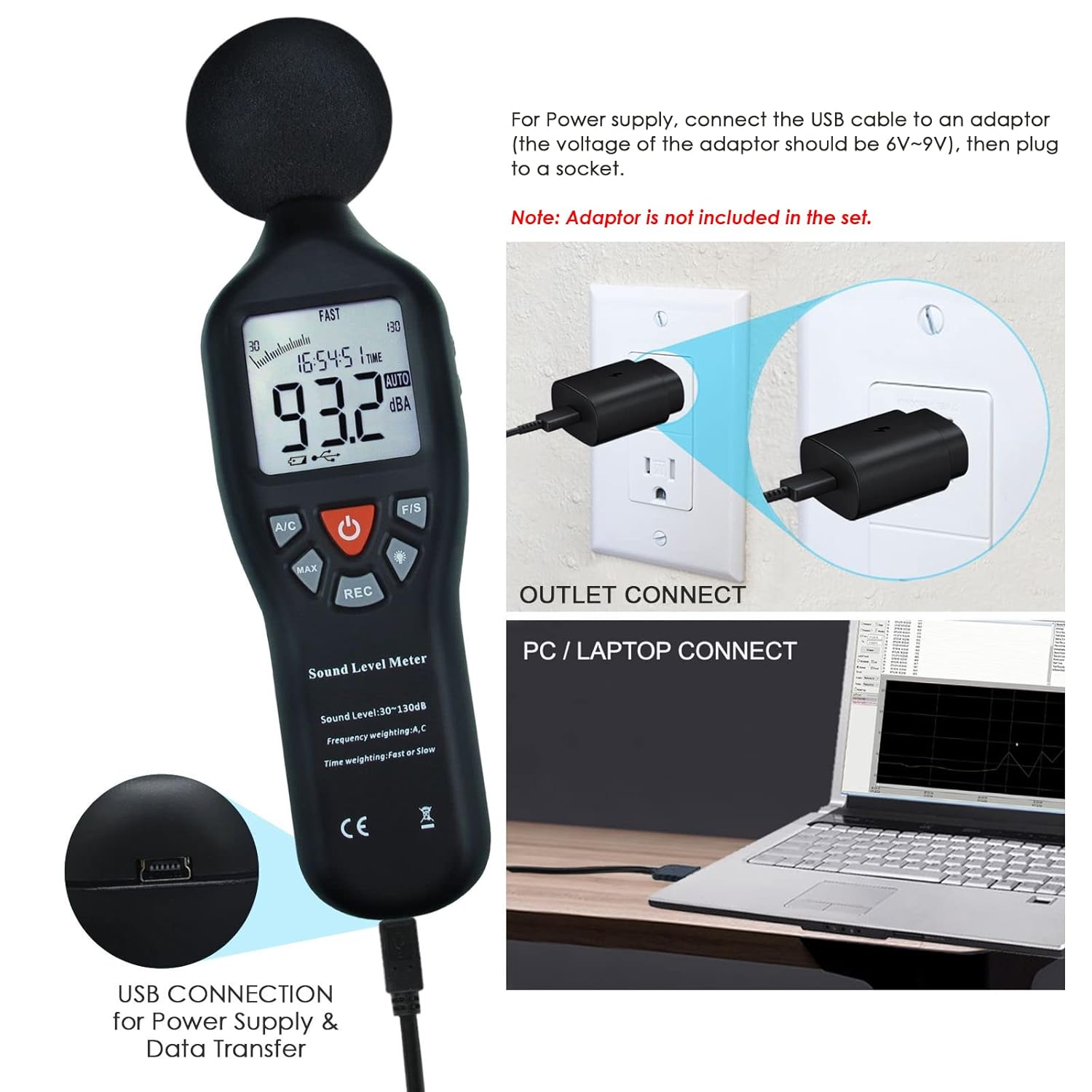
Figure 5: Software Data Logging Steps. This image illustrates the process of connecting to the PC, setting parameters, downloading data, and checking the noise chart using the included software.
6. Maintenance
To ensure optimal performance and longevity of your TEKCOPLUS SLM25TK Decibel Meter, keep the device clean and dry. Avoid exposing it to extreme temperatures, humidity, or direct sunlight. When not in use for extended periods, remove the batteries to prevent leakage. Store the meter in its protective carrying case.
7. Specifications
| Feature | Detail |
|---|---|
| Measurement Range | 30 – 130 dB |
| Frequency Response | 31.5Hz to 8.5KHz |
| Item Model Number | SLM25TK |
| Power Source | 4 AA batteries required (or USB power) |
| Item Weight | 1 pound |
| Package Dimensions | 9.92 x 4.02 x 2.05 inches |
| Manufacturer | TekcoPlus Ltd |
| Data Logging Capacity | Up to 32,000 readings |
| Certifications | CE, RoHS |
8. Support
For technical assistance, troubleshooting, or any inquiries regarding your TEKCOPLUS SLM25TK Decibel Meter, please contact TEKCOPLUS customer support. Refer to the contact information provided in your product packaging or visit the official TEKCOPLUS website for further assistance.