
1. Introduction
Thank you for choosing the ZENY Vibration Plate Exercise Machine. This manual provides essential information for the safe and effective operation, maintenance, and troubleshooting of your new fitness equipment. Please read this manual thoroughly before first use and retain it for future reference.
Key Features:
- Durable Construction: Features an ABS shell for durability, ergonomic design, anti-static, and anti-overload device.
- Adjustable Vibration Speed: Speed can be adjusted from 1 to 99 levels to suit various needs.
- Whole Body Workout: Designed for full-body workouts, aiding in circulation, muscle strength, flexibility, and recovery.
- Quiet Operation: Operates quietly, allowing for use without disturbance.
- Bluetooth Connectivity: Connects to smart devices via Bluetooth for enhanced user experience.
- User-Friendly Controls: Equipped with an LED display and remote control for easy adjustment of time and speed.

Figure 1: ZENY Vibration Plate highlighting key functions and a user demonstrating an exercise.
2. What's in the Box
Upon unpacking, please ensure all items listed below are present and in good condition. If any items are missing or damaged, please contact customer support.
- Vibration Plate Machine (1 unit)
- Remote Control (1 unit)
- User Manual (1 copy)
- Loop Bands (2 units)
- Power Cord (1 unit)
- Wrench (1 unit)

Figure 2: Package contents of the ZENY Vibration Plate Exercise Machine.
3. Setup Instructions
- Unpack the Unit: Carefully remove the vibration plate and all accessories from the packaging.
- Placement: Place the machine on a flat, stable surface. Ensure there is enough space around the unit for safe exercise. It is recommended to place a towel or mat underneath the rubber feet to prevent marks on certain floor types.
- Power Connection: Locate the power input port on the side or back of the machine. Connect the power cord to the machine and then plug it into a standard electrical outlet.
- Power On: Locate the main power switch, usually on the side or back of the unit, and flip it to the 'ON' position. The LED display on the control panel should illuminate.
- Attach Resistance Bands (Optional): If desired, attach the loop bands to the designated attachment points on the sides of the vibration plate.

Figure 3: Details of the power switch, suction cups, and resistance band attachments.
4. Operating Instructions
Your ZENY Vibration Plate can be operated using the integrated control panel or the included remote control. Always ensure the main power switch is on before attempting to operate the machine.
Control Panel & Remote:
- Power Button: Press to turn the machine on/off (after the main switch is on).
- Start/Stop: Initiates or pauses the vibration.
- Speed Adjustment: Use the 'Low' and 'Hi' buttons (or arrow keys on the remote) to increase or decrease the vibration speed (levels 1-99).
- Time Setting: Adjust the workout duration using the time buttons.
- Program Mode (PRG MODE/M): Select from pre-programmed workout routines. The remote also features quick-select buttons for walking (speed 20), running (speed 50), and high-intensity (speed 80) modes.

Figure 4: Control panel and remote control overview.
Using the Machine:
- Step onto the platform with both feet. For varying intensity, adjust your foot placement: closer to the center for lower intensity, wider for higher intensity.
- Turn on the machine using the power button on the control panel or remote.
- Select your desired program or manually adjust the speed and time.
- Press 'Start' to begin your workout.
- Maintain a slight bend in your knees and engage your core during operation.
- To stop, press the 'Stop' button.
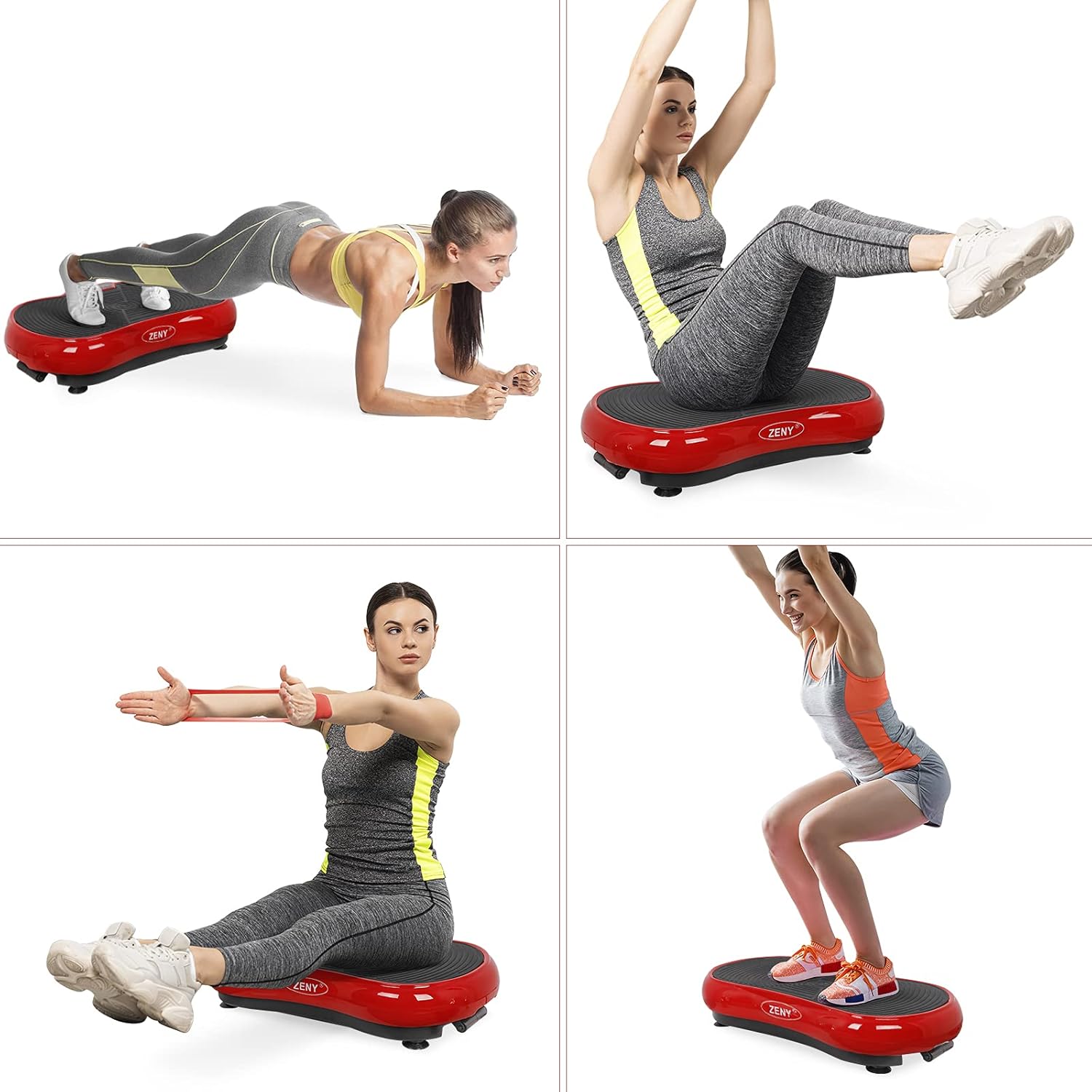
Figure 5: Examples of exercises on the vibration plate.
Bluetooth Connectivity:
To connect your smart device via Bluetooth:
- Ensure Bluetooth is enabled on your smart device.
- Search for available devices. The vibration plate should appear as 'ZENY' or a similar name.
- Select the device to pair. Once connected, you can play music through the integrated speakers.
Video 1: Official product video demonstrating the ZENY Vibration Plate Machine in use, including various exercises and features.
5. Maintenance
- Cleaning: Wipe the surface of the machine with a soft, damp cloth after each use. Do not use abrasive cleaners or solvents.
- Storage: Store the machine in a cool, dry place away from direct sunlight and moisture. Its compact design allows it to fit under most beds or furniture.
- Inspection: Periodically check the power cord for any damage. Ensure all rubber feet are securely in place.
6. Troubleshooting
| Problem | Possible Cause | Solution |
|---|---|---|
| Machine does not power on. | Power cord not securely plugged in; Main power switch is off; Outlet malfunction. | Check power cord connection; Ensure main power switch is ON; Try a different outlet. |
| Vibration is weak or inconsistent. | Speed setting is too low; Overload (exceeding max weight). | Increase speed setting; Ensure user weight does not exceed 220 lbs. |
| Remote control not working. | Batteries are dead; Obstruction between remote and machine. | Replace remote batteries; Ensure clear line of sight to the machine's sensor. |
| Bluetooth connection issues. | Bluetooth not enabled on device; Device too far from machine. | Ensure Bluetooth is on; Move device closer to the machine; Re-pair the device. |
7. Specifications
- Brand: ZENY
- Model: B06Y4RN5MX
- Item Weight: 24.16 Pounds
- Color: Red
- Material: Acrylonitrile Butadiene Styrene (ABS)
- Product Dimensions (D x W x H): 26.8" x 15" x 5.3"
- Controls Type: Remote / Touch
- Display: LED
- Maximum Speed: 99 RPM
- Minimum Speed: 1 RPM
- Number of Resistance Levels: 99
- Operation Mode: Automatic
- Power Source: Corded Electric
- Maximum Weight Recommendation: 220 Pounds

Figure 6: Product information and key components.
8. Warranty and Support
The ZENY Vibration Plate Exercise Machine comes with a 1-year warranty. For warranty claims, technical support, or any questions regarding your product, please contact ZENY customer service. Keep your purchase receipt as proof of purchase.
For further assistance, please refer to the contact information provided with your product packaging or visit the official ZENY website.