
Introduction
Thank you for choosing the Metzler Stainless Steel LED Doorbell. This manual provides essential information for the safe and efficient installation, operation, and maintenance of your new doorbell. Please read these instructions carefully before proceeding with installation or use.
This high-quality doorbell is crafted from V2A stainless steel, ensuring durability and resistance to various weather conditions. It features an IP67-rated LED illuminated button and offers customizable engraving to personalize your entrance.
Product Overview
The Metzler Stainless Steel LED Doorbell is designed for modern entrances, combining elegant aesthetics with practical functionality. Its compact 60x60mm dimensions make it suitable for various mounting locations.

Figure 1: Metzler Stainless Steel LED Doorbell with dimensions and example engraving.

Figure 2: Available LED illumination colors for the doorbell button.
Setup and Installation
Safety Precautions
- Ensure the power supply to the doorbell system is disconnected before beginning any installation work.
- Installation should only be performed by qualified personnel or with appropriate safety measures.
- Verify local electrical codes and regulations before installation.
Mounting Options
The doorbell offers flexible mounting solutions to suit various surfaces:
- Silicone Adhesive: For smooth, non-porous surfaces where drilling is not desired.
- Tension Spring: Designed for flush-mounted sockets.
- Headless Screws + Universal Anchors: For standard wall materials.
- Headless Screws + Insulation Anchors (WDVS): Specifically for WDVS/WDV facades or surface mounting.
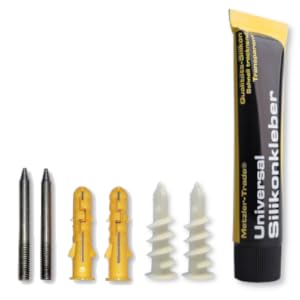
Figure 3: Mounting accessories for different installation types.
Electrical Connection
The LED switch supports a voltage range of 6V to 24V AC/DC. It can be connected to existing 2-wire doorbell systems.
- Identify the doorbell wires from your existing system.
- Connect the doorbell wires to the terminals on the back of the Metzler doorbell unit. Ensure correct polarity if specified by your chime unit, though the LED switch is generally tolerant to AC/DC.
- Secure all connections.
- After mounting and wiring, restore power to the doorbell system and test functionality.
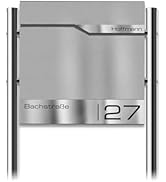
Figure 4: Example technical diagram for wall-mounted electronic device installation.
Engraving Customization
The doorbell features personalized engraving. During the ordering process, you select your desired text, font, and engraving position.

Figure 5: Engraving position options.

Figure 6: Available font styles for engraving.
Operating Instructions
Operating the Metzler Stainless Steel LED Doorbell is straightforward:
- Simply press the illuminated button to activate your chime unit.
- The integrated LED provides clear visibility of the button, especially in low-light conditions.
Maintenance
The Metzler Stainless Steel LED Doorbell requires minimal maintenance due to its durable construction.
- Cleaning: To maintain the appearance of the stainless steel, wipe the surface regularly with a soft, damp cloth. For stubborn dirt, use a mild stainless steel cleaner. Avoid abrasive cleaners or scouring pads, as these can scratch the surface.
- Inspection: Periodically check the mounting and electrical connections to ensure they remain secure.
Troubleshooting
If you encounter issues with your Metzler Doorbell, consider the following:
- Doorbell not ringing:
- Check if the power supply to the doorbell system is active.
- Verify all electrical connections are secure and correctly wired.
- Ensure your chime unit is functioning correctly.
- LED not illuminating:
- Confirm the power supply is within the 6V-24V AC/DC range.
- Check the wiring to the LED button for any loose connections.
If problems persist, please contact Metzler customer support for assistance.
Specifications
| Feature | Detail |
|---|---|
| Model Number | p678910-60x60-mGra |
| Dimensions (L x W x H) | 6 x 6 x 6 cm (60x60mm surface) |
| Material | V2A Stainless Steel |
| Light Type | LED |
| Ingress Protection (IP) Rating | IP67 (LED switch) |
| Operating Voltage | 6V - 24V AC/DC |
| Mounting Type | Flush-mounted (various options available) |
| Customizable | Yes (Engraving) |
| Components Included | Doorbell unit, LED bulb |
Warranty and Support
This product is manufactured by Metzler GmbH. For any warranty claims, technical support, or inquiries, please contact Metzler GmbH directly. Refer to your purchase documentation for specific warranty terms and contact information.
Manufacturer: Metzler GmbH

