
QSC K12.2
QSC K12.2 Active 12-inch Powered Loudspeaker User Manual
Model: K12.2 | Brand: QSC
Introduction
The QSC K12.2 Active 12-inch Powered 2000 Watt Loudspeaker represents the next standard in powered loudspeakers, combining legendary QSC reliability with rugged ABS construction. This speaker features new advanced electronics, providing superior acoustic performance for more output with deeper bass and improved voice clarity. This manual provides essential information for the proper setup, operation, and maintenance of your K12.2 loudspeaker.
Key Features

Figure 1: Front view of the QSC K12.2 Loudspeaker, showcasing its robust grille and sleek design.

Figure 2: Rear view of the QSC K12.2 Loudspeaker, highlighting the integrated control panel and connectivity options.
- Best in class audio performance: Experience superior sound quality with clear highs and deep lows.
- Low-noise and variable speed fan: Ensures optimal cooling and quiet operation.
- 2000 Watt Class-D amplifier module: Delivers powerful and efficient audio output.
- Factory Presets and savable/recallable Scenes: Easily configure the loudspeaker for commonly-used applications such as stage monitor, dance music, musical instruments, or hand-held microphone.
- Multi-function digital display: Provides intuitive control and selection of loudspeaker functions, including crossover, EQ, delay, and preset contours.
- Global 6-Year Warranty with product registration: Ensures long-term reliability and support.
Setup
Proper setup is crucial for optimal performance and safety. Ensure the loudspeaker is placed on a stable, level surface or securely mounted on a pole stand.

Figure 3: Bottom view of the loudspeaker, illustrating the dual-angle pole mount sockets for versatile placement.

Figure 4: The loudspeaker positioned for use as a stage monitor, demonstrating its adaptable design.
Placement
- For full-range sound, place the loudspeaker on a flat, stable surface or use a compatible speaker pole stand.
- When using as a stage monitor, utilize the angled side for optimal sound projection towards the performer.
- Ensure adequate ventilation around the rear panel to prevent overheating.
Connections
- Connect your audio source (mixer, instrument, microphone) to the appropriate input jacks on the rear panel. The K12.2 supports XLR, 1/4-inch TRS, and RCA inputs.
- Use the MIX OUT (POST GAIN) XLR output to send the mixed signal to another loudspeaker or audio device.
- Connect the included power cord to the AC INLET and a suitable power outlet.
Operating Instructions
The QSC K12.2 features an intuitive multi-function digital display and controls for easy operation.

Figure 5: Detailed view of the digital display and main control knob on the rear panel.
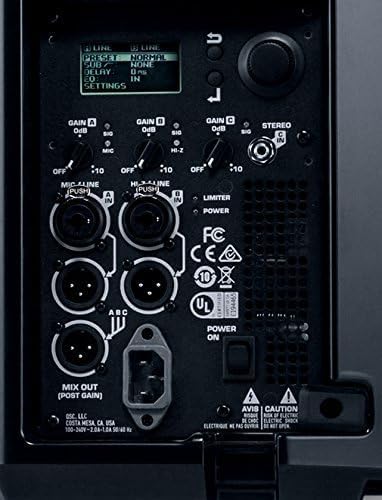
Figure 6: The digital display showing various settings and options for sound customization.
Powering On/Off
- Ensure all connections are secure before powering on.
- Locate the POWER switch on the rear panel and flip it to the 'ON' position. The 'POWER' LED will illuminate blue.
- To power off, flip the POWER switch to the 'OFF' position.
Adjusting Settings
- Use the multi-function digital display and rotary encoder knob to navigate through menus and adjust settings.
- Gain Control: Adjust GAIN A, GAIN B, and GAIN C knobs to set input levels for connected devices. Monitor the 'SIG' (Signal) and 'LIMIT' LEDs to prevent clipping.
- LF/HF Switches: Toggle these switches to adjust low-frequency (LF) and high-frequency (HF) response. Options include 'EXT SUB', 'NORM', 'DEEP' for LF, and 'VOCAL BOOST', 'FLAT' for HF.
- Presets: Select from various factory presets optimized for different applications (e.g., Dance, Live, Monitor).
- Scenes: Save and recall your custom settings for quick setup in recurring scenarios.
- Front LED: Control the behavior of the front panel LED (PWR, LIMIT, OFF).
Maintenance
Regular maintenance ensures the longevity and optimal performance of your QSC K12.2 loudspeaker.
- Cleaning: Use a soft, dry cloth to clean the exterior of the loudspeaker. For stubborn dirt, a slightly damp cloth with mild soap can be used, followed by a dry cloth. Avoid abrasive cleaners or solvents.
- Grille Care: Periodically inspect the front grille for any debris or damage. Gently clean with a soft brush or vacuum cleaner if necessary.
- Ventilation: Ensure the rear panel's fan and vents are free from dust and obstructions to maintain proper airflow and prevent overheating.
- Storage: When not in use, store the loudspeaker in a cool, dry place, ideally in a protective cover or case to prevent dust accumulation and physical damage.
- Cable Inspection: Regularly check all audio and power cables for signs of wear, fraying, or damage. Replace any damaged cables immediately.
Troubleshooting
This section provides solutions to common issues you might encounter with your QSC K12.2 loudspeaker.
| Problem | Possible Cause | Solution |
|---|---|---|
| No Sound Output | Power not connected or turned on; Input gain too low; Muted source; Damaged cable. | Check power connection and switch; Increase input gain; Verify audio source is not muted; Test with different cables. |
| Distorted Sound | Input signal too high (clipping); Speaker overloaded; Incorrect EQ settings. | Reduce input gain; Check 'LIMIT' LED and reduce volume if lit; Adjust EQ settings to 'FLAT' or appropriate preset. |
| No Power LED | No power to unit; Faulty power cable. | Ensure power cable is securely plugged into both the loudspeaker and a working outlet; Try a different power cable. |
| Overheating | Blocked ventilation; Prolonged high-volume use in hot environment. | Ensure vents are clear; Reduce volume or allow speaker to cool down in a well-ventilated area. |
Specifications
| Feature | Detail |
|---|---|
| Mounting Type | Floor Standing |
| Model Name | QSC |
| Speaker Type | Bookshelf |
| Special Feature | Display,Portable |
| Compatible Devices | Laptop, Personal Computer, Smartphone |
| Subwoofer Diameter | 12 Inches |
| Unit Count | 1.0 Count |
| Controller Type | Corded Electric |
| Surround Sound Channel Configuration | 2.0 |
| Color | MultiColored |
| Included Components | Loudspeaker |
| Product Dimensions | 26"D x 19"W x 19"H |
| Item Weight | 10 Pounds |
| Is Waterproof | FALSE |
| Warranty Type | Full |
| Maximum Range | 1 Meters |
| Number of Items | 1 |
| Control Method | App |
| Speaker Size | 12 Inches |
| Power Source | Corded Electric |
| Woofer Diameter | 12 Inches |
| Vehicle Service Type | Car |
| Water Resistance Level | Not Water Resistant |
| EU Spare Part Availability Duration | 6 Years |
| Audio Driver Type | Dynamic Driver |
| Audio Driver Size | 12 Inches |
| Connectivity Protocol | XLR |
| Includes MP3 player? | No |
| Series Number | 2 |
| UPC | 642892818402 |
| Style | K12.2 12" Loudspeaker |
| Global Trade Identification Number | 00684284065520 |
| Manufacturer | QSC |
| Item Weight | 10 pounds |
| ASIN | B06Y477LND |
| Item model number | K12.2 |
| Is Discontinued By Manufacturer | No |
| Date First Available | April 7, 2017 |
| Color Name | MultiColored |
| Speaker Amplification Type | Active |
| Standing screen display size | 1.75 |
| Wattage | 2000 watts |
| Brand | QSC |
| Speaker Maximum Output Power | 2000 Watts |
| Connectivity Technology | XLR |
| Audio Output Mode | Stereo |
| Input Voltage | 240 Volts |
Warranty and Support
Warranty Information
The QSC K12.2 Loudspeaker comes with a Global 6-Year Warranty upon product registration. This warranty covers defects in materials and workmanship under normal use.
Extended Protection Plans
For additional peace of mind, consider purchasing an extended protection plan:
- 2-Year Protection Plan: Available for $79.99 USD.
- 3-Year Protection Plan: Available for $99.99 USD.
- Complete Protect: One plan covers all eligible past and future purchases for $16.99/month.
Additional Resources
- User Manual (PDF): Download Here
- User Guide (PDF): Download Here
- Visit the QSC Store: QSC Official Store
Related documentsK12.2


Ask a question about this manual
Ask about setup, troubleshooting, compatibility, parts, safety, or missing instructions. Manuals+ will review the question and use this page’s manual context to help answer it.