
Introduction
This manual provides essential information for the safe and effective use of your DEWALT DCD771C2 20V MAX Cordless Lithium-Ion 1/2 inch Compact Drill Driver and DCS391B 20-Volt MAX Li-Ion Circular Saw Kit. Please read and understand all instructions before operating these tools. Keep this manual for future reference.
General Safety Instructions
WARNING: Read all safety warnings, instructions, illustrations, and specifications provided with this power tool. Failure to follow all instructions listed below may result in electric shock, fire, and/or serious injury.
Work Area Safety
- Keep work area clean and well lit. Cluttered or dark areas invite accidents.
- Do not operate power tools in explosive atmospheres, such as in the presence of flammable liquids, gases, or dust. Power tools create sparks which may ignite the dust or fumes.
- Keep children and bystanders away while operating a power tool. Distractions can cause you to lose control.
Electrical Safety
- Power tool plugs must match the outlet. Never modify the plug in any way.
- Avoid body contact with earthed or grounded surfaces, such as pipes, radiators, ranges, and refrigerators. There is an increased risk of electric shock if your body is earthed or grounded.
- Do not expose power tools to rain or wet conditions. Water entering a power tool will increase the risk of electric shock.
Personal Safety
- Stay alert, watch what you are doing, and use common sense when operating a power tool. Do not use a power tool while you are tired or under the influence of drugs, alcohol, or medication.
- Use personal protective equipment. Always wear eye protection. Protective equipment such as a dust mask, non-skid safety shoes, hard hat, or hearing protection used for appropriate conditions will reduce personal injuries.
- Prevent unintentional starting. Ensure the switch is in the off-position before connecting to battery pack, picking up or carrying the tool.
Product Components
Your kit includes the following main components:
- DEWALT DCD771C2 20V MAX Cordless Lithium-Ion 1/2 inch Compact Drill Driver
- DEWALT DCS391B 20V MAX Li-Ion Circular Saw
- 20V MAX Lithium-Ion Battery
- Battery Charger
DEWALT DCD771C2 20V MAX Cordless Drill Driver

Image: The DEWALT DCD771C2 20V MAX Cordless Drill Driver, featuring its yellow and black design, chuck, and battery connection point.
This compact drill driver is designed for a wide range of drilling and fastening applications. It features a 1/2 inch chuck and a two-speed transmission for versatility.
DEWALT DCS391B 20V MAX Circular Saw

Image: The DEWALT DCS391B 20V MAX Circular Saw, showing its blade, handle, and magnesium shoe.
The circular saw is engineered for demanding cutting tasks, offering a powerful motor and a durable magnesium shoe for accurate cuts. It supports a 0-50 degree bevel capacity.
Setup and Assembly
Battery Charging and Installation
- Charging the Battery: Connect the charger to a standard power outlet. Slide the battery pack onto the charger until it clicks into place. The charger indicator light will show the charging status. Ensure the battery is fully charged before first use.
- Installing the Battery: Align the battery pack with the battery port on the tool handle. Slide the battery into the tool until it locks securely.
- Removing the Battery: Press the battery release button and slide the battery pack out of the tool.
Drill Driver Setup
- Opening the Chuck: Rotate the chuck counter-clockwise until the jaws are wide enough to accept the drill bit or accessory.
- Installing a Bit: Insert the desired drill bit or accessory into the chuck. Ensure it is centered.
- Tightening the Chuck: Rotate the chuck clockwise until the bit is firmly secured. Hand-tighten for best grip.

Image: A user operating the DEWALT DCD771C2 Drill Driver to fasten a screw into a wooden surface.
Circular Saw Setup
- Blade Installation: Ensure the tool is disconnected from the battery. Press the spindle lock button and use the provided wrench to loosen the blade bolt. Place the blade onto the arbor with the teeth pointing in the direction of rotation (usually indicated by an arrow on the blade and tool). Re-tighten the blade bolt securely.
- Adjusting Cutting Depth: Loosen the depth adjustment lever. Move the shoe up or down to set the desired cutting depth. Ensure the blade extends approximately 1/8 inch (3mm) below the workpiece. Tighten the lever.
- Adjusting Bevel Angle: Loosen the bevel adjustment lever. Tilt the shoe to the desired angle (0-50 degrees). Tighten the lever.
Operation
Drill Driver Operation
- Speed Selection: Use the speed selector switch located on top of the tool to choose between high speed (2) for drilling and low speed (1) for fastening or larger diameter drilling.
- Forward/Reverse Control: The forward/reverse button near the trigger controls the direction of rotation. Push left for forward, right for reverse, and center for lock-off.
- Operating the Trigger: Squeeze the trigger to start the tool. Variable speed is controlled by the amount of trigger depression.
- Drilling: Apply steady, even pressure. For hard materials, use slower speeds.
Circular Saw Operation
- Starting the Saw: Ensure the workpiece is securely clamped. Depress the trigger lock-off button, then squeeze the trigger to start the saw. Allow the blade to reach full speed before contacting the workpiece.
- Making a Cut: Guide the saw along the cutting line, maintaining a firm grip. Do not force the saw; let the blade do the work. Keep both hands on the tool handles during operation.
- Safety Precautions: Always ensure the lower blade guard operates freely. Never tie or wedge the guard in the open position. Avoid cutting small pieces that cannot be securely held.
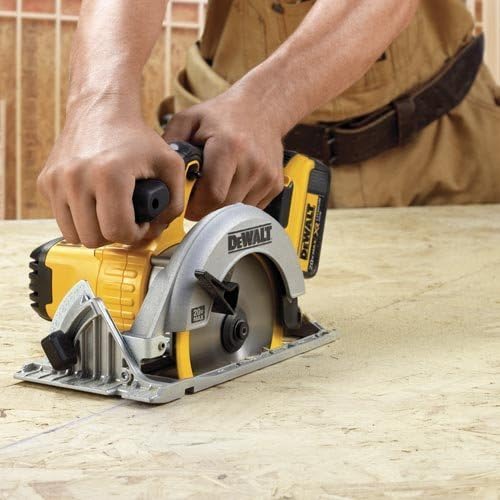
Image: A user operating the DEWALT DCS391B Circular Saw to cut a sheet of plywood.
Maintenance
Regular maintenance ensures optimal performance and extends the life of your tools.
- Cleaning: Keep the tool's ventilation openings clear of dust and debris. Use a soft brush or compressed air to clean the tool. Do not use water or chemical cleaners.
- Blade Care (Circular Saw): Regularly inspect the saw blade for sharpness and damage. Replace dull or damaged blades promptly. Ensure the blade is clean and free of resin buildup.
- Battery Care: Store batteries in a cool, dry place away from direct sunlight. Do not store batteries in a discharged state for extended periods.
- Inspection: Periodically check all screws and fasteners for tightness. Inspect cords and connections for damage.
Troubleshooting
| Problem | Possible Cause | Solution |
|---|---|---|
| Tool does not start | Battery not charged or improperly installed; Tool switch in lock-off position. | Charge battery and ensure proper installation; Check forward/reverse switch is not in center (lock-off) position. |
| Loss of power during operation | Battery charge low; Overload. | Recharge battery; Reduce pressure on tool, allow tool to work at its own pace. |
| Drill bit/saw blade slips in chuck/arbor | Chuck/blade bolt not tightened sufficiently. | Re-tighten chuck/blade bolt firmly. |
| Excessive vibration or noise (Circular Saw) | Dull or damaged blade; Loose blade. | Replace blade; Ensure blade bolt is securely tightened. |
Specifications
- Brand: DEWALT
- Power Source: Battery Powered (20V MAX Lithium-Ion)
- Drill Driver (DCD771C2):
- Maximum Chuck Size: 0.5 inches
- Number of Speeds: 2 (0-450 RPM / 0-1500 RPM)
- Maximum Power: 300 Unit Watts Out (UWO)
- Drilling Capacity (Wood/Metal): 0.5 inches
- Circular Saw (DCS391B):
- Maximum Rotational Speed: 5150 RPM
- Maximum Power: 460 MWO
- Bevel Capacity: 0-50 degrees
- Shoe Material: Magnesium
- Model Numbers: DCD771C2 (Drill Driver), DCS391B (Circular Saw)
- Material Type: Metal With Magnesium And Plastic Components
Warranty and Support
For warranty information, service, or technical support, please refer to the official DEWALT website or contact DEWALT customer service. Keep your purchase receipt as proof of purchase.
DEWALT Contact Information:
- Website: www.dewalt.com
- Refer to the product packaging or official website for specific regional contact numbers.


