
AUNA PL-8983-8978
AUNA Elegance Tower Bluetooth 2.0 HiFi Set Instruction Manual
Model: PL-8983-8978
1. Introduction
Thank you for choosing the AUNA Elegance Tower Bluetooth 2.0 HiFi Set. This system combines a powerful stereo amplifier with a versatile CD/MP3 player and radio tuner, offering multiple connectivity options including Bluetooth, USB, and AUX inputs. This manual provides essential information for the safe and efficient operation of your device. Please read it thoroughly before use and retain it for future reference.
2. Safety Instructions
To ensure safe operation, please observe the following safety precautions:
- Power Supply: Connect the unit only to an AC 230V ~ 50Hz power supply.
- Ventilation: Ensure adequate ventilation. Do not block ventilation openings.
- Moisture: Do not expose the unit to rain, moisture, or dripping/splashing liquids.
- Heat Sources: Keep away from heat sources such as radiators, heat registers, stoves, or other apparatus that produce heat.
- Servicing: Do not attempt to service the unit yourself. Refer all servicing to qualified service personnel.
- Cleaning: Disconnect from power before cleaning. Use a dry cloth only.
- Object/Liquid Entry: Do not insert objects or spill liquids into the unit openings.
3. Package Contents
Verify that all items are present and in good condition:
- 1 x HiFi Amplifier
- 1 x MP3 CD Player
- 1 x Amplifier Remote Control
- 1 x CD Player Remote Control
- 1 x User Manual (English and German)
4. Product Overview
The AUNA Elegance Tower HiFi Set consists of two main units: a stereo amplifier and a CD/MP3 player with radio functionality. Below are illustrations and descriptions of their front and rear panels.
4.1 Overall System View

Image 1: The AUNA Elegance Tower Bluetooth 2.0 HiFi Set, with the CD player unit positioned above the amplifier unit. Both units feature a brushed silver finish and blue illuminated standby buttons.
4.2 CD/MP3 Player Front Panel

Image 2: Front panel of the CD/MP3 player. Features include a standby button, CD tray, digital display, control buttons (OPEN/CLOSE, PLAY/PAUSE, PREV, NEXT, SOURCE), and a USB input port.
4.3 CD/MP3 Player Rear Panel

Image 3: Rear panel of the CD/MP3 player. Connections include Line Output (RCA L/R), FM antenna input, Optical Digital Output (TOSLINK), Coaxial Digital Output (S/P DIF), and the AC power input with an ON/OFF switch.
4.4 Amplifier Front Panel
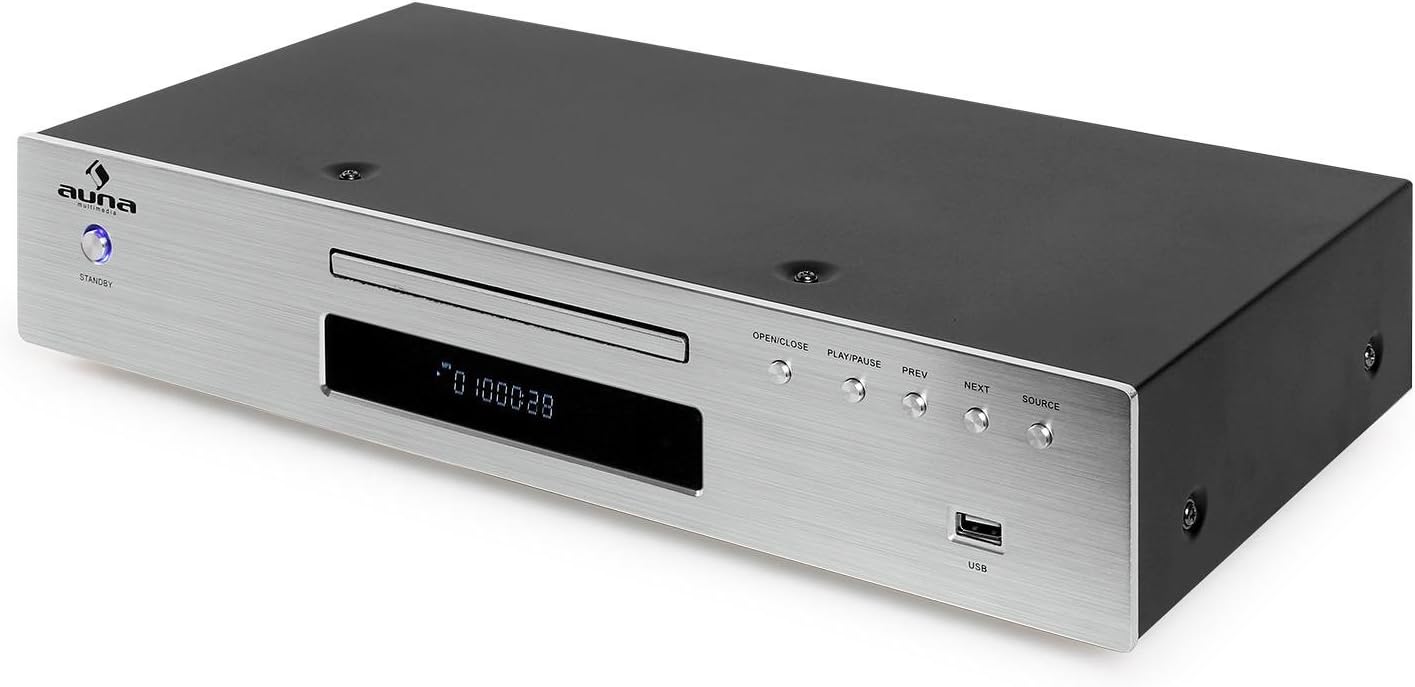
Image 4: Front panel of the amplifier. Controls include a standby button, input selector buttons (CD, DVD, AUX, Bluetooth), a large volume knob, bass, treble, and balance adjustment knobs, and a 3.5mm headphone jack.
4.5 Amplifier Rear Panel

Image 5: Rear panel of the amplifier. Connections include speaker terminals (Right/Left), REC.L/R output, and multiple audio input options: AUX (RCA L/R), CD (RCA L/R), DVD (RCA L/R). Also features the AC power input with an ON/OFF switch.
4.6 Remote Control

Image 6: The remote control for the AUNA HiFi system, featuring various buttons for source selection, playback control, volume adjustment, and numerical track selection.
5. Setup
Follow these steps to set up your AUNA Elegance Tower HiFi Set:
5.1 Placement
Place the amplifier and CD player units on a stable, flat surface. Ensure there is sufficient space around the units for proper ventilation.
5.2 Connecting the CD Player to the Amplifier
- Connect an RCA audio cable (not included) from the LINE OUTPUT (RCA L/R) on the rear of the CD player to the CD INPUT (RCA L/R) on the rear of the amplifier.
5.3 Connecting Speakers
- Connect your passive speakers to the SPEAKER TERMINALS (RIGHT/LEFT) on the rear of the amplifier. Ensure correct polarity (+ to + and - to -) for each speaker. The amplifier supports speakers with an impedance of 8-16 ohms.
5.4 Connecting Other Audio Sources
You can connect additional audio devices to the amplifier:
- AUX Input: Use an RCA audio cable to connect external devices (e.g., turntable with pre-amp, cassette deck) to the AUX INPUT (RCA L/R).
- DVD Input: Use an RCA audio cable to connect a DVD player or other audio source to the DVD INPUT (RCA L/R).
5.5 Connecting the FM Antenna
Connect the supplied FM antenna to the FM ANTENNA INPUT on the rear of the CD player for radio reception.
5.6 Power Connection
- Ensure both the amplifier and CD player are switched OFF using their respective rear panel power switches.
- Connect the power cables of both units to a suitable AC 230V ~ 50Hz wall outlet.
6. Operating Instructions
6.1 Power On/Off
- Switch on both units using the main power switches on their rear panels.
- Press the STANDBY button on the front panel of each unit to turn them on or put them into standby mode.
6.2 Source Selection
On the amplifier, press the corresponding input button (CD, DVD, AUX, Bluetooth) to select your desired audio source.
6.3 CD Playback
- Select the CD input on the amplifier.
- Press the OPEN/CLOSE button on the CD player (or its remote) to open the disc tray.
- Place a CD (CD, CD-R, CD-RW, MP3 CD) into the tray with the label side up.
- Press OPEN/CLOSE again to close the tray. Playback should start automatically.
- Use PLAY/PAUSE, PREV, and NEXT buttons for playback control.
6.4 USB Playback

Image 7: A USB flash drive inserted into the USB port on the front panel of the CD player, indicating its readiness for MP3 playback.
- Insert a USB flash drive containing MP3 files into the USB port on the front of the CD player.
- Press the SOURCE button on the CD player until USB is selected.
- Playback should begin automatically. Use the playback controls (PLAY/PAUSE, PREV, NEXT) to navigate.
6.5 Bluetooth Pairing

Image 8: The AUNA amplifier unit with a smartphone nearby, illustrating the wireless Bluetooth connectivity feature.
- Select the Bluetooth input on the amplifier. The Bluetooth indicator will flash.
- Enable Bluetooth on your smartphone, tablet, or computer.
- Search for available devices and select "AUNA Elegance" (or similar) from the list.
- Once paired, the Bluetooth indicator will glow steadily. You can now stream audio wirelessly.
6.6 AUX/DVD Input
- Select the AUX or DVD input on the amplifier, depending on which input your external device is connected to.
- Start playback on your connected external device.
6.7 Headphone Use
Connect headphones to the 3.5mm HEADPHONE JACK on the front of the amplifier. Speaker output will be muted automatically.
6.8 Tone Controls
Use the BASS, TREBLE, and BALANCE knobs on the amplifier to adjust the audio output to your preference.
7. Maintenance
7.1 Cleaning
Before cleaning, ensure both units are powered off and disconnected from the mains. Use a soft, dry cloth to wipe the surfaces. Do not use abrasive cleaners, waxes, or solvents as they may damage the finish.
7.2 Storage
If storing the unit for an extended period, disconnect it from the power supply and store it in a cool, dry place, away from direct sunlight and extreme temperatures.
8. Troubleshooting
If you encounter issues, refer to the following table before contacting support:
| Problem | Possible Cause | Solution |
|---|---|---|
| No power | Power cable not connected; Rear power switch off; Standby mode | Check power cable connection; Ensure rear power switch is ON; Press front STANDBY button |
| No sound | Incorrect input selected; Volume too low; Speakers not connected; Mute activated | Select correct input; Increase volume; Check speaker connections; Deactivate mute on remote |
| CD not playing | Disc inserted incorrectly; Disc dirty/scratched; Unsupported disc format | Insert disc correctly; Clean or replace disc; Ensure disc is CD, CD-R, CD-RW, or MP3 CD |
| Bluetooth not connecting | Bluetooth input not selected; Device too far; Pairing mode not active | Select Bluetooth input on amplifier; Move device closer; Re-initiate pairing on both devices |
| USB not playing | USB source not selected; Unsupported file format; USB drive not formatted correctly | Select USB source on CD player; Ensure files are MP3; Check USB drive formatting |
9. Specifications
- Brand: AUNA
- Model Number: PL-8983-8978
- Color: Silver
- Connectivity Technology: USB, Bluetooth, RCA, 3.5mm Jack, Optical, Coaxial, FM Antenna
- Compatible Devices: Personal Computer, Smartphone, Tablet
- Supported Audio Formats: CD, CD-R, CD-RW, MP3
- Number of Discs: 1 (CD Player)
- Number of Channels: 2 (Stereo)
- Amplifier Max. Power: 600 Watts
- Amplifier Impedance: 8-16 Ohms
- Amplifier Dimensions (WxHxD): Approx. 42 x 8.5 x 25 cm
- Amplifier Weight: Approx. 3.2 kg
- CD Player Dimensions (WxHxD): Approx. 42.5 x 8.5 x 22.5 cm
- CD Player Weight: Approx. 3 kg
- Power Supply: AC 230V ~ 50Hz
10. Warranty and Support
This product is covered by a manufacturer's warranty. For detailed warranty terms and conditions, please refer to the documentation provided at the time of purchase or contact your retailer. For technical support or service inquiries, please contact the AUNA customer service department or your local distributor.
Ask a question about this manual
Ask about setup, troubleshooting, compatibility, parts, safety, or missing instructions. Manuals+ will review the question and use this page’s manual context to help answer it.