
beats MLYE2LL/A
beatsX Wireless In-Ear Headphones User Manual
Model: MLYE2LL/A
Introduction
This manual provides comprehensive instructions for the setup, operation, maintenance, and troubleshooting of your beats by Dr. Dre beatsX Wireless In-Ear Headphones. Please read this guide thoroughly to ensure proper use and to maximize your listening experience.

Image: The beatsX Wireless In-Ear Headphones in black, featuring the flexible neckband design and magnetic earbuds. The headphones are shown in a typical wearing position around the neck.
What's in the Box
Verify that all the following items are included with your beatsX Wireless In-Ear Headphones:
- beatsX earphones
- Four different sized eartips (various sizes for optimal fit)
- Removable secure-fit wingtips (for added stability during activity)
- Pocket-sized carrying case
- Lightning to USB-A charging cable

Image: The included Lightning to USB-A charging cable and the compact, black oval carrying case for the beatsX headphones.
Setup
1. Charging Your Headphones
Before first use, fully charge your beatsX headphones. A full charge provides up to 8 hours of playback. The Fast Fuel feature allows for 2 hours of playback from a 5-minute charge when the battery is low.
- Connect the Lightning end of the charging cable to the charging port on your beatsX headphones.
- Connect the USB-A end of the charging cable to a USB power adapter or a powered USB port.
- The LED indicator light will show charging status. It will turn white when fully charged.
2. Pairing with Your Device
The beatsX headphones utilize Apple's W1 chip for seamless pairing with Apple devices and standard Bluetooth for other devices.
For Apple Devices (iOS 10 or later):
- Ensure your iPhone, iPad, or iPod touch is unlocked and near your beatsX headphones.
- Press and hold the power button on your beatsX headphones for 1 second.
- A setup animation will appear on your iOS device. Follow the on-screen instructions.
- Your beatsX headphones are now connected and set up with all Apple devices signed into iCloud.
For Other Bluetooth Devices:
- Press and hold the power button on your beatsX headphones for 5 seconds until the LED indicator light flashes white. This puts the headphones in pairing mode.
- On your device, go to Bluetooth settings and ensure Bluetooth is enabled.
- Select "beatsX" from the list of available devices.
- Once paired, the LED indicator light will stop flashing and remain solid white.
3. Finding Your Optimal Fit
Proper fit is crucial for sound quality and comfort. Experiment with the included ear tips and wingtips.
- Ear Tips: Choose the size that creates a comfortable seal in your ear canal. This helps with sound isolation and bass response.
- Wingtips: If desired, attach the secure-fit wingtips for added stability, especially during physical activity.
Operating Your Headphones
The RemoteTalk control on the left cable allows you to manage music, calls, and Siri.
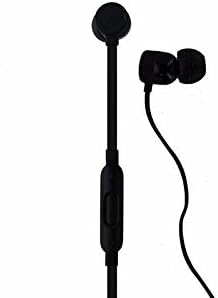
Image: A detailed view of the beatsX earbud and the in-line RemoteTalk control, which features volume buttons and a multi-function button.
RemoteTalk Controls:
| Action | Function |
|---|---|
| Press center button once | Play/Pause audio, Answer/End call |
| Press center button twice | Skip forward |
| Press center button three times | Skip backward |
| Press and hold center button | Activate Siri or voice assistant |
| Press volume up button | Increase volume |
| Press volume down button | Decrease volume |
Power On/Off:
- To power on, press and hold the power button until the LED indicator light illuminates.
- To power off, press and hold the power button until the LED indicator light turns off.
Magnetic Earbuds:
The earbuds are magnetic, allowing them to snap together when not in use. This helps prevent tangling and keeps them securely around your neck.
Maintenance
Proper care will extend the life of your beatsX headphones.
- Cleaning: Use a soft, dry, lint-free cloth to clean the headphones. Do not use abrasive cleaners or solvents.
- Ear Tips: Remove ear tips periodically and clean them with a damp cloth and mild soap, then rinse and dry thoroughly before reattaching.
- Storage: When not in use, store your headphones in the provided carrying case to protect them from dust and damage. The magnetic earbuds help keep them tangle-free.
- Water Resistance: These headphones are not water resistant. Avoid exposure to excessive moisture, rain, or submersion in liquids.
- Temperature: Avoid exposing the headphones to extreme temperatures.
Troubleshooting
If you encounter issues with your beatsX headphones, try the following solutions:
- No Power:
- Ensure the headphones are charged. Connect them to a power source using the Lightning to USB-A cable.
- Check the charging cable and power adapter for damage.
- Cannot Pair:
- Make sure the headphones are in pairing mode (LED flashing white).
- Ensure Bluetooth is enabled on your device and it is within range (typically 30 feet or 10 meters).
- Try turning Bluetooth off and on again on your device.
- If previously paired, try "forgetting" the device in your Bluetooth settings and re-pairing.
- No Sound or Poor Sound Quality:
- Check the volume level on both your headphones and your connected device.
- Ensure the headphones are properly paired and connected.
- Try different sized ear tips to ensure a proper seal in your ear canal.
- Clean any debris from the ear tips and speaker grilles.
- Move closer to your device to avoid interference.
- RemoteTalk Not Responding:
- Ensure the headphones are powered on and connected to your device.
- Restart your connected device.
If issues persist, you may need to reset your beatsX headphones. Consult the official beats support website for specific reset instructions.
Specifications
| Feature | Detail |
|---|---|
| Model Name | beatsX Wireless In-Ear Headphones |
| Model Number | MLYE2LL/A |
| Brand | beats by Dr. Dre |
| Color | Black |
| Connectivity Technology | Bluetooth (Class 1 with Apple W1 chip) |
| Wireless Communication Technology | Bluetooth |
| Battery Life | Up to 8 hours |
| Fast Fuel Charging | 5-minute charge for 2 hours playback |
| Control Type | RemoteTalk (in-line control) |
| Ear Placement | In Ear |
| Form Factor | In Ear |
| Noise Control | Sound Isolation |
| Water Resistance Level | Not Water Resistant |
| Item Weight | 3.52 ounces |
| UPC | 817689015474 |
Warranty Information
As this product is a renewed item, warranty coverage may vary. Please refer to the specific warranty details provided by the seller at the time of purchase. For standard manufacturer warranty information on new products, please visit the official beats by Dr. Dre website.
Support
For further assistance, technical support, or additional product information, please visit the official beats by Dr. Dre support website or contact their customer service. You can typically find support resources, FAQs, and contact options on their official website.
For issues related to your renewed product purchase, please contact the seller directly.
Related documentsMLYE2LL/A


Ask a question about this manual
Ask about setup, troubleshooting, compatibility, parts, safety, or missing instructions. Manuals+ will review the question and use this page’s manual context to help answer it.