
1. Introduction
This manual provides comprehensive instructions for the Rockwood Compact 15 Watt Bodyshaker Speaker. This device is a compact audio transducer designed to convert electrical audio signals into mechanical vibrations, which are then transmitted through a surface to create a tactile and immersive audio experience. Please read this manual carefully before installation and operation to ensure proper use and longevity of your product.
2. Product Overview
Key Features:
- Compact Bodyshaker design.
- Power output: 15 Watts.
- Impedance: 8 Ohm.
- Dimensions (without connections): 50 x 50 x 17 mm (H x W x D).
- Includes double-sided 3M adhesive pad for mounting.
- Includes 140 cm connection cable.
- Strong neodymium-iron-boron magnet for efficient vibration transfer.
What's in the Box:
- 1 x Rockwood Bodyshaker Speaker
- 1 x Double-sided 3M adhesive pad
- 1 x 140 cm connection cable
Product Components:

Figure 1: Side view of the Rockwood Compact Bodyshaker Speaker, showing its slim profile and connection terminals.

Figure 2: Back view of the bodyshaker, highlighting the four mounting holes for secure attachment to a surface.
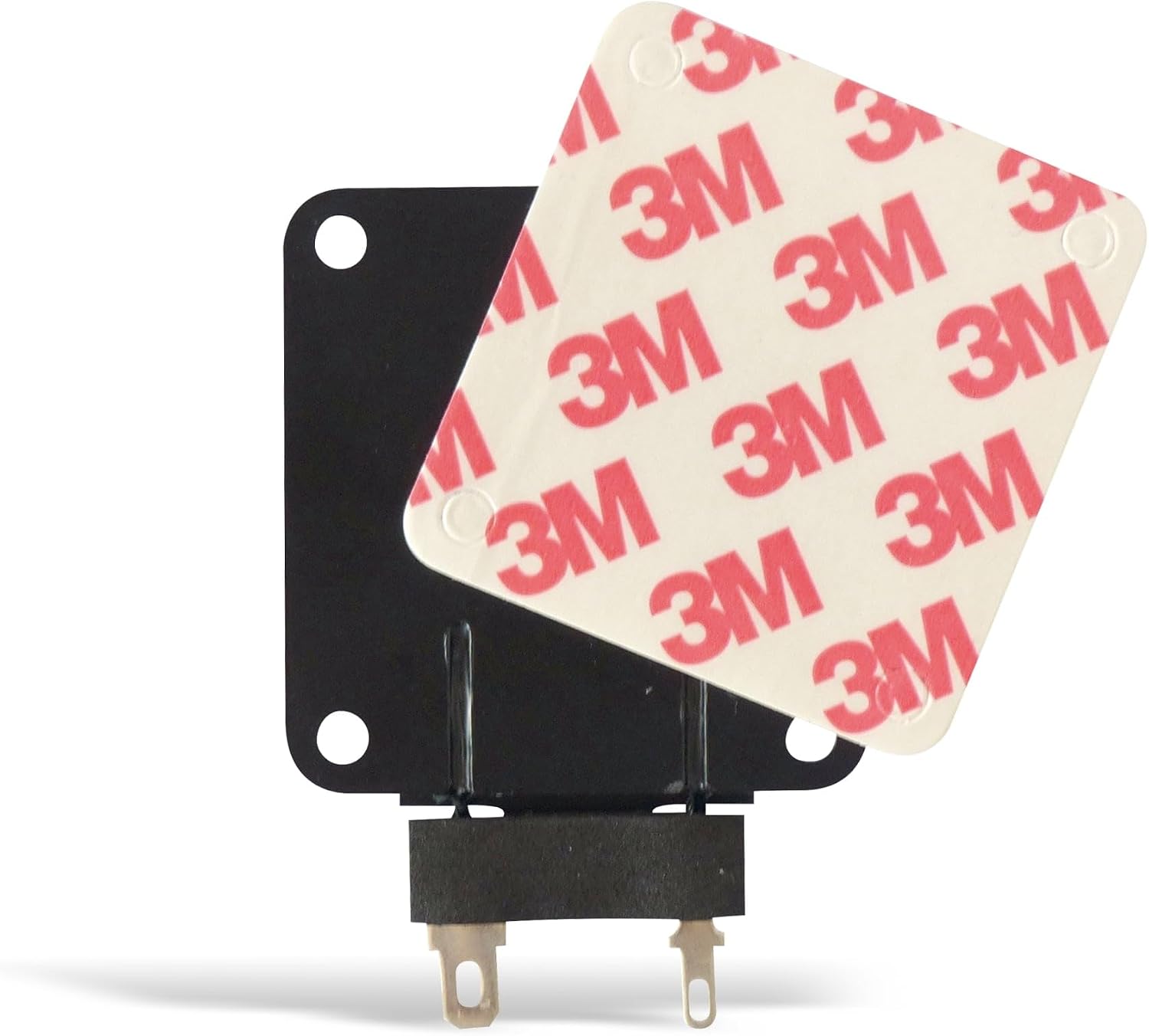
Figure 3: The bodyshaker with the included 3M adhesive pad, ready for quick and easy installation.

Figure 4: The 140 cm connection cable, used to connect the bodyshaker to an audio amplifier.
3. Specifications
| Specification | Value |
|---|---|
| Model Number | 207318 |
| Type | Compact Bodyshaker Speaker |
| Power Output (Max) | 15 Watts |
| Impedance | 8 Ohm |
| Frequency Range | 255 Hz - 15 kHz |
| Dimensions (H x W x D) | 50 x 50 x 17 mm (without connections) |
| Weight | Approx. 66 g |
| Material | Plastic or Metal |
| Mounting Type | Flush Mount / Adhesive |
| Connection Cable Length | 140 cm |
| Recommended Use | Audio enhancement for electronic devices, improved music/audio experience for personal computer users |
| Compatible Devices | Laptop, Smartphone, Tablet, Television (when connected via a suitable amplifier) |
Note: While some specifications mention Bluetooth connectivity, the Rockwood Bodyshaker Speaker itself is a passive component designed for wired connection to an external amplifier. Bluetooth functionality would be provided by the amplifier or source device.
4. Setup
4.1 Choosing a Mounting Surface:
Select a sturdy, resonant surface where you wish to experience the tactile vibrations. This could be a desk, chair, or other furniture. The quality of the vibration will depend on the material and thickness of the surface.
4.2 Mounting the Bodyshaker:
- Clean the Surface: Ensure the chosen mounting surface is clean, dry, and free of dust or grease.
- Apply Adhesive Pad: Peel off one side of the protective film from the double-sided 3M adhesive pad. Carefully align and press it firmly onto the back of the bodyshaker (the side with the mounting holes).
- Attach to Surface: Peel off the remaining protective film from the adhesive pad. Position the bodyshaker on your desired surface and press firmly for at least 30 seconds to ensure a strong bond. Alternatively, you can use screws (not included) through the mounting holes for a more permanent installation.
4.3 Connecting to an Amplifier:
The Rockwood Bodyshaker Speaker is a passive device and requires an external audio amplifier to function. Ensure your amplifier is compatible with an 8 Ohm impedance load and can provide at least 15 Watts of power per channel.
- Connect Cable: Attach the included 140 cm connection cable to the terminals on the bodyshaker. Ensure correct polarity (red to positive, black to negative, if marked).
- Connect to Amplifier: Connect the other end of the cable to the speaker output terminals of your audio amplifier. Again, observe correct polarity.
- Power On: Once all connections are secure, power on your amplifier and audio source.
Related Product Video (Amplifier Demonstration):
Video 1: This video demonstrates the setup and operation of an NS-01G PRO 50W+50W power amplifier. While not the Rockwood Bodyshaker itself, it illustrates how an amplifier can be used to drive speakers, which is essential for the bodyshaker's operation.
5. Operating
Once the Rockwood Bodyshaker Speaker is correctly installed and connected to an amplifier, it will convert the low-frequency audio signals from your source into vibrations. These vibrations are then transferred to the surface it's mounted on, providing a tactile dimension to your audio experience.
- Adjust Volume: Start with the amplifier volume at a low setting and gradually increase it until you achieve the desired level of vibration.
- Source Material: The effectiveness of the bodyshaker is most noticeable with audio content that has significant low-frequency components, such as music with strong bass, movies with explosions, or gaming sound effects.
- Experiment: Different mounting surfaces will produce varying tactile responses. Experiment with different locations and materials to find the optimal experience for your setup.
General Bass Shaker Demonstration Video:
Video 2: This video provides a general demonstration of a bass shaker, illustrating the concept of how such devices produce tactile feedback. While not the exact Rockwood model, it shows the principle of operation for a 50mm resonance speaker.
6. Maintenance
The Rockwood Bodyshaker Speaker requires minimal maintenance.
- Cleaning: Use a soft, dry cloth to wipe the exterior of the bodyshaker. Do not use liquid cleaners or abrasive materials, as these can damage the unit.
- Environment: Keep the bodyshaker in a dry environment, away from direct sunlight, extreme temperatures, and moisture. It is not water-resistant.
- Connections: Periodically check the cable connections to ensure they are secure and free from corrosion.
7. Troubleshooting
If you encounter issues with your Rockwood Bodyshaker Speaker, refer to the following common problems and solutions:
| Problem | Possible Cause | Solution |
|---|---|---|
| No vibration or very weak vibration |
|
|
| Distorted or unclear vibration |
|
|
8. Warranty and Support
Warranty Information:
This product comes with a limited warranty. Please refer to your purchase documentation or contact the retailer for specific warranty terms and conditions.
Manufacturer:
Sintron
Customer Support:
For technical assistance or warranty claims, please contact the retailer from whom you purchased the product. Specific contact information for direct manufacturer support is not provided in this manual.