
1. Product Overview
The Impex Natural Wood Numeric Button is a versatile crafting and sewing accessory, available as either the number '6' or '9'. Crafted from natural wood, this button offers a rustic and unique aesthetic for various creative projects. Its design includes two central holes for easy attachment.
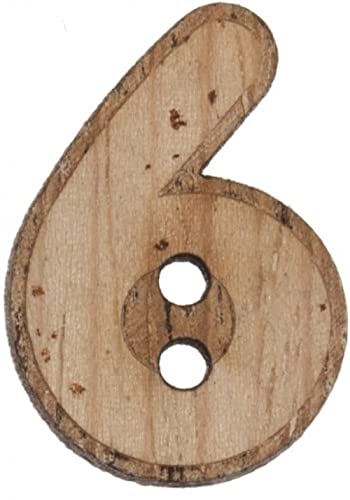
Figure 1: Front view of the Impex Natural Wood Numeric Button, depicting the number 6. The button features a natural wood grain and two circular holes for attachment.
2. Product Features
- Brand: Impex
- Quantity: Sold individually per button
- Color: Natural wood finish
- Number: Available as '6' or '9'
- Dimensions: Approximately 2.2 cm (0.87 inches) in size
- Shape: Numeric (digit)
- Material: Durable natural wood
3. Setup and Attachment
This numeric button is designed for easy integration into various projects. Follow these general steps for attachment:
- Preparation: Ensure the fabric or material you are attaching the button to is clean and prepared for sewing.
- Positioning: Place the button in the desired location on your item.
- Sewing: Using a needle and thread, pass the thread through one of the two holes on the button, then through the fabric, and back up through the other hole. Repeat this process several times to secure the button firmly. For added durability, you may sew through each hole multiple times.
- Finishing: Tie off the thread securely on the underside of the fabric.
Note: For specific crafting techniques, consult relevant guides for sewing buttons onto different materials.
4. Operating Instructions
The Impex Natural Wood Numeric Button functions primarily as a decorative or functional element in sewing, knitting, crocheting, and other craft projects. Once securely attached, it can be used for:
- Fastening: When paired with a buttonhole, it can serve as a closure for garments, bags, or other fabric items.
- Decoration: It adds a unique, natural touch to clothing, accessories, home decor items, or scrapbooking projects.
- Numeric Labeling: Can be used to label items with numbers, such as advent calendars, storage bins, or educational crafts.
5. Maintenance and Care
To ensure the longevity and appearance of your natural wood button, follow these care guidelines:
- Cleaning: Wipe gently with a dry or slightly damp cloth. Avoid using harsh chemical cleaners, as they may damage the wood finish.
- Washing: If attached to washable garments, it is recommended to hand wash or use a delicate cycle with cold water. Air dry flat. Avoid tumble drying, as high heat can cause the wood to warp or crack.
- Storage: Store in a dry environment away from extreme temperatures or humidity to prevent warping or cracking.
- Avoid Soaking: Do not soak the button in water for extended periods.
6. Troubleshooting
Due to the simple nature of this product, common operational issues are minimal. However, consider the following:
- Button Loosening: If the button becomes loose, re-sew it securely using a strong thread and appropriate sewing technique.
- Wood Damage: Natural wood can be susceptible to cracking or splintering if subjected to excessive force or extreme environmental changes. Handle with care.
7. Specifications
| Attribute | Detail |
|---|---|
| Brand | Impex |
| Model Number | G4456/N6 |
| ASIN | B06Y14JJPZ |
| Material | Natural Wood (HOLZ) |
| Shape | Numeric (Number 6 or 9) |
| Dimensions | 2.2 cm / 0.87 inches |
| Quantity | 1 piece |
| First Available Date | December 21, 2018 |
8. Warranty and Support
For specific warranty information or product support, please refer to the retailer or manufacturer's official website where this product was purchased. Keep your purchase receipt as proof of purchase.
For general inquiries about Impex products, you may visit the Impex brand page on Amazon.
