
1. Introduction
Thank you for purchasing the AUNA KCD-20 Under-Cabinet Kitchen Radio System. This manual provides essential information for the safe and efficient operation of your device. Please read these instructions carefully before use and retain them for future reference.
2. Safety Instructions
- Ensure the power supply matches the voltage specified on the unit.
- Do not expose the unit to rain or moisture to prevent fire or electric shock.
- Do not open the casing. Refer all servicing to qualified personnel.
- Avoid placing the unit near heat sources or in direct sunlight.
- Ensure adequate ventilation around the unit.
- Keep the unit away from strong magnetic fields.
- Clean the unit only with a soft, dry cloth.
3. Package Contents
Please check that all items are present and in good condition:
- AUNA KCD-20 Main Unit
- Remote Control
- Wire Antenna
- Drilling Guide
- Mounting Kit (screws, spacers)
- User Manual (English and German)
4. Product Overview
The AUNA KCD-20 is a versatile under-cabinet kitchen radio system designed for space-saving installation. It features an FM radio with RDS, a CD/MP3 player, USB port, and AUX input, along with an alarm and timer functions.

Image 4.1: Front view of the AUNA KCD-20 unit, showing the CD tray, display, control buttons, and volume knobs.

Image 4.2: Detailed view of the front panel, highlighting the CD compartment, USB port, AUX input, and various function buttons.

Image 4.3: Close-up of the USB port with a USB drive inserted, demonstrating its accessibility for media playback.
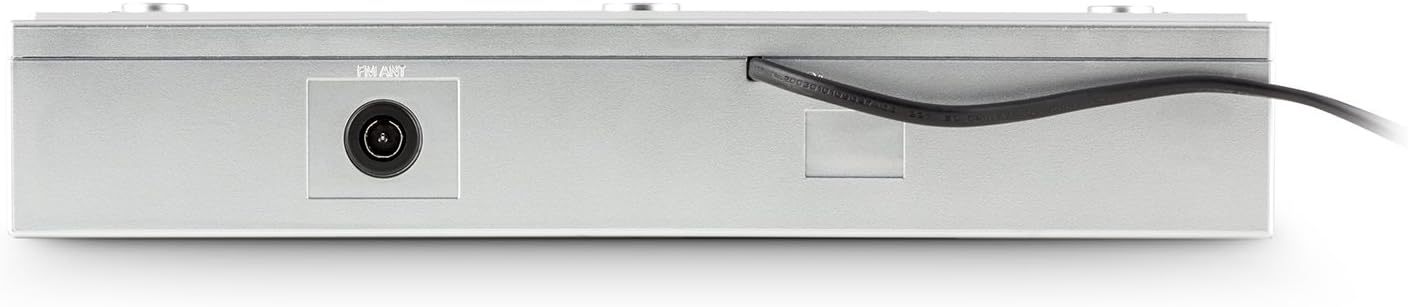
Image 4.4: Rear view of the unit, showing the power cable and antenna input for FM reception.

Image 4.5: Diagram illustrating the dimensions of the AUNA KCD-20 unit: 32cm (width) x 6cm (height) x 28.5cm (depth).
5. Setup and Installation
The AUNA KCD-20 is designed for under-cabinet mounting to save space. Follow these steps for installation:
- Choose Location: Select a suitable flat surface under a kitchen cabinet, ensuring enough space for the unit and access to power.
- Mark Drilling Points: Use the provided drilling guide to mark the screw positions on the underside of the cabinet.
- Drill Holes: Carefully drill pilot holes at the marked positions.
- Attach Mounting Brackets: Secure the mounting brackets (if separate) or the unit directly using the supplied screws and spacers. Ensure the unit is level and securely fastened.
- Connect Antenna: Connect the wire antenna to the FM antenna input on the rear of the unit. Position the antenna for optimal reception.
- Power Connection: Plug the power cable into a wall outlet.

Image 5.1: The AUNA KCD-20 unit installed neatly under a kitchen cabinet, demonstrating its space-saving design.
6. Operating Instructions
6.1 Basic Operation
- Power On/Off: Press the POWER button () to turn the unit on or off.
- Volume Control: Use the VOL - and VOL + buttons to adjust the volume.
- Function Selection: Press the FUNCTION button to cycle through modes: FM Radio, CD, USB, AUX.
6.2 FM Radio Operation
- Switch to FM mode using the FUNCTION button.
- Automatic Scan: Press and hold the PLAY MODE/RDS SEARCH button to automatically scan and store available FM stations. The unit can store up to 20 stations.
- Manual Tuning: Use the SKIP/TUNE buttons (|<< / >>|) to manually tune to frequencies.
- Preset Stations: Use the FOLDER/PRE buttons (^ / v) to navigate through stored preset stations.
- RDS Function: When available, RDS (Radio Data System) will display station information such as program type, song title, or artist. Press DISPLAY/ID3/RDS MODE to cycle through RDS information.
6.3 CD/MP3 Playback
- Switch to CD mode using the FUNCTION button.
- Gently insert a CD into the CD slot with the label side facing up. The unit will automatically load the disc and begin playback.
- Play/Pause: Press the PLAY/PAUSE button (II) to pause or resume playback.
- Skip Tracks: Use the SKIP/TUNE buttons (|<< / >>|) to skip to the previous or next track.
- Fast Forward/Rewind: Press and hold the SKIP/TUNE buttons to fast forward or rewind within a track.
- MP3 Folder Navigation: For MP3 CDs, use the FOLDER/PRE buttons to navigate between folders.
- Repeat Function: Press the REPEAT button to repeat the current track, current folder (for MP3), or all tracks.
6.4 USB Playback
- Insert a USB flash drive into the USB port on the front of the unit.
- Switch to USB mode using the FUNCTION button. The unit will automatically detect the USB drive and begin playing MP3 files.
- Playback controls (Play/Pause, Skip Tracks, Fast Forward/Rewind, Folder Navigation, Repeat) are similar to CD/MP3 playback.
6.5 AUX Input
- Connect an external audio device (e.g., smartphone, MP3 player, tablet) to the 3.5mm AUX input jack on the front of the unit using an audio cable (not supplied).
- Switch to AUX mode using the FUNCTION button.
- Audio will now be played through the unit's speakers. Control playback from your external device.
6.6 Clock, Alarm, and Timer Functions
- Setting the Clock: In standby mode, press and hold MEM/CLK-ADJ to enter clock setting mode. Use the SKIP/TUNE buttons to adjust hours and minutes, and MEM/CLK-ADJ to confirm.
- Setting the Alarm: Press the ALARM button. Use SKIP/TUNE to set the alarm time and ALARM to confirm. You can choose to wake up to FM radio or a buzzer.
- Sleep Timer: Press the SLEEP button repeatedly to set a sleep timer (e.g., 15, 30, 60, 90 minutes). The unit will automatically turn off after the set time.
- Kitchen Timer (Egg Timer): Press the TIMER button to set a countdown timer for cooking. Use SKIP/TUNE to adjust the time.
6.7 Equalizer Settings
Press the PRESET EQ button repeatedly to cycle through preset equalizer modes: Neutral, Classic, Rock, Pop, Jazz, or Off.
6.8 Remote Control
The included remote control allows for convenient operation of all functions from a distance. Ensure the remote has working batteries and is pointed towards the unit's front panel.
7. Maintenance
- Cleaning: Wipe the unit with a soft, dry cloth. Do not use abrasive cleaners or solvents.
- CD Lens Care: If CD playback issues occur, use a commercially available CD lens cleaner disc.
- Storage: If storing the unit for an extended period, disconnect it from power and store it in a cool, dry place.
8. Troubleshooting
| Problem | Possible Cause | Solution |
|---|---|---|
| No power | Power cable not connected; power outlet faulty. | Check power cable connection; try a different outlet. |
| No sound | Volume too low; incorrect function selected. | Increase volume; press FUNCTION to select correct mode. |
| Poor FM reception | Antenna not properly positioned or connected. | Adjust the wire antenna position; ensure it is fully connected. |
| CD not playing / Disc error | Disc inserted incorrectly; disc dirty or scratched; incompatible disc format. | Re-insert disc correctly; clean disc; ensure it is an audio CD or MP3 CD. |
| USB not recognized | USB drive not formatted correctly; incompatible file types; drive too large. | Ensure USB is FAT32 formatted; only MP3 files are supported; try a different USB drive. |
| Remote control not working | Batteries depleted; obstruction between remote and unit. | Replace remote control batteries; remove any obstructions. |
9. Specifications
- Brand: AUNA
- Model: KCD-20
- Product Dimensions: 32 cm (W) x 6 cm (H) x 28.5 cm (D)
- Weight: Approximately 2.62 kg
- Power Source: Corded Electric
- Tuner Technology: FM with RDS support
- Radio Presets: 20 stations
- Playback Formats: CD, MP3 (from CD and USB)
- Connectivity: USB (MP3 compatible), 3.5mm AUX input, FM antenna input
- Special Features: Programmable alarm, sleep timer, kitchen timer, preset equalizer, illuminated volume buttons, remote control.
10. Warranty and Support
AUNA products are manufactured to high-quality standards. In the unlikely event of a defect or issue, please refer to your purchase documentation for warranty details. For technical support or service inquiries, please contact your retailer or the AUNA customer service department.
Please retain your proof of purchase for any warranty claims.
