
Nitecore TIP 2017 CRI
Nitecore TIP 2017 CRI Upgrade Keychain Flashlight User Manual
Model: TIP 2017 CRI
Introduction
Thank you for purchasing the Nitecore TIP 2017 CRI Upgrade 240 Lumen USB Rechargeable Keychain Flashlight. This manual provides detailed instructions for the proper use, maintenance, and troubleshooting of your device. Please read this manual thoroughly before use to ensure optimal performance and longevity of your flashlight.
Package Contents
- Nitecore TIP 2017 CRI Flashlight
- Multi-Purpose Clip / Switch Protector
- USB to Micro-USB Charging Cable

Image: The Nitecore TIP 2017 CRI flashlight, showing its compact design, along with the included USB charging cable and the multi-purpose clip.

Image: A close-up view of the included accessories: the multi-purpose clip/switch protector and the USB to Micro-USB charging cable.
Product Features
- High CRI LED for accurate color rendition
- Integrated USB charging port
- Dual switch design for easy operation
- Multiple brightness levels
- Built-in Li-ion battery
- Advanced Temperature Regulation (ATR) technology
- Impact resistant and water ingress protected (IP54 rated)

Image: Diagram illustrating the accidental activation prevention feature provided by the multi-purpose clip, and the physical protection against water and dust ingress for the USB charging port.
Setup
Charging the Battery
The Nitecore TIP 2017 CRI has a built-in rechargeable Li-ion battery. Before first use, fully charge the battery.
- Locate the micro-USB charging port on the side of the flashlight.
- Connect the included USB charging cable to the flashlight's micro-USB port and to a USB power source (e.g., computer USB port, USB wall adapter).
- During charging, the built-in red power indicator will stay lit.
- The indicator will turn green upon charging completion.

Image: The Nitecore TIP 2017 flashlight connected to a USB charging cable, demonstrating the USB rechargeable feature and the charging indicator.
Initial Use
The flashlight may be in "Daily Mode" or "Constant-on Mode" by default. Refer to the "Operating" section to switch between modes.
Operating Instructions
Buttons Overview
- Power Button (⑂): Used to turn the flashlight on/off and access different modes.
- Mode Button (≡): Used to cycle through brightness levels.
Turning On/Off
- Turn On: Press the Power Button.
- Turn Off: Press the Power Button again.
Brightness Levels
With the flashlight on, press the Mode Button to cycle through brightness levels: Ultralow → Mid → High → Turbo.
Mode Switching (Daily Mode / Constant-on Mode)
The TIP 2017 CRI features two user modes:
- Daily Mode: The flashlight will automatically shut off after 30 seconds of no operation. This mode is suitable for short-time illumination and helps prevent accidental activation. To access constant-on mode from daily mode, press the power switch within 3 seconds after the light shuts off.
- Constant-on Mode: Provides continuous illumination until manually turned off.
To switch between Daily Mode and Constant-on Mode:
- Hold down both the Power Button and Mode Button simultaneously until the LED flashes once for Daily Mode, or twice for Constant-on Mode.

Image: A person using the Nitecore TIP 2017 in a dark environment, illustrating the "Daily Mode" where the light automatically turns off after 30 seconds of inactivity.

Image: A person standing on a path illuminated by the Nitecore TIP 2017 in "Constant-on Mode," demonstrating continuous illumination.
Maintenance
- Cleaning: Wipe the flashlight with a clean, soft cloth. Avoid using abrasive materials or harsh chemicals.
- Charging: Recharge the battery regularly, especially if the flashlight has not been used for an extended period, to maintain battery health.
- Storage: Store the flashlight in a cool, dry place away from direct sunlight and extreme temperatures.
- Water Resistance: While rated IP54, avoid submerging the flashlight in water. Ensure the USB port cover is securely closed to prevent water and dust ingress.
Troubleshooting
| Problem | Possible Cause | Solution |
|---|---|---|
| Flashlight does not turn on. | Battery is depleted. | Charge the battery fully. |
| Light output is dim or flickers. | Low battery. | Recharge the battery. |
| Flashlight turns off automatically. | In Daily Mode. | Switch to Constant-on Mode (refer to Operating Instructions). |
| Buttons are unresponsive. | Possible water damage (if exposed to rain/submersion). | Ensure USB port cover is sealed. If damage suspected, contact customer support. |
Specifications
| Feature | Detail |
|---|---|
| Light Source Type | LED |
| Brightness | Up to 240 Lumens (CRI version) |
| Voltage | 3.7 Volts |
| Light Path Distance | Up to 61 Yards (56 meters) |
| Battery Type | Built-in Lithium-Ion |
| Runtime | Up to 46 hours (Ultralow mode) |
| Impact Resistance | 1.5 meters |
| Water Resistance | IP54 Rated |
| Dimensions | 2.39 x 0.54 x 0.96 inches |
| Weight | 0.8 ounces (22.68 g) |
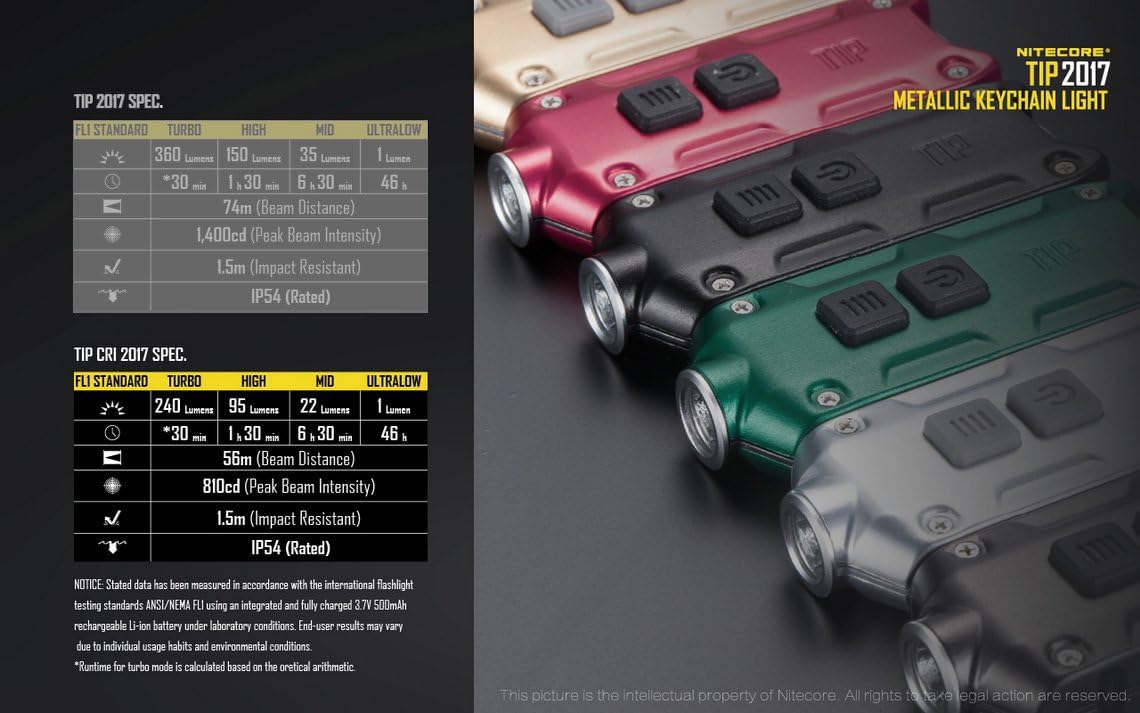
Image: Detailed specifications table for the Nitecore TIP 2017 CRI, including brightness levels, runtime, beam distance, peak beam intensity, impact resistance, and IP rating.
Warranty and Support
Nitecore products are covered by a warranty. For detailed warranty information, please refer to the official Nitecore website or contact your local distributor. If you encounter any issues not covered in this manual, please contact Nitecore customer support for assistance.
For further support, visit the official Nitecore website: Nitecore Store on Amazon
Ask a question about this manual
Ask about setup, troubleshooting, compatibility, parts, safety, or missing instructions. Manuals+ will review the question and use this page’s manual context to help answer it.