
Introduction
This manual provides detailed instructions for the installation, operation, and maintenance of your Prophete 517 17-Function Digital Wireless Bicycle Computer. This device offers comprehensive cycling data, including speed, distance, time, temperature, and calorie consumption, all transmitted wirelessly for a clean setup. It is designed for tool-free mounting and features automatic start/stop functionality.
Setup
1. Battery Installation
The Prophete 517 bicycle computer requires one CR2032 battery (included). To install or replace the battery:
- Carefully open the battery compartment cover on the back of the computer unit.
- Insert the CR2032 battery with the positive (+) side facing upwards.
- Securely close the battery compartment cover.
2. Mounting the Computer
The computer unit can be mounted tool-free on your bicycle's handlebars or stem. The mounting bracket allows for 90-degree rotation for optimal viewing angle.
- Attach the mounting bracket to your handlebars or stem using the provided straps or zip ties. Ensure it is securely fastened and does not obstruct your view or controls.
- Slide the bicycle computer unit onto the mounting bracket until it clicks into place.
- Adjust the computer's angle by rotating it on the bracket for best visibility.

Image: Prophete 517 Bicycle Computer mounted on bicycle handlebars. The computer is centrally positioned on the stem, showing a green casing, with the display visible. The handlebars and brake levers are also visible.
3. Sensor and Magnet Installation
For accurate speed and distance measurements, the wireless sensor and wheel magnet must be correctly installed.
- Attach the wireless sensor to your bicycle's front fork using the provided straps. Position it so that it aligns with the wheel spokes.
- Attach the magnet to a spoke on your front wheel. Ensure the magnet passes within 5mm of the sensor as the wheel rotates.
- Spin the wheel to verify that the sensor detects the magnet. The computer display should show a speed reading.
4. Initial Settings
Before first use, configure basic settings such as wheel circumference, unit of measurement (km/h or mph), and clock format.
- Refer to the specific instructions in your package for entering the setup menu (usually by pressing and holding a button).
- Input your wheel circumference for accurate distance and speed calculations.
- Set the current time and date.
Operating Instructions (17 Functions)
The Prophete 517 offers 17 functions accessible via its intuitive interface. Use the buttons (typically one or two) to navigate through the display modes and adjust settings.
Key Functions:
- Current Speed: Displays your real-time cycling speed.
- Average Speed: Shows the average speed of your current ride.
- Maximum Speed: Records the highest speed achieved during your ride.
- Speed Comparator: Indicates if your current speed is above or below your average speed.
- Total Distance (Odometer): Accumulates the total distance covered by the bicycle. This value is stored in memory.
- Daily Distance (Trip Distance): Measures the distance of your current ride. Resettable.
- Ride Time: Tracks the duration of your current ride. Resettable.
- Clock: Displays the current time (12h/24h format).
- Scan Function: Automatically cycles through various display modes (e.g., speed, distance, time).
- Total Odometer Memory Function: Ensures the total distance is saved even after battery replacement.
- Daily Ride Time: Displays the total time spent cycling for the current day.
- Carbon Dioxide (CO2) Savings: Estimates CO2 emissions saved by cycling instead of driving.
- Temperature Display: Shows the ambient temperature.
- Calorie Counter: Estimates calories burned during your ride.
- Automatic Display Off: The display turns off automatically after a period of inactivity to save battery.
- Automatic Start/Stop: The computer automatically starts recording when you begin cycling and pauses when you stop.
- Backlight: (If applicable, check product for specific button) Illuminates the display for night riding.
Navigation:
Typically, a single button cycles through the main display modes. A long press or a second button may be used to enter settings or reset daily values.

Image: Prophete 517 Bicycle Computer with a black casing. The display shows '30 KM/hr' and '56.43' (likely distance or time).

Image: Prophete 517 Bicycle Computer with a yellow casing. The display shows '30 KM/hr' and '56.43' (likely distance or time).
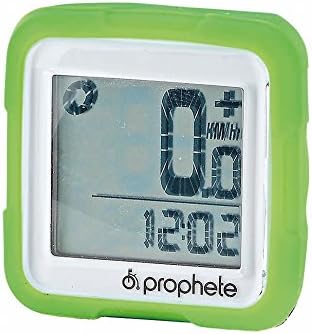
Image: Prophete 517 Bicycle Computer with a green casing. The display shows '0.0 KM/hr' and '12:02' (likely current time).
Maintenance
- Cleaning: Wipe the computer unit and sensor with a soft, damp cloth. Do not use abrasive cleaners or solvents.
- Battery Replacement: Replace the CR2032 battery when the display becomes dim or functions become erratic. Ensure proper polarity during installation.
- Storage: If storing the bicycle for an extended period, remove the battery from the computer unit to prevent leakage. Store in a cool, dry place.
- Water Resistance: The unit is designed to be splash-proof, but avoid submerging it in water or exposing it to heavy rain for prolonged periods.
Troubleshooting
- No Display/Dim Display:
Solution: Check battery installation. Replace the CR2032 battery if necessary. Ensure the battery is inserted with correct polarity. - No Speed Reading:
Solution: Verify that the wireless sensor is correctly positioned on the front fork and the magnet is securely attached to a spoke. Ensure the gap between the magnet and sensor is less than 5mm. Check the sensor battery (if applicable, some wireless sensors have their own battery). - Inaccurate Readings:
Solution: Confirm that the wheel circumference setting is correct. Ensure the magnet and sensor alignment is precise. Avoid strong electromagnetic interference sources. - Unit Not Responding:
Solution: Remove the battery, wait for 30 seconds, then reinsert it. This may reset the unit. If issues persist, contact customer support.
Specifications
| Model Number | 517 |
| Brand | Prophete |
| Functions | 17 |
| Transmission | Digital Wireless |
| Battery Type | 1 x CR2032 (included) |
| Mounting | Tool-free on handlebars or stem (90° rotatable) |
| Dimensions (L x W x H) | 20 x 13 x 5 cm (approx. 7.9 x 5.1 x 2 inches) |
| Weight | 100 grams (approx. 3.5 ounces) |
| Color Options | Assorted colors (e.g., black, yellow, green) |
Warranty Information
Specific warranty details for the Prophete 517 Bicycle Computer are not provided in the available product information. Please refer to the warranty card included with your product or contact Prophete customer service for detailed warranty terms and conditions.
Customer Support
For further assistance, technical support, or inquiries regarding your Prophete 517 Bicycle Computer, please refer to the contact information provided in your product packaging or visit the official Prophete website. Support contact details are not available in this document.