
1. Safety Information
Always observe basic safety precautions when using power tools to reduce the risk of fire, electric shock, and personal injury. Read all instructions carefully before operation.
- Work Area Safety: Keep your work area clean and well-lit. Cluttered or dark areas invite accidents. Do not operate power tools in explosive atmospheres, such as in the presence of flammable liquids, gases, or dust.
- Electrical Safety: Power tool plugs must match the outlet. Never modify the plug in any way. Avoid body contact with earthed or grounded surfaces.
- Personal Safety: Always wear eye protection and hearing protection. Use dust masks when working in dusty conditions. Dress properly; avoid loose clothing or jewelry. Secure long hair.
- Tool Use and Care: Do not force the power tool. Use the correct power tool for your application. Disconnect the plug from the power source and/or the battery pack from the power tool before making any adjustments, changing accessories, or storing power tools.
- Battery Tool Use and Care: Recharge only with the charger specified by the manufacturer. Use power tools only with specifically designated battery packs.
2. Product Overview
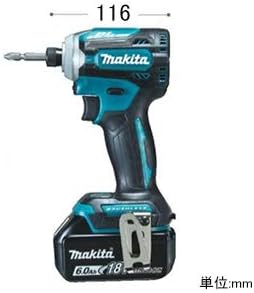
The Makita TD171DRGX is an 18V cordless impact driver designed for efficient fastening tasks. It features advanced technology for improved performance and user comfort.
Key Features:
- Zero-Shake Bit Wobble Reduction: Utilizes a double ball bearing in the shaft receiving part to minimize bit wobble, ensuring stable and precise fastening even in demanding applications.
- 8 Operating Modes: Includes four 'Easy Modes' (Wood, Bolt, Thick Plate, Thin Plate) and four-stage impact mode switching, providing versatility for various tasks from powerful tightening to delicate screw work.
- Mode Memory Function: Allows registration of one frequently used mode for quick access.
- Impact Mode Switching Hand Button: Enables convenient mode changes while maintaining grip on the tool.
- Dual LED Work Lights: Left and right LED lights enhance visibility in dimly lit work areas.
- Optimized Plastic Case: Features a horizontal handle for easy transport, large capacity storage, and a simple lock mechanism to prevent accidental opening.
- Fast Charging: The included charger with 'New Optimal Charging Control' can fully charge a 6.0Ah battery in approximately 40 minutes, or achieve a practical charge (80%) in about 27 minutes.
Components:
- Impact Driver Unit (TD171)
- Li-ion Battery (BL1860B) x2
- Charger (DC18RF)
- Plastic Carrying Case
- Bit 2-65
- Hook


3. Setup
3.1 Charging the Battery
Before initial use, fully charge the battery pack. Ensure the charger is connected to a standard power outlet.
- Insert the battery pack firmly into the charger until it clicks into place.
- The charger's indicator lights will show the charging status. Refer to the charger's specific manual for detailed light patterns.
- A full charge for a 6.0Ah battery typically takes approximately 40 minutes. A practical charge (around 80%) can be achieved in about 27 minutes.
- Once charging is complete, remove the battery pack from the charger.
3.2 Installing and Removing the Battery
- To Install: Align the battery pack with the grooves in the tool's handle and slide it in until it locks with a click.
- To Remove: Press the release button on the battery pack and slide it out of the tool.
3.3 Installing and Removing the Bit
The TD171DRGX uses a bit sleeve chuck type for quick bit changes.
- To Install: Pull the bit sleeve forward, insert the bit into the chuck as far as it will go, then release the sleeve. Ensure the bit is securely locked in place.
- To Remove: Pull the bit sleeve forward and pull the bit out.
4. Operating Instructions
4.1 Powering On/Off and Variable Speed
- The tool is powered on by pulling the trigger switch. The speed increases with greater trigger depression.
- To turn off, release the trigger switch.
4.2 Changing Rotation Direction
The forward/reverse switch is located above the trigger. Push the lever from either side to select the desired rotation direction. Ensure the tool is stopped before changing direction.
4.3 LED Work Lights
The tool is equipped with two LED lights that illuminate the work area when the trigger is pulled. These lights improve visibility in dark conditions.
4.4 Selecting Operating Modes
The TD171DRGX offers 8 operating modes for diverse applications. These include four 'Easy Modes' and four-stage impact mode settings.
- Easy Modes: Wood Mode, Bolt Mode, Thick Plate Mode, Thin Plate Mode. These modes automatically adjust speed and impact for optimal fastening in specific materials.
- Impact Modes: Four stages (Soft, Medium, Hard, Max) allow manual control over impact power.
- Mode Switching: Use the dedicated hand button located near the grip to cycle through the available modes.
- Mode Memory: One frequently used mode can be registered for quick recall. Consult the full manual for specific instructions on setting and recalling memory modes.
4.5 General Tightening Operations
Select the appropriate bit and mode for the material and fastener type. Apply steady pressure to the tool and allow the impact mechanism to do the work. Avoid over-tightening, especially with delicate materials or small screws.


5. Maintenance
Regular maintenance ensures the longevity and optimal performance of your impact driver.
- Cleaning: Regularly clean the tool's ventilation openings to prevent dust accumulation. Use a soft, damp cloth. Do not use harsh chemicals or abrasive cleaners.
- Bit Chuck: Keep the bit chuck clean and free of debris to ensure proper bit retention.
- Battery Care: Store batteries in a cool, dry place away from direct sunlight and extreme temperatures. Do not store fully discharged batteries for extended periods.
- Inspection: Periodically inspect the tool for any signs of damage, loose screws, or worn parts. If any issues are found, discontinue use and contact a qualified service center.
- Lubrication: This tool is designed to be maintenance-free regarding internal lubrication. Do not attempt to lubricate internal components.
6. Troubleshooting
If you encounter issues with your Makita TD171DRGX, refer to the following common problems and solutions:
| Problem | Possible Cause | Solution |
|---|---|---|
| Tool does not start | Battery not charged or improperly installed; Trigger lock engaged. | Charge battery; Reinstall battery; Disengage trigger lock. |
| Reduced power or speed | Low battery charge; Incorrect mode selected for task. | Recharge battery; Select a more powerful operating mode. |
| Bit wobbles excessively | Bit not fully inserted; Worn bit. | Ensure bit is fully inserted and sleeve is released; Replace with a new, high-quality bit. |
| Tool overheats | Continuous heavy use; Blocked ventilation. | Allow tool to cool down; Clear ventilation openings. |
If problems persist after attempting these solutions, contact an authorized Makita service center for assistance.
7. Specifications
| Feature | Specification |
|---|---|
| Model | TD171DRGX |
| Voltage | DC 18V |
| Battery Type | Slide-type Li-ion |
| Max Tightening Torque | 180 N·m |
| No-Load Speed | 0 - 3,600 rpm |
| Impact Rate | 0 - 3,800 ipm |
| Tightening Capacity (Wood Screw) | φ5.4×90mm (approx. 550 pieces per charge with BL1860B) |
| Chuck Method | Bit sleeve type |
| Dimensions (L x W x H) | 35.6 cm x 29.7 cm x 11.9 cm |
| Weight (with BL1860B battery) | 1.5 kg |
| Included Components | Impact Driver, 2x 6.0Ah Batteries, Charger, Case, Bit 2-65, Hook |
8. Warranty and Support
Makita products are manufactured under strict quality control. In the event of any issues, please refer to the warranty card included with your purchase for specific terms and conditions.
- Warranty: Warranty details are provided in a separate document. Please retain your proof of purchase for warranty claims.
- Service and Repairs: For service, repairs, or technical assistance, please contact your authorized Makita dealer or a Makita service center. Do not attempt to repair the tool yourself, as this may void the warranty and cause further damage or injury.
- Genuine Parts: Always use genuine Makita replacement parts and accessories to ensure compatibility and maintain product safety and performance.


