
Introduction
This manual provides detailed instructions for the Urbanears Stadion in-Ear Active Wireless Bluetooth Headset. Please read this guide carefully to ensure proper use, optimal performance, and longevity of your device. Keep this manual for future reference.
What's in the Box
- Urbanears Stadion Wireless Bluetooth Headset
- USB Charging Cable (Note: The product specifications mention a "3.5 cable" but also "Without Cable" for audio, and "USB" for headphones jack, indicating USB is for charging.)
Setup
1. Charging the Headset
Before first use, fully charge your Urbanears Stadion headset. Locate the hidden micro USB port, typically on the control unit. Connect the provided USB charging cable to the headset and a power source (e.g., computer USB port or USB wall adapter).
A single charge provides up to 7 hours of playback time.
2. Powering On/Off
- To Power On: Press and hold the central button on the control unit until the indicator light illuminates.
- To Power Off: Press and hold the central button until the indicator light turns off.
3. Bluetooth Pairing
The Urbanears Stadion uses Bluetooth 4.0 for wireless connectivity.
- Ensure the headset is powered off.
- Press and hold the central button for approximately 5 seconds until the indicator light begins to flash rapidly, indicating pairing mode.
- On your audio device (smartphone, tablet, etc.), enable Bluetooth and search for available devices.
- Select "Urbanears Stadion" from the list of found devices.
- Once connected, the indicator light on the headset will stop flashing and remain solid or flash slowly.
4. Achieving a Secure Fit
The Stadion headset features stretchy coils and ear click technology designed to adapt to your head shape and keep the earbuds securely in place during active use.

Image: Close-up view of the Urbanears Stadion earbud and the unique coiled cable design, highlighting the flexible structure.

Image: A person running outdoors, wearing the Urbanears Stadion headset, demonstrating its secure fit during physical activity.
- Gently place the earbuds into your ears.
- Adjust the stretchy coils around the back of your head to find a comfortable and snug fit. The ear click technology helps the earbuds stay firmly inside your ears.
Operating Instructions
The Stadion headset features a 3-button control unit located at the back of the neckband for easy access.

Image: Rear view of the Urbanears Stadion headset, clearly showing the plus (+), minus (-), and central control buttons on the neckband.
1. Music Playback
- Play/Pause: Press the central button once.
- Next Track: Double-press the central button.
- Previous Track: Triple-press the central button.
- Volume Up: Press the '+' button.
- Volume Down: Press the '-' button.
2. Call Management
- Answer/End Call: Press the central button once during an incoming call or an active call.
- Reject Call: Press and hold the central button for 2 seconds during an incoming call.
Maintenance
1. Cleaning
To maintain hygiene and performance, regularly clean your headset.
- Wipe the earbuds and neckband with a soft, dry, or slightly damp cloth.
- Avoid using harsh chemicals or abrasive materials.
- Ensure the micro USB charging port is dry before charging.
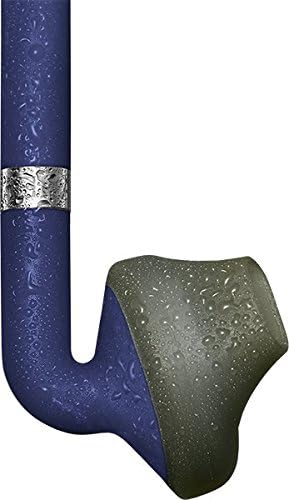
Image: A close-up of an Urbanears Stadion earbud with water droplets, indicating its resistance to moisture, suitable for active use.
2. Storage
When not in use, store the headset in a cool, dry place away from direct sunlight and extreme temperatures. Avoid tangling the cables.
Troubleshooting
- No Power: Ensure the headset is fully charged. Connect it to a power source and check the charging indicator.
- No Sound: Check if the headset is properly paired with your device. Ensure the volume on both the headset and your device is turned up.
- Pairing Issues: Turn off Bluetooth on your device and the headset, then restart the pairing process. Ensure no other Bluetooth devices are interfering.
- Poor Audio Quality/Disconnections: Ensure your device is within the Bluetooth range of the headset. Avoid obstacles that may interfere with the signal.
Specifications
| Model Name | Stadion |
| Item Model Number | 04091870 |
| Brand | Urbanears |
| Connectivity Technology | Wireless, Bluetooth 4.0 |
| Ear Placement | In Ear |
| Form Factor | In Ear |
| Control Type | 3-button control |
| Battery | 1 Lithium Polymer battery (included) |
| Battery Life | Up to 7 hours playback |
| Material | Plastic |
| Item Weight | 0.6 ounces |
| Product Dimensions | 5.87 x 1.97 x 5.75 inches |
| Manufacturer | Zound Industries |
Warranty and Support
For warranty information or technical support, please refer to the documentation included with your purchase or visit the official Urbanears website. Keep your proof of purchase for any warranty claims.


