
Spin Master 6040389
Chipo Barjo Electronic Game Instruction Manual
Brand: Spin Master | Model: 6040389
1. Safety Information
WARNING: Not suitable for children under 3 years due to small parts.
Please read all instructions before use. Adult supervision is recommended for young children.
2. Product Overview
The Chipo Barjo is an electronic game designed to test reflexes and speed. Players must follow the instructions given by the game unit, performing specific movements. The game features multiple modes for solo and multiplayer play.

Image: The Chipo Barjo game unit, a red sausage-shaped device with a smiling cartoon face at the top and a button in the middle.
What's in the Box:
- 1 Chipo Barjo electronic game unit
- 1 Rule Book
- 2 AA Batteries (pre-installed or included)

Image: The Chipo Barjo game box, illustrating the product and the five main actions required during gameplay.
3. Setup
Battery Installation:
- Locate the battery compartment on the Chipo Barjo unit. This is typically on the back or bottom.
- Using a screwdriver (not included), open the battery compartment cover.
- Insert 2 AA batteries, ensuring correct polarity (+/-).
- Replace the battery compartment cover and secure it with the screw.
The game unit requires 2 AA batteries, which are included with the product.
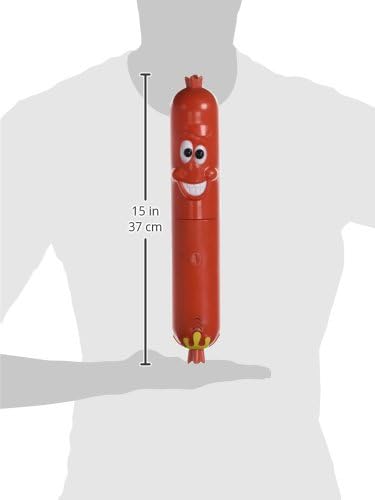
Image: The Chipo Barjo game unit held upright, illustrating its approximate length of 37 cm (15 inches).
4. Operating Instructions
Turning On and Starting a Game:
To turn on the Chipo Barjo game, press the central button located on the unit. The game will announce the available modes or start a new game depending on the last played settings.

Image: A hand demonstrating how to press the central button on the Chipo Barjo game unit to activate it.
Gameplay - The 5 Actions:
The Chipo Barjo game will instruct players to perform one of five specific actions. Players must react quickly and accurately. The actions are:
- Twist Me: Rotate the two halves of the sausage.
- Poke Me: Press the central button.
- Shake Me: Vigorously shake the unit.
- Tap Me: Tap the unit against your hand or a surface.
- Stretch Me: Pull the two halves of the sausage apart.

Image: A visual guide depicting the five interactive commands: Twist Me, Poke Me, Shake Me, Tap Me, and Stretch Me, with arrows indicating the required motion.

Image: A user demonstrating the 'Twist Me' action by rotating the two segments of the Chipo Barjo game unit.
Game Modes:
The Chipo Barjo game offers various modes to enhance replayability:
- Solo Mode: Play individually to beat your high score.
- Multiplayer Mode: Compete with friends and family.
- Solo Turbo Mode: A faster-paced solo challenge.
- Multiplayer Turbo Mode: A faster-paced competitive mode for multiple players.
In total, there are over 10 different ways to play the Chipo Barjo game. Refer to the included rule book for detailed instructions on each mode.
5. Maintenance
To clean the Chipo Barjo unit, wipe it with a soft, dry cloth. Do not use abrasive cleaners or immerse the unit in water. Ensure the battery compartment is securely closed to prevent moisture ingress.
When storing the game for extended periods, it is recommended to remove the batteries to prevent leakage.
6. Troubleshooting
- Game does not turn on:
- Check if the batteries are correctly installed with the correct polarity.
- Replace old batteries with new ones.
- Ensure the battery compartment cover is securely closed.
- Game is unresponsive or behaving erratically:
- Turn the unit off and then on again.
- Replace the batteries.
- Sound is distorted or too low:
- Replace the batteries.
7. Specifications
| Feature | Detail |
|---|---|
| Product Dimensions (L x W x H) | 36.9 x 7.7 x 10.2 cm |
| Weight | 420 grams |
| Manufacturer Recommended Age | 6 years and up |
| Educational Value(s) | Manipulation, Dexterity |
| Language | French (Game instructions may be multilingual) |
| Manufacturer Reference | 6040389 |
| Number of Players | 1 player and more |
| Self-assembly Product | No |
| Battery(ies) Required | No (Batteries are included) |
| Main Material | Plastic |
| Brand | Spin Master |
| Theme | Music (as per product data, though gameplay is reflex-based) |
| Cartoon Character | Chipo Barjo |
| Components Included | Game Unit, Rule Book |
| Packaging Information | Box |
| Quantity of Items in Package | 1 |
8. Warranty and Support
For warranty information or customer support regarding your Chipo Barjo game, please refer to the contact details provided in the included rule book or visit the official Spin Master website.
Keep your purchase receipt as proof of purchase for any warranty claims.
Ask a question about this manual
Ask about setup, troubleshooting, compatibility, parts, safety, or missing instructions. Manuals+ will review the question and use this page’s manual context to help answer it.