Introduction
This manual provides essential information for the proper installation, use, and maintenance of your ELICA Leather Flip Cover for the Samsung Galaxy A5 (2017) A520F. Please read these instructions carefully to ensure optimal protection and longevity of your device and cover.
Setup and Installation
Follow these steps to correctly install your Samsung Galaxy A5 (2017) A520F into the ELICA Leather Flip Cover:
- Prepare Your Device: Ensure your Samsung Galaxy A5 (2017) A520F is clean and free of dust or debris before installation.
- Align the Phone: Gently align your phone with the inner frame of the flip cover. The camera, buttons, and ports on your phone should match the cutouts in the cover.
- Insert the Phone: Carefully press your phone into the inner frame, starting from one side and working your way around until it is securely seated. Ensure all edges are properly enclosed by the frame.
- Verify Fit: Once installed, check that the phone is firmly held in place and that all buttons, ports, and the camera are accessible and unobstructed.
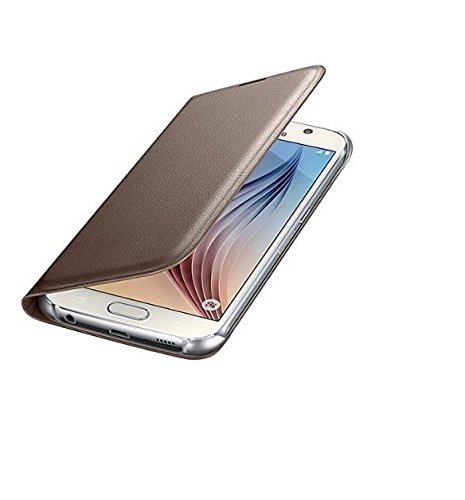
Image: The ELICA Leather Flip Cover shown with a Samsung Galaxy A5 (2017) A520F smartphone partially inserted, demonstrating the installation process. The cover is gold-colored, and the phone's screen is visible.
Operating Instructions
The ELICA Leather Flip Cover is designed for ease of use and protection:
- Opening and Closing: The flip cover opens and closes easily, providing quick access to your phone's screen while offering protection when closed.
- Access to Features: Precision cutouts ensure full access to the charging port, headphone jack, volume buttons, power button, and camera without needing to remove the cover.
- Screen Protection: When closed, the front flap protects your phone's screen from scratches, dust, and minor impacts.
- Device Protection: The durable material and secure fit protect the back and sides of your device from everyday wear and tear, bumps, and accidental drops.
Maintenance and Care
To maintain the appearance and functionality of your ELICA Leather Flip Cover, follow these care guidelines:
- Cleaning: Use a soft, dry, lint-free cloth to gently wipe the exterior of the cover. For minor stains, a slightly damp cloth can be used, followed by immediate drying. Avoid harsh chemicals, abrasive cleaners, or excessive moisture.
- Avoid Extreme Conditions: Do not expose the cover to direct sunlight for prolonged periods, high temperatures, or excessive humidity, as this may affect the material's integrity and color.
- Prevent Scratches: While the cover is designed to protect your phone, avoid placing it in direct contact with sharp objects that could scratch the cover itself.
- Regular Inspection: Periodically check the cover for any signs of wear or damage.
Troubleshooting
If you encounter any issues with your ELICA Leather Flip Cover, consider the following:
- Cover Does Not Close Properly: Ensure no foreign objects are lodged between the phone and the cover. Verify that the phone is correctly seated within the inner frame.
- Buttons or Ports Blocked: Double-check that your phone model is indeed the Samsung Galaxy A5 (2017) A520F. If it is, remove and re-install the phone, ensuring it is perfectly aligned with the cutouts.
- Loose Fit: Confirm that the phone is fully pressed into the inner frame. If the fit remains loose, verify the phone model compatibility.
- Discoloration or Wear: Over time, natural wear and exposure to elements can affect the material. Refer to the Maintenance section for care tips.
Specifications
Key specifications for the ELICA Leather Flip Cover:
| Brand | ELICA |
| Model | gold-a5-17-sx |
| Compatible Devices | Samsung Galaxy A5 (2017) A520F |
| Material | Leather |
| Form Factor | Flip Cover |
| Special Features | Complete access to all features of the device, Perfect Fit, Prevents the phone from getting scratched and protects it against dirt and bumps without adding a lot of bulk, Stylish Look |
| Item Weight | 199 g |
| Package Dimensions | 18 x 7 x 4 cm |
Warranty and Support
For specific warranty information regarding your ELICA Leather Flip Cover, please refer to the documentation provided at the time of purchase or contact the retailer. ELICA aims to provide quality products and customer satisfaction.
For further assistance or inquiries, please visit the official ELICA website or contact their customer support channels as indicated on their packaging or website.

Image: The ELICA brand logo, featuring the company name in orange text on a white background, indicating the manufacturer of the product.


