
Product Overview
The Timegyro Digital Alarm Clock (Model CRS1W) is a battery-operated alarm clock designed for bedrooms and other indoor spaces. It features a clear LED display with adjustable brightness, 12/24 hour time format, and a snooze function. Its compact size and cordless design allow for flexible placement.
Key Features:
- Battery Operated: Requires 4 AA batteries (not included), providing long-lasting operation without a power cord.
- LED Display: Clear digital time display with red digits.
- Adjustable Brightness: Three brightness levels to suit different lighting conditions.
- Night-Mode: Automatically dims the display between 8:00 PM and 6:00 AM.
- 12/24 Hour Mode: Easily switch between 12-hour and 24-hour time formats.
- Snooze Function: Provides a 7-minute snooze interval, repeatable up to 3 times.
- Compact Design: Ideal for desks, nightstands, or travel.
Safety Information
Please read and understand all safety instructions before using this product. Keep this manual for future reference.
- Use only the specified battery type (4 AA batteries).
- Do not mix old and new batteries, or different types of batteries.
- Ensure batteries are inserted with correct polarity (+ and -).
- Remove exhausted batteries promptly to prevent leakage and damage.
- If the clock will not be used for an extended period, remove the batteries.
- Keep the clock away from water, high temperatures, and direct sunlight.
- Do not attempt to disassemble or repair the clock yourself. Contact customer service for assistance.
Components

Front View: Displays current time with large red LED digits.

Rear Controls: Includes TIME SET, AL SET, HOUR/12-24, MIN/AL ON/OFF, RESET buttons, brightness switch, and alarm speaker.
Control Buttons and Switches:
- SNOOZE AL STOP Button (Top): Activates snooze during alarm, or stops the alarm.
- TIME SET Button (Rear): Used to enter time setting mode.
- AL SET Button (Rear): Used to enter alarm setting mode.
- HOUR / 12-24 Button (Rear): Adjusts hour during setting; toggles between 12-hour and 24-hour display modes.
- MIN / AL ON/OFF Button (Rear): Adjusts minutes during setting; turns alarm on or off.
- Brightness Switch (Rear): Slides to select one of three brightness levels.
- RESET Button (Rear): Resets the clock to default settings.
- Battery Compartment (Rear): Holds 4 AA batteries.
Setup
1. Battery Installation:
- Locate the battery compartment cover on the back of the clock.
- Slide the cover off.
- Insert 4 new AA batteries (not included) into the compartment, ensuring correct polarity (+ and -) as indicated inside.
- Replace the battery compartment cover.
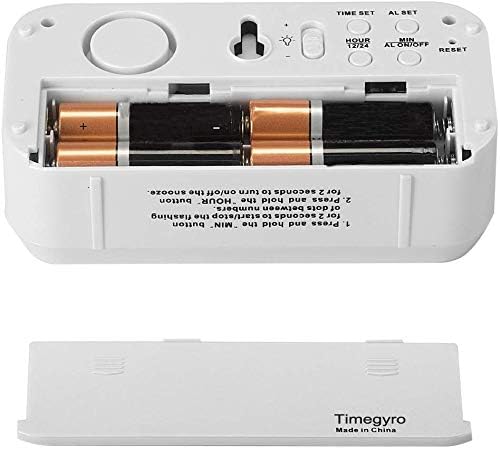
Battery Compartment: Insert 4 AA batteries with correct polarity.
2. Initial Power-On:
Once batteries are installed, the LED display will light up, typically showing a default time. You can then proceed to set the current time and other preferences.
Operating Instructions
Setting the Time:
- Press and hold the TIME SET button on the back of the clock for 2 seconds. The hour digits will begin to flash.
- Press the HOUR / 12-24 button repeatedly to adjust the hour.
- Press the TIME SET button again. The minute digits will begin to flash.
- Press the MIN / AL ON/OFF button repeatedly to adjust the minutes.
- Press the TIME SET button one more time to confirm and exit time setting mode.
Setting the Alarm:
- Press and hold the AL SET button on the back of the clock for 2 seconds. The alarm hour digits will begin to flash.
- Press the HOUR / 12-24 button repeatedly to adjust the alarm hour.
- Press the AL SET button again. The alarm minute digits will begin to flash.
- Press the MIN / AL ON/OFF button repeatedly to adjust the alarm minutes.
- Press the AL SET button one more time to confirm and exit alarm setting mode.
Turning Alarm On/Off:
- To turn the alarm ON, press the MIN / AL ON/OFF button once. An alarm icon (usually a bell) will appear on the display.
- To turn the alarm OFF, press the MIN / AL ON/OFF button again. The alarm icon will disappear.
Using the Snooze Function:
When the alarm sounds, touch the large SNOOZE AL STOP button on the top of the clock. The alarm will pause for 7 minutes and then sound again. This can be repeated up to 3 times.
Adjusting Display Brightness:
On the back of the clock, locate the brightness switch (often marked with a sun icon). Slide the switch to select one of the three available brightness levels (High, Medium, Low). The clock also features a Night-Mode which automatically dims the display between 8:00 PM and 6:00 AM.


Brightness Levels: The clock display adjusts for both bright and dim environments.
Switching 12/24 Hour Mode:
Press the HOUR / 12-24 button once to toggle between 12-hour (with AM/PM indicator) and 24-hour time formats.
Controlling Flashing Dots:
To start or stop the flashing of the dots between the hour and minute digits, press and hold the MIN / AL ON/OFF button for 2 seconds.
Maintenance
Cleaning:
Wipe the clock with a soft, dry cloth. Do not use abrasive cleaners or solvents, as these may damage the finish or display.
Battery Replacement:
When the display becomes dim or the clock stops functioning, it's time to replace the batteries. Follow the battery installation steps in the "Setup" section. It is recommended to replace all 4 AA batteries at the same time.
Troubleshooting
| Problem | Possible Cause | Solution |
|---|---|---|
| Display is blank or dim. | Batteries are low or incorrectly installed. | Replace all 4 AA batteries with new ones, ensuring correct polarity. Check the brightness switch setting. |
| Alarm does not sound. | Alarm is not activated or set incorrectly. | Ensure the alarm is turned ON (alarm icon visible). Verify the alarm time is set correctly. |
| Time is incorrect. | Time was not set or reset. | Follow the "Setting the Time" instructions to set the correct time. If the clock was recently without power, it may need to be reset. |
| Snooze function not working. | Alarm was stopped instead of snoozed, or snooze limit reached. | Ensure you lightly touch the top SNOOZE AL STOP button when the alarm sounds. The snooze function can only be used 3 times per alarm cycle. |
If you experience issues not listed here, please contact customer support.
Specifications
| Brand: | Timegyro |
| Model Number: | CRS1W |
| Display Type: | LED-backlit |
| Color: | White case with Red digits |
| Product Dimensions: | 5.5"W x 2.9"H (130x40x69mm) |
| Item Weight: | 3.88 ounces (110 Grams) |
| Power Source: | 4 AA batteries (not included) |
| Material: | Plastic |
| Special Features: | Snooze, Alarm, Auto Dimmable, Brightness Dimmer, Battery Operated, Cordless, 12/24Hr, Easy to use, Large Display |
Warranty and Support
For product support, warranty information, or any inquiries, please contact Timegyro customer service.
Customer Service Email: chaorong@shenzhenchaorong.com
Please refer to your purchase documentation for specific warranty terms and conditions.

