1. Introduction
The Wantek F600J35 is a lightweight, mono wired headset designed for clear communication across various devices. Featuring a noise-canceling microphone and comfortable ear cushion, it is suitable for extended use with smartphones, computers, laptops, and tablets equipped with a 3.5mm jack. This manual provides detailed instructions for setup, operation, and maintenance to ensure optimal performance.

Image 1.1: The Wantek F600J35 Mono Wired Headset, showcasing its single earpiece, adjustable headband, and microphone boom.
2. Package Contents
Please verify that all items are present in your package:
- 1 x Wantek F600J35 3.5mm Jack Headset
- 1 x 3.5mm to 2.5mm Jack Adapter
- 1 x User Guide

Image 2.1: Contents of the Wantek F600J35 headset package, including the headset, 3.5mm to 2.5mm adapter, and user guide.
3. Setup and Installation
3.1 Connecting to Devices
- For devices with a single 3.5mm headset jack (e.g., most smartphones, laptops, tablets): Plug the 3.5mm jack of the headset directly into the device's headset port.
- For devices with a 2.5mm headset jack (e.g., some landline phones): Use the included 3.5mm to 2.5mm adapter. First, plug the headset's 3.5mm jack into the adapter, then plug the adapter into the device's 2.5mm port.
- For PCs or devices with separate 3.5mm speaker and microphone ports: This headset's 3.5mm jack combines both audio and microphone functions. If your PC requires separate ports, a headphone splitter (not included) will be necessary to utilize both microphone and speaker functions. Without a splitter, only the speaker function may be supported.
- For newer iPhones (iPhone 7/7 Plus/8/8 Plus/X/XS/XR or newer): A Lightning to 3.5mm adapter (supplied by Apple, not included with this headset) is required for connection.

Image 3.1: Diagram illustrating the wide compatibility of the headset with various devices via 3.5mm jack and the included 2.5mm adapter.
4. Operating Instructions
4.1 Wearing the Headset
- Adjust the headband to fit comfortably over your head. The headband is adjustable to suit various head circumferences.
- The headset can be worn on either the left or right ear. Rotate the microphone boom 270 degrees to position it on the desired side.
- Rotate the earpiece 180 degrees to better fit the contour of your ear for optimal comfort.
4.2 Using the In-line Controls
The headset features an in-line control unit for convenient management of calls and audio:
- Volume Control: Use the volume wheel or buttons on the in-line control to adjust the listening volume.
- Call Answer/End Button: Press the button to answer or end a call.
- Microphone Mute: The in-line control may include a switch or button to mute the microphone independently.
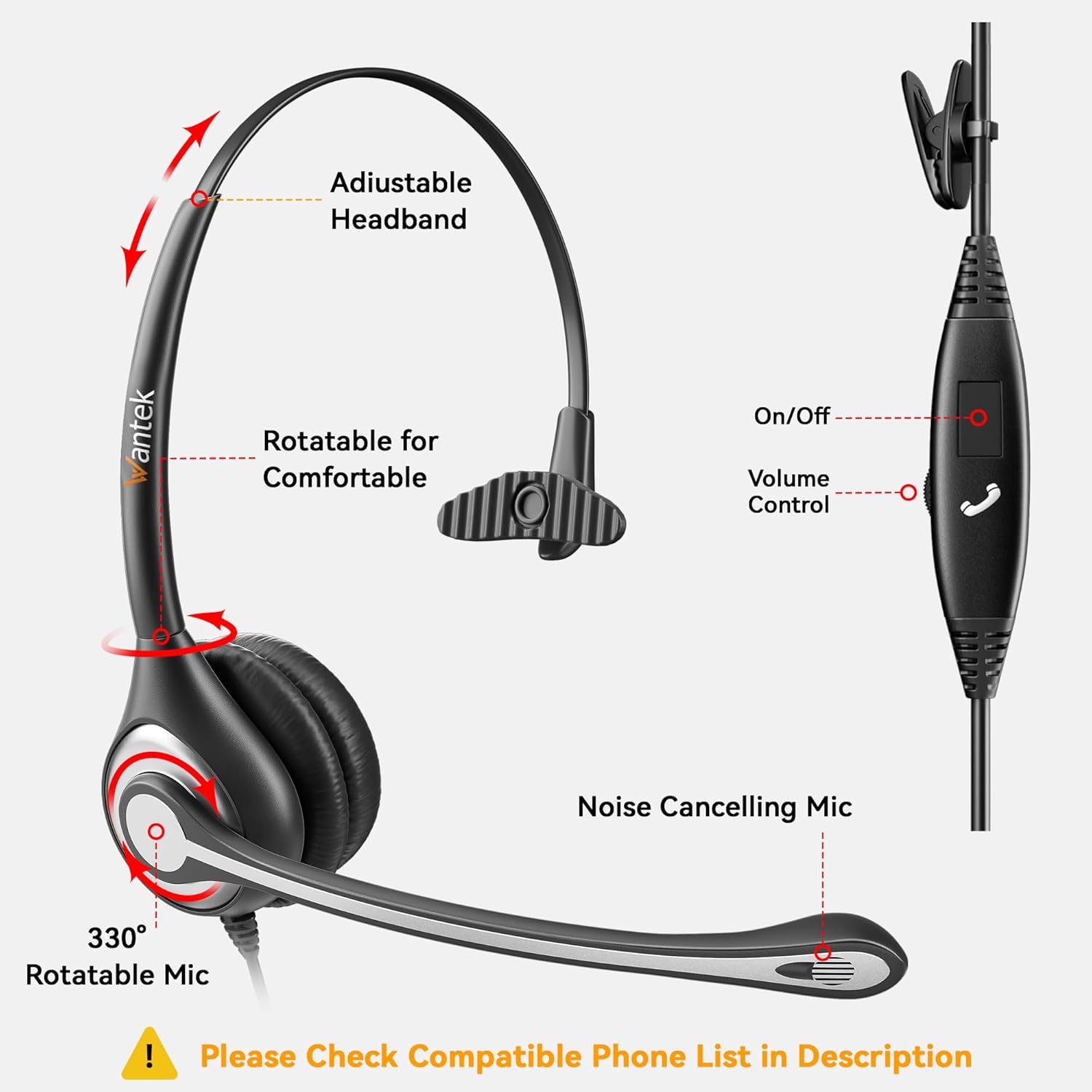
Image 4.1: Illustration of the headset's adjustable headband, 270-degree rotatable microphone, and in-line controls for volume and call management.

Image 4.2: Detailed view of the in-line multifunction controls, 3.5mm plug, and 2.5mm adapter.
5. Maintenance
To ensure the longevity and optimal performance of your Wantek F600J35 headset, follow these maintenance guidelines:
- Cleaning: Gently wipe the headset with a soft, dry cloth. Avoid using harsh chemicals or abrasive cleaners.
- Storage: Store the headset in a clean, dry place away from extreme temperatures and direct sunlight.
- Cable Care: Avoid sharp bends or excessive pulling on the cable to prevent internal damage. Use the included shirt clip to manage the cable and reduce strain.
- Ear Cushions: The soft ear cushions are designed for comfort. If they become worn or damaged, contact customer support for replacement options.
6. Troubleshooting
If you encounter issues with your headset, please refer to the following common solutions:
| Problem | Possible Cause | Solution |
|---|---|---|
| No sound or low volume from headset |
|
|
| Microphone not working |
|
|
| Sound quality is poor or distorted |
|
|
If the problem persists after trying these solutions, please contact Wantek customer support.
7. Specifications
| Feature | Specification |
|---|---|
| Model Name | F600J35 |
| Connectivity Technology | Wired |
| Headphones Jack | 3.5 mm Jack |
| Microphone | Noise-Canceling, 270° Rotatable |
| Ear Placement | On Ear (Mono) |
| Form Factor | On Ear |
| Control Type | Volume Control, In-line volume, Call Answer/End |
| Compatible Devices | Smartphones, Laptops, Computers, PCs, Tablets, iPad, MAC, and devices with a 3.5mm headset jack |
| Frequency Range | 20 Hz - 20,000 Hz |
| Impedance | 32 Ohm |
| Item Weight | 150 Grams (approx. 5.3 ounces) |
| Product Dimensions | 5.71 x 6.89 x 2.17 inches |
| Material | Plastic |
| Special Features | Adjustable Headband, Lightweight |
8. Warranty and Support
8.1 Warranty Information
This Wantek headset is covered by a 24-month warranty from the date of purchase. This warranty covers manufacturing defects and ensures that the product meets its specified performance standards. Please retain your proof of purchase for warranty claims.
8.2 Customer Support
For any questions, technical assistance, or warranty claims, please contact Wantek customer support. Our team is available to provide assistance and ensure your satisfaction.
You can find contact information on the official Wantek website or through your purchase platform.


