
1. Introduction
Thank you for choosing the RFIVER UT2003 Swivel Tabletop TV Stand. This manual provides essential information for the safe and correct assembly, operation, and maintenance of your new TV stand. Please read these instructions carefully before beginning assembly and retain them for future reference.
The RFIVER UT2003 is designed to securely hold televisions ranging from 20 to 43 inches, offering a stable and versatile viewing solution with its swivel and height adjustment features.

Image 1.1: RFIVER UT2003 Swivel Tabletop TV Stand, showcasing its sleek design and tempered glass base.
2. Safety Information
To ensure safe operation and prevent damage, please observe the following safety precautions:
- Weight Limit: Do not exceed the maximum weight capacity of 30 kg (66 lbs) for the TV stand.
- TV Size: This stand is suitable for televisions between 20 and 43 inches. Ensure your TV's size and weight are within these limits.
- VESA Compatibility: Verify your TV's VESA mounting pattern matches the stand's compatibility (75x75mm to 200x200mm, excluding 100x200mm). Refer to your TV's manual for VESA information.
- Stable Surface: Always place the TV stand on a flat, stable, and level surface to prevent tipping.
- Assembly: Follow all assembly instructions carefully. Incorrect assembly can lead to instability and injury.
- Children and Pets: Keep children and pets away from the TV stand during assembly. Do not allow them to climb on or play with the stand or attached TV.
- Cable Management: Utilize the integrated cable management system to prevent tripping hazards and maintain a tidy appearance.
- Regular Checks: Periodically check all screws and connections to ensure they remain tight and secure.
3. Package Contents
Before assembly, ensure all parts are present and undamaged. If any parts are missing or damaged, do not proceed with assembly and contact customer support.
- Tempered Glass Base
- Support Pillar
- Durable TV Plate (VESA mounting bracket)
- Protective Cover for Pillar
- Non-Slip Feet for Base
- Mounting Hardware Kit (various screws, washers, spacers for TV attachment)
- Assembly Tools (e.g., Allen key)
- Instruction Manual

Image 3.1: Detailed view of the stand's components, including the durable TV plate, stable support pillar, protective cover, non-slip feet, and tempered glass base, highlighting the cable management system.
4. Setup and Assembly Instructions
Follow these steps carefully to assemble your RFIVER UT2003 TV Stand.
- Attach Non-Slip Feet to Base: Carefully place the tempered glass base on a soft, clean surface. Attach the non-slip feet to the designated points on the underside of the glass base.
- Secure Support Pillar to Base: Align the support pillar with the mounting holes on the tempered glass base. Use the provided screws to firmly attach the pillar to the base. Ensure it is stable and upright.
- Install Protective Cover: Slide the protective cover onto the support pillar. This cover also aids in cable management.
- Attach VESA Plate to Support Pillar: Secure the durable TV plate (VESA mounting bracket) to the top of the support pillar using the designated mounting screws. Ensure it is oriented correctly for your TV.
- Determine VESA Pattern and Select Screws: Identify your TV's VESA mounting pattern (e.g., 75x75mm, 200x200mm) and select the appropriate screws, washers, and spacers from the hardware kit. Refer to Image 4.1 for common VESA patterns and screw types.
- Attach Mounting Brackets to TV: Carefully place your TV face down on a soft, clean surface. Attach the vertical mounting brackets (part of the TV plate assembly) to the back of your TV using the selected VESA screws, washers, and spacers. Ensure the brackets are securely fastened and evenly spaced.
- Mount TV onto Stand: With assistance, carefully lift your TV and hook the attached mounting brackets onto the TV plate assembly on the stand. Ensure the TV is properly seated and secured. Tighten any safety screws or clips to prevent accidental dislodgement.
- Cable Management: Route your TV's power and input cables through the integrated cable management system within the support pillar to maintain a clean and organized setup.

Image 4.1: Guide for checking TV VESA compatibility and selecting appropriate mounting screws from the provided hardware kit.
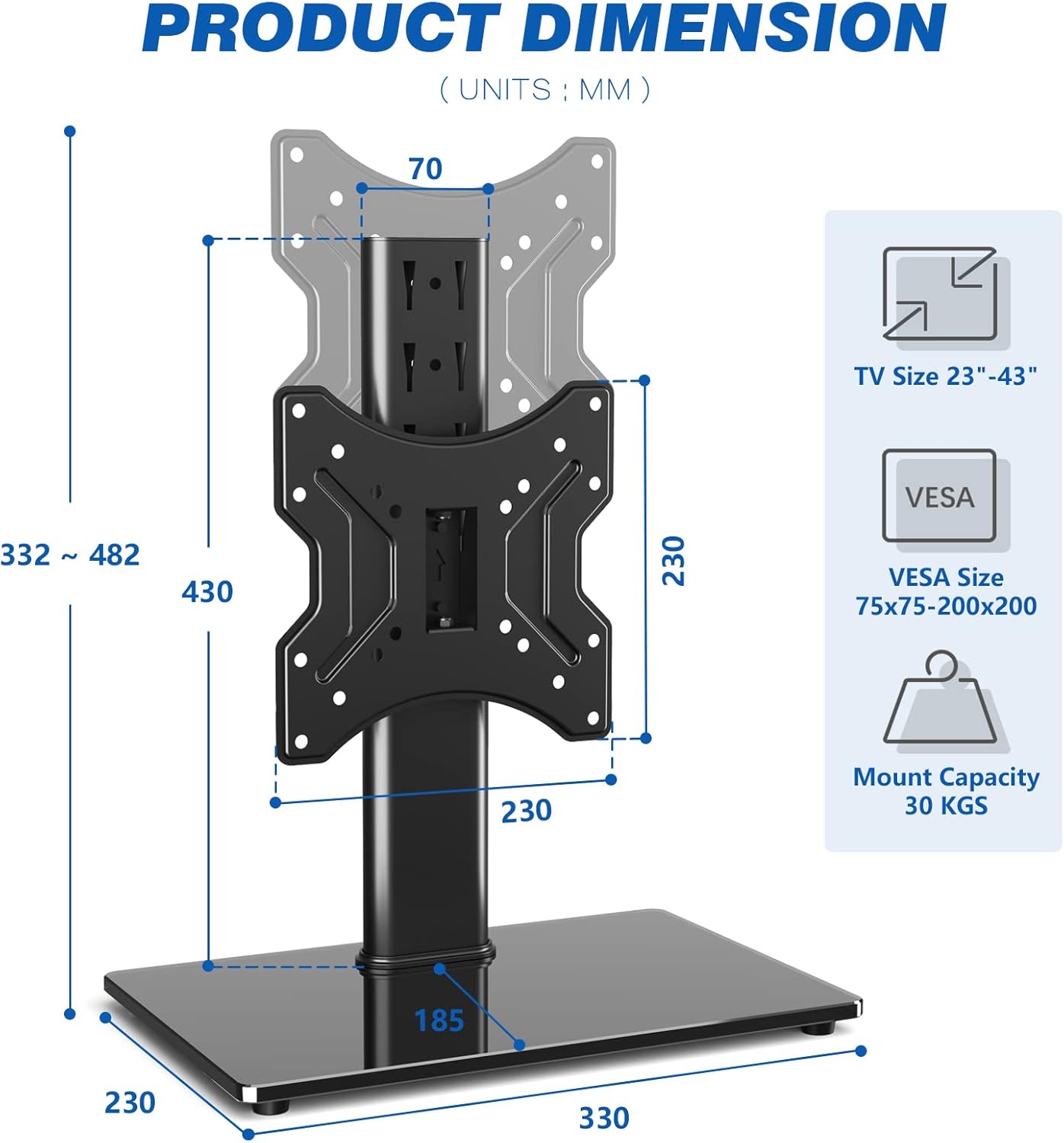
Image 4.2: Diagram illustrating the product dimensions, supported TV sizes (23-43 inches), VESA sizes (75x75mm to 200x200mm), and maximum mount capacity (30 KGS).
5. Operating Instructions
The RFIVER UT2003 TV Stand offers flexibility for optimal viewing.
5.1 Swivel Function
The TV stand allows you to swivel your television up to 40 degrees to the left or right. Gently grasp the sides of your TV and rotate it to your desired viewing angle. This feature is ideal for adjusting the screen position from different seating areas.

Image 5.1: Illustration of the TV stand's 40-degree swivel capability, enhancing viewing flexibility.
5.2 Height Adjustment
The stand offers multiple height adjustment positions to suit your viewing preferences and TV size. To adjust the height, you will need to carefully remove the TV from the stand, reposition the VESA mounting bracket on the support pillar to one of the available height settings, and then re-mount the TV. The stand typically offers 4 distinct height positions.
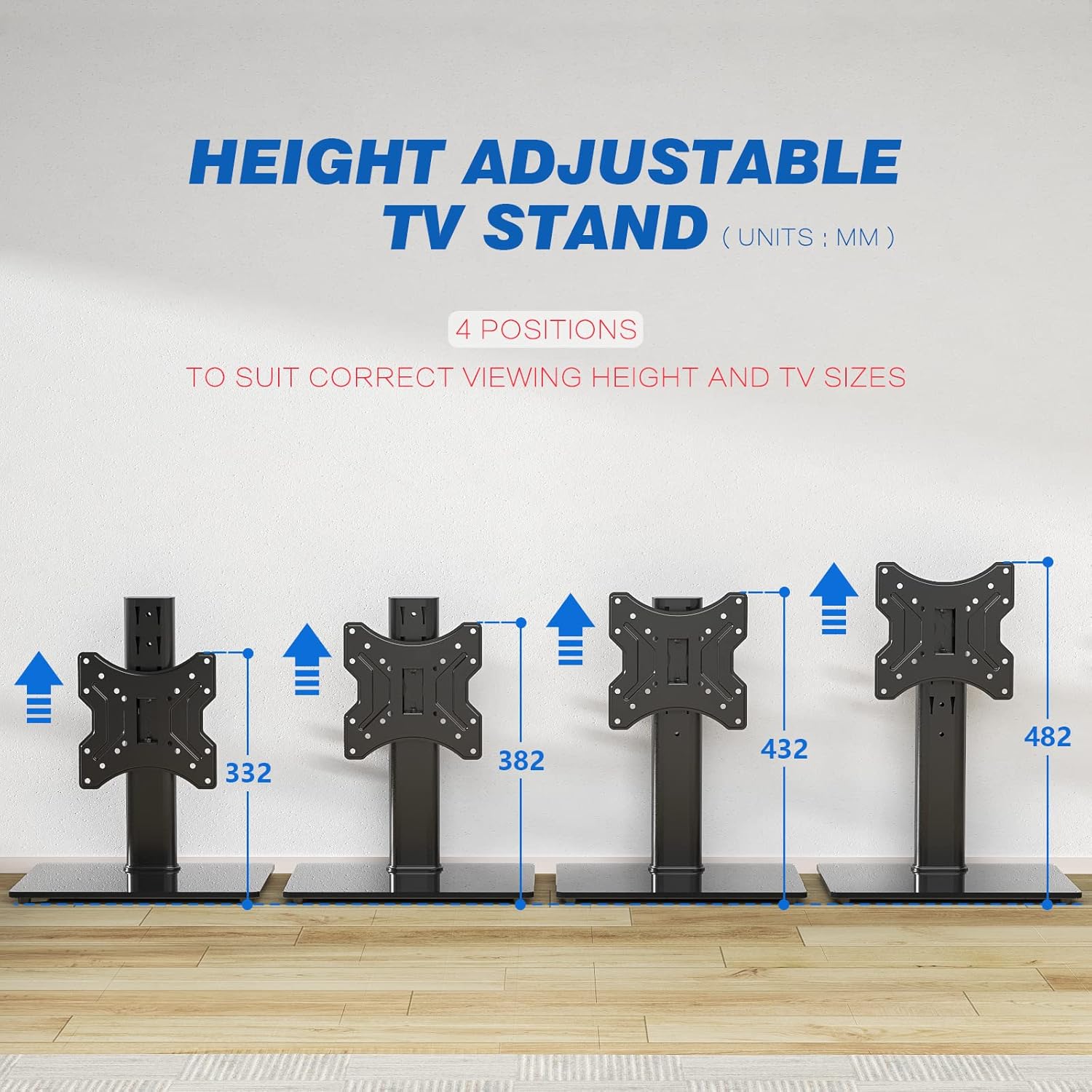
Image 5.2: Diagram showing the four available height adjustment positions for the TV stand, ranging from 332mm to 482mm.
6. Maintenance
Proper maintenance will ensure the longevity and appearance of your TV stand.
- Cleaning: The stand is easy to clean. Dust and smudges can be removed with a soft, damp cloth. For more stubborn marks, a mild detergent solution can be used. Avoid abrasive cleaners or harsh chemicals that may damage the finish or glass.
- Hardware Check: Periodically inspect all screws and connections to ensure they remain tight. Loose connections can affect stability.
- Glass Care: Handle the tempered glass base with care to prevent scratches or chips.
7. Troubleshooting
If you encounter any issues with your RFIVER UT2003 TV Stand, please refer to the following common solutions:
- TV is not stable:
- Ensure all assembly screws are tightened securely.
- Verify the TV's weight and size are within the stand's specifications.
- Confirm the stand is placed on a flat, level, and stable surface.
- Difficulty swiveling the TV:
- Check for any obstructions around the swivel mechanism.
- Ensure the TV is not exceeding the weight limit, which could cause resistance.
- Missing parts or damaged components:
- Do not attempt to assemble the stand with missing or damaged parts. Contact RFIVER customer support immediately for assistance.
8. Specifications
| Feature | Specification |
|---|---|
| Model Number | UT2003 |
| Brand | RFIVER |
| Compatible TV Sizes | 20 - 43 inches |
| Maximum Weight Capacity | 30 kg (66 lbs) |
| VESA Compatibility | 75x75mm, 100x100mm, 150x150mm, 200x100mm, 200x200mm (Not compatible with 100x200mm) |
| Swivel Angle | ±40 degrees (left/right) |
| Height Adjustment | 4 positions |
| Base Dimensions (W x D) | 330mm x 230mm |
| Material | Metal & 8mm Tempered Glass |
| Color | Black |
| UPC | 761330649818 |
9. Warranty and Support
9.1 Warranty Information
RFIVER provides a 5-year satisfaction guarantee for this product, ensuring quality and customer confidence. Please retain your proof of purchase for any warranty claims.
9.2 Customer Support
If you have any questions regarding the assembly, operation, or maintenance of your RFIVER UT2003 TV Stand, or if you require technical assistance, please do not hesitate to contact our customer service team. Our team is always available to help you.
For support, please visit the official RFIVER website or refer to the contact information provided with your purchase.


