
Introduction
Welcome to the world of Our Generation! This instruction manual provides essential information for the setup, operation, and maintenance of your Sweet Stop Ice Cream Truck playset. Designed for 18-inch dolls, this playset offers an immersive experience with numerous accessories and interactive features. Please read this manual thoroughly before use to ensure proper enjoyment and longevity of your product.
What's Included
Your Our Generation Sweet Stop Ice Cream Truck comes with the following items:
- 1 Ice Cream Truck
- 4 Trays
- 2 Fridge Racks
- 1 Deep Fryer with Basket
- 2 Stools
- 4 Chalk Sticks
- 1 Bell
- 1 Napkin Holder
- 6 Paper Bills
- 3 Coins
- 2 Ice-Cream Holders
- 1 Popsicle Holder
- 3 Containers
- 3 Cups
- 3 Donut Trays
- 4 Serving Spoons
- 1 Ice-Cream Scooper
- 1 Jar with 6 Straws
- 1 Set of Prongs
- 3 Syrup Bottles
- 2 Shakers
- 8 Ice-Cream Cones
- 3 Slushies
- 6 Sundaes
- 2 Cyclones
- 2 Cookie Sandwiches
- 3 Pretzels
- 6 Ice-Cream Trays
- 28 Popsicles
- 9 Doughnuts
- 1 Ice-Cream & Waffle Cone
- 1 Soft Ice-Cream in a Cup
- 3 Soft Ice-Cream Cones
- 2 Ice-Cubes
- 2 Milkshakes with Whipped Cream
- 4 Ice-Cream Cones with Paper Cups
- 1 Large Sundae
Setup and Battery Installation
The Our Generation Sweet Stop Ice Cream Truck requires 3 AA batteries for its interactive light and sound features. These batteries are included with your playset.
- Locate the battery compartment on the underside of the ice cream truck.
- Using a Phillips head screwdriver (not included), unscrew the battery compartment cover.
- Insert 3 new AA batteries, ensuring correct polarity (+/-) as indicated inside the compartment.
- Replace the battery compartment cover and secure it with the screw.
- Ensure all accessories are placed securely within the truck's designated areas or stored safely when not in use.
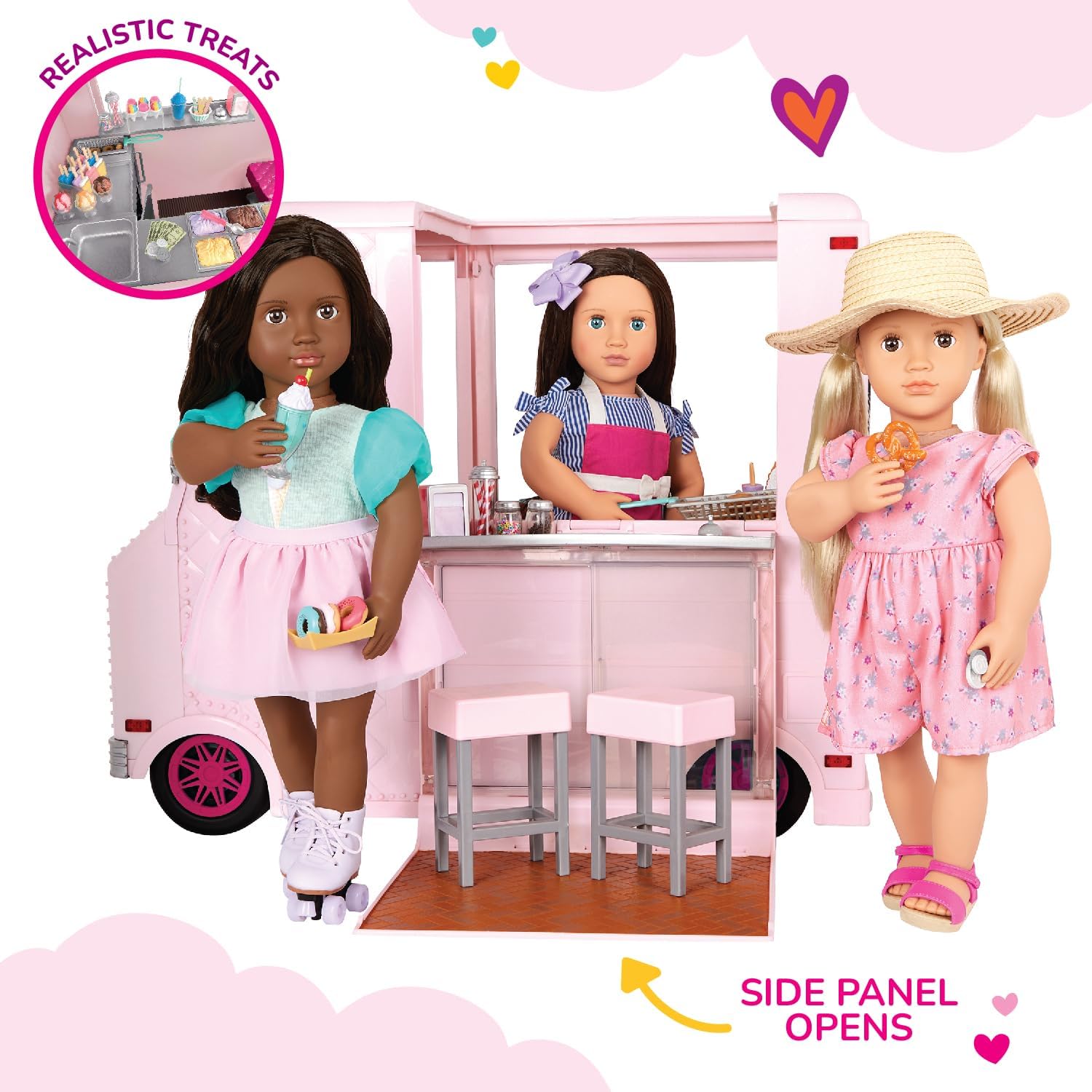
Image: The Our Generation Sweet Stop Ice Cream Truck showcasing its interactive features, including working lights and wipers, sound effects, and a functional chalkboard.
Operating Instructions
1. Interactive Features
- Lights and Sounds: Press the buttons on the dashboard to activate the truck's headlights, taillights, and play 3 different ice cream truck songs.
- Working Wipers: Manually move the windshield wipers for realistic play.
- Chalkboard: Use the included chalk sticks to write daily specials or messages on the functional chalkboard located on the side of the truck.
- Opening Panels: The side panel of the truck opens to reveal the serving area, and the driver's side door also opens for doll access.
2. Serving Area and Accessories
Arrange the various play food accessories on the trays and fridge racks within the serving area. The deep fryer basket can be used for pretend cooking, and the sink area allows for imaginative cleanup. The bell can be rung to announce service.

Image: A detailed look at the interior serving counter, showcasing the ice cream tubs, sink, and other accessories.

Image: Dolls engaging in pretend play, serving various treats from the fully stocked ice cream truck.
Maintenance
- Cleaning: Wipe the truck and accessories with a damp cloth and mild soap. Avoid harsh chemicals or abrasive cleaners. Ensure all parts are dry before storing.
- Storage: Store the playset in a cool, dry place away from direct sunlight to prevent fading or damage.
- Battery Care: If the playset will not be used for an extended period, remove the batteries to prevent leakage and corrosion.
Troubleshooting
- Lights or Sounds Not Working:
- Check if the batteries are correctly installed with the proper polarity.
- Replace old batteries with new AA batteries.
- Ensure the power switch (if present, usually near the battery compartment) is in the "ON" position.
- Stuck Moving Parts: Gently check for any obstructions or debris that might be preventing doors, wipers, or wheels from moving freely.
Specifications
| Product Dimensions | 20 x 10 x 22 inches |
| Item Weight | 10 pounds |
| Item Model Number | BD37363Z |
| Manufacturer Recommended Age | 6 - 10 years |
| Batteries | 3 AA batteries required (included) |
| Manufacturer | Kaplan Early Learning Company |
Warranty and Support
For information regarding warranty, replacement parts, or customer support, please refer to the official Our Generation website or contact their customer service department. Keep your proof of purchase for any warranty claims.
Official Website: www.ogdolls.com

