
Sami LD9930A
Sami LD-9930N Digital Timer User Manual
Model: LD9930A
Introduction
Thank you for purchasing the Sami LD-9930N Digital Timer. This compact and versatile timer is designed to assist you with various timing needs in the kitchen, laboratory, or any other setting requiring precise time management. Please read this manual carefully before using the device to ensure proper operation and longevity.
Safety Information
- Keep the device away from water and high humidity.
- Do not expose to extreme temperatures or direct sunlight.
- Avoid dropping the device or subjecting it to strong impacts.
- Do not attempt to disassemble or repair the timer yourself. Contact qualified personnel for service.
- Dispose of batteries responsibly according to local regulations.
Package Contents
- 1 x Sami LD-9930N Digital Timer
- 1 x User Manual (this document)
Note: AAA battery is not included.
Product Overview
Familiarize yourself with the components of your Sami Digital Timer:

Figure 1: Front view of the Sami LD-9930N Digital Timer, showing the LCD display and control buttons.
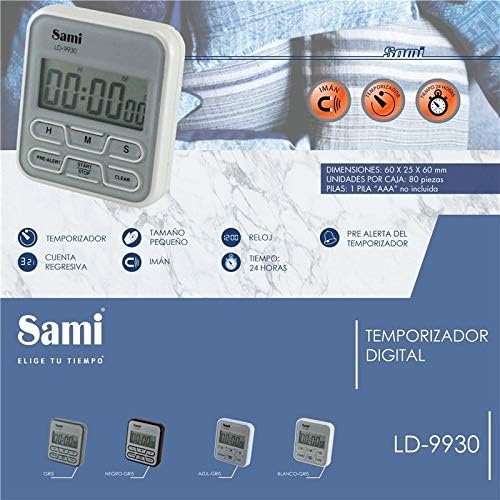
Figure 2: Back view and feature overview of the Sami LD-9930N Digital Timer, highlighting its magnetic back, countdown, and pre-alert functions.
Buttons and Display:
- LCD Display: Shows hours (H), minutes (M), and seconds (S).
- H Button: Used to set hours.
- M Button: Used to set minutes.
- S Button: Used to set seconds.
- START/STOP Button: Starts or pauses the timer/countdown.
- CLEAR Button: Resets the timer to 00:00:00.
- PRE-ALERT Button: Activates or deactivates the pre-alert function.
Setup
Battery Installation:
- Locate the battery compartment on the back of the timer.
- Slide open the battery cover.
- Insert one AAA battery, ensuring correct polarity (+/-).
- Close the battery cover securely.
The timer display should now show 00:00:00.
Operating Instructions
1. Setting the Countdown Timer:
- Ensure the timer is reset to 00:00:00 by pressing the CLEAR button if necessary.
- Press the H button repeatedly to set the desired hours.
- Press the M button repeatedly to set the desired minutes.
- Press the S button repeatedly to set the desired seconds.
- Once the desired time is set, press the START/STOP button to begin the countdown.
- To pause the countdown, press the START/STOP button again. Press it once more to resume.
- When the countdown reaches 00:00:00, an alarm will sound. Press any button to stop the alarm.
2. Using the Stopwatch (Count-up) Function:
- Ensure the timer is reset to 00:00:00 by pressing the CLEAR button.
- Press the START/STOP button. The timer will begin counting up from 00:00:00.
- To pause the stopwatch, press the START/STOP button again. Press it once more to resume.
- To reset the stopwatch, press the CLEAR button while the stopwatch is paused or running.
3. Pre-Alert Function:
The pre-alert function provides an early warning before the main timer expires. This feature is particularly useful for tasks requiring preparation before the final alarm.
- While setting the countdown timer (before pressing START/STOP), press the PRE-ALERT button.
- The timer will emit a short beep approximately one minute before the set time expires.
- This function is active only during countdown mode.
Maintenance
- Cleaning: Wipe the timer with a soft, dry cloth. Do not use abrasive cleaners or immerse in water.
- Storage: Store the timer in a cool, dry place when not in use. If storing for an extended period, remove the battery to prevent leakage.
- Battery Replacement: Replace the battery when the display becomes dim or the timer functions erratically.
Troubleshooting
| Problem | Possible Cause | Solution |
|---|---|---|
| Display is blank or dim. | Low or dead battery. | Replace with a new AAA battery. Ensure correct polarity. |
| Timer does not start. | Time not set or START/STOP button not pressed. | Set a time using H, M, S buttons, then press START/STOP. |
| Alarm does not sound. | Battery too low or internal malfunction. | Replace battery. If problem persists, contact customer support. |
| Buttons are unresponsive. | Battery issue or internal malfunction. | Replace battery. If problem persists, contact customer support. |
Specifications
- Model: LD9930A
- Brand: Sami
- Material: Durable Plastic
- Color: Black
- Power Source: 1 x AAA Battery (not included)
- Dimensions: 60 x 25 x 60 mm
- Timer Range: Up to 99 hours, 59 minutes, 59 seconds
- Features: Countdown Timer, Stopwatch, Pre-alert, Magnetic Back
Warranty and Support
Sami products are manufactured with high-quality standards. For warranty information or technical support, please refer to the warranty card included with your purchase or visit the official Sami website. Keep your purchase receipt as proof of purchase for any warranty claims.
For further assistance, you may contact Sami customer service through their official channels.
Ask a question about this manual
Ask about setup, troubleshooting, compatibility, parts, safety, or missing instructions. Manuals+ will review the question and use this page’s manual context to help answer it.