
MJX 14210
MJX Hyper Go 14210 High-Speed Offroad RC Car
Instruction Manual
Model: 14210 | Brand: MJX
Important Safety Information
Choking Hazard: This product contains small parts and is not suitable for children under 3 years old. Adult supervision is required during operation and maintenance.
Always operate the RC car in a safe environment, away from people, pets, and obstacles. Do not operate near public roads or in crowded areas. Ensure the battery is charged correctly and never leave charging batteries unattended.
What's in the Box
Upon unpacking, please verify that all components listed below are present. If any items are missing or damaged, contact customer support immediately.
- MJX Hyper Go 14210 RC Car
- 2.4GHz 3-channel Radio Transmitter
- 2S 2000mAh LiPo Battery
- Battery Charger
- Charging Cable
- Product Manual (this document)
- Two Interchangeable Car Shells
- Extra Paddle Tires
- Basic Tool Kit (screwdriver, wrench)

Image: All components included in the MJX Hyper Go 14210 package. This includes the RC car, remote control, battery, charger, and various accessories like extra tires and tools.
Setup Guide
-
Battery Charging:
Connect the included 2S 2000mAh LiPo battery to the charger, then plug the charger into a power source. The charging indicator will show the charging status. Ensure the battery is fully charged before first use. Charging time may vary.

Image: The included 2S 2000mAh LiPo battery and its charging accessories.
-
Transmitter Battery Installation:
Open the battery compartment on the back of the 2.4GHz radio transmitter. Insert 4 AA batteries (included) according to the polarity markings. Close the compartment securely.
-
Car Shell Installation:
Choose one of the two included car shells. Align the shell with the body posts on the chassis and secure it using the body clips. Ensure it is firmly attached before operation.
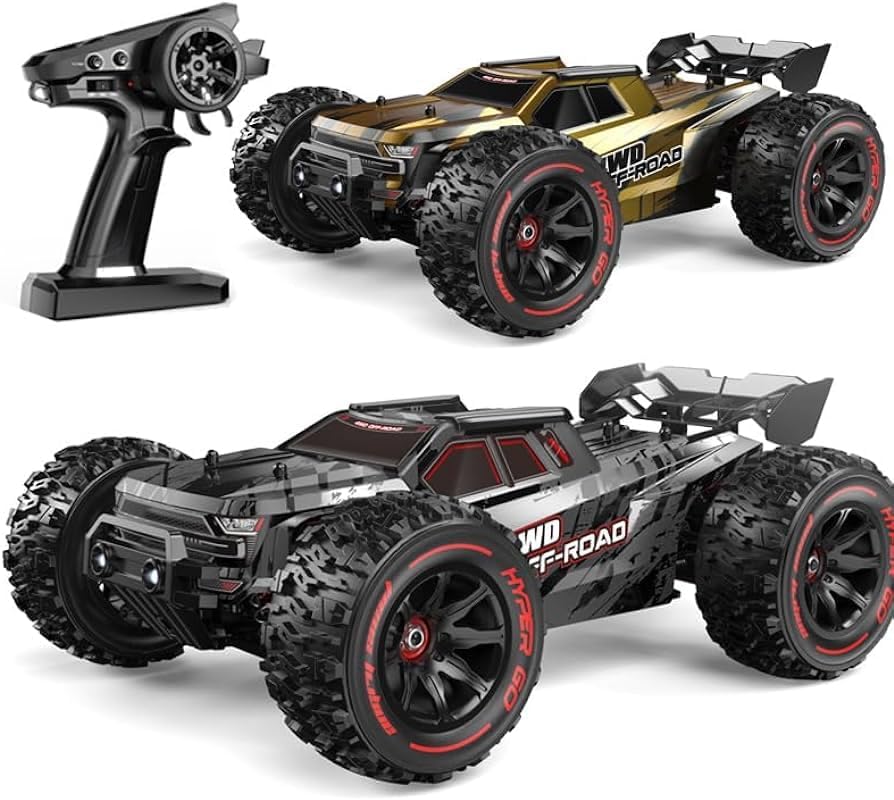
Image: The MJX Hyper Go 14210 RC car showcasing its two interchangeable body shells and the remote control.
-
Power On Sequence:
First, turn on the transmitter. Then, connect the charged LiPo battery to the RC car's ESC (Electronic Speed Controller). The car will emit a series of beeps, indicating it is binding with the transmitter. Once bound, the car is ready for operation.
Operating Instructions
The MJX Hyper Go 14210 is designed for high-speed off-road performance. Familiarize yourself with the controls before operating at full speed.
-
Throttle Control:
Pull the trigger on the transmitter to accelerate forward. Push the trigger forward to brake or reverse. The car can reach speeds up to 55km/h. For beginners, it is recommended to utilize the throttle limit function on the transmitter, setting it to 70% to gain better control.
-
Steering Control:
Turn the steering wheel on the transmitter left or right to control the direction of the car. Adjust the ST/TH Trim dials on the transmitter to fine-tune steering and throttle neutral positions if needed.
-
Terrain Performance:
The car is equipped with versatile multi-terrain airless tires for various surfaces. For optimal traction on snow, sand, or mud, install the extra paddle tires provided. The robust 4WD system ensures excellent grip and stability.

Image: The MJX Hyper Go 14210 in action on an off-road surface, demonstrating its LED headlights and the two types of tires (all-terrain and paddle) it can use.
-
High-Speed Stability:
Oil-filled shocks and pre-mounted sponge-inserted tires are designed to minimize shaking and improve stability, especially at high speeds. This allows for smoother handling across uneven terrain.
Maintenance
Regular maintenance will extend the lifespan and performance of your MJX Hyper Go 14210 RC car.
-
Cleaning:
After each use, especially in dirty or wet conditions, clean the car thoroughly. Use a soft brush or compressed air to remove dirt and debris from the chassis, suspension, and drivetrain. Avoid using water directly on electronic components.
-
Component Inspection:
Periodically inspect all moving parts for wear and tear. Check the steel differential outdrives, metal gearbox internals, and aluminum alloy chassis for any damage. Ensure all screws are tight.

Image: Detailed view of the internal drivetrain components, highlighting the durable chromium steel and powder metallurgy gears.

Image: Key metal components contributing to the car's rugged durability, including metal CVD shafts, bearings, the metal chassis, and the metal support rod.
-
Shock Absorbers:
Check the oil-filled shocks for leaks or damage. If performance degrades, the shock oil may need to be replaced or refilled according to advanced maintenance guides.

Image: The metal oil-filled shocks, crucial for absorbing impacts and maintaining stability during high-speed operation.
-
Electronic Components:
Ensure the brushless ESC, Hobby 2852 4400KV brushless motor, 2.2KG servo, and waterproof receiver box are free from dirt and moisture. While the receiver box is waterproof, avoid submerging the entire vehicle.

Image: Key electronic components: the brushless ESC (compatible with 3s batteries), the powerful brushless 2852 motor, the 2.2KG servo, and the waterproof receiver box.
Troubleshooting
This section addresses common issues you might encounter with your MJX Hyper Go 14210 RC car.
| Problem | Possible Cause | Solution |
|---|---|---|
| Car does not respond to transmitter. | Low battery in car or transmitter; binding issue; power switch off. | Ensure car and transmitter batteries are fully charged. Re-bind the car and transmitter (refer to Setup Guide). Check power switches are ON. |
| Reduced speed or power. | Low car battery; motor or ESC overheating; debris in drivetrain. | Recharge car battery. Allow motor/ESC to cool down. Clean any debris from gears and axles. |
| Steering is erratic or unresponsive. | Servo damage; loose steering linkages; low transmitter battery. | Check servo connections and functionality. Inspect steering linkages for looseness or damage. Replace transmitter batteries. |
| Car makes unusual noises. | Damaged gears; debris in motor/drivetrain; loose components. | Inspect gears for damage and replace if necessary. Clean drivetrain. Tighten any loose screws. |
| Frequent breakage of parts (e.g., shocks). | Aggressive driving; impacts; material fatigue. | Consider driving at lower speeds (e.g., 70% throttle limit). Avoid severe impacts. Replace broken parts with genuine MJX or compatible aftermarket parts. |
For issues not covered here, please refer to the official MJX support resources or contact the seller.
Specifications
| Feature | Detail |
|---|---|
| Model Number | 14210 |
| Brand | MJX |
| Top Speed | Up to 55 km/h |
| Drive System | 4WD (Four-Wheel Drive) |
| Motor Type | Hobby 2852 4400KV Brushless Motor |
| Battery | 2S 2000mAh LiPo (included) |
| Transmitter | 2.4GHz 3-channel Radio (requires 4 AA batteries, included) |
| Chassis Material | Aluminum Alloy |
| Shock Absorbers | Oil-filled |
| Product Dimensions (L x W x H) | 320mm x 230mm x 124mm (13 x 9 x 6 inches) |
| Wheelbase | 188mm |
| Wheel Track | 198mm |
| Tire Diameter | 90mm |
| Item Weight | 5.57 pounds |
| Recommended Age | 6 years and up |
| Country of Origin | China |
Warranty and Support
For warranty information, technical support, or replacement parts, please contact the manufacturer, MJX, or the seller, SpeedyWheels, directly. Refer to your purchase documentation for specific warranty terms and contact details.
While this product is built for durability, aggressive use or impacts may lead to component wear or breakage. Replacement parts are generally available through authorized dealers or the manufacturer.
Consider purchasing extended protection plans for additional coverage, if available, to safeguard your investment beyond the standard manufacturer's warranty.
Related documents14210


Ask a question about this manual
Ask about setup, troubleshooting, compatibility, parts, safety, or missing instructions. Manuals+ will review the question and use this page’s manual context to help answer it.