1. Introduction
This manual provides essential information for the safe and efficient operation of your Unitek 160W 10-Port USB-C PD 60W Charging Station. Please read this manual thoroughly before use and retain it for future reference.
2. Product Features
- USB-C Power Delivery (PD): Supports up to 60W output for charging compatible USB-C laptops (e.g., MacBook Pro 13-inch 2015 or later), and 18W for iPhone PD charging, iPad PD, and FCP specification devices.
- Quick Charge 3.0 (QC 3.0): Charges compatible devices up to 80% in approximately 35 minutes, offering 4 times faster charging than conventional chargers. Compatible with QC 2.0/3.0 devices.
- 10-Port Charging: Simultaneously charges up to 10 USB-powered devices, including support for up to 9 iPads. Standard USB ports provide 5V/2.4A output.
- Certified Safety: UL listed, CE, FCC, and RoHS certified power adapter. Built-in protections against over-heating, over-charging, over-current, and power surges ensure device safety.
- Removable Dividers: Adjustable dividers allow customization of slot width to accommodate various devices (e.g., Nintendo Switch, phones, tablets) even with protective cases, preventing scratches and maintaining organization.

Figure 2.1: Overview of the charging station's ports and their respective power outputs, highlighting the 160W total power. This image displays the various USB-A and USB-C ports, along with their wattage capabilities, such as 12W for 8 USB-A ports, 18W for 1 QC 3.0 USB-A port, and 60W for 1 USB-C port.
3. Package Contents
Verify that all items are present in the package:
- 1 x 10-Port USB Charging Station
- 11 x Detachable Dividers (5 tall, 6 short)
- 1 x 20V/8A DC Power Adapter
- 1 x Power Cord
- 1 x User Manual
4. Setup
- Connect Power: Plug the 20V/8A DC Power Adapter into the charging station's power input port. Then, connect the power cord to the adapter and a standard 100-240V AC power outlet.
- Install Dividers: Insert the detachable dividers into the desired slots on the charging station. Ensure each divider is pushed down firmly until it is snug to prevent it from popping out. Adjust spacing to match the thickness of your devices.
- Power On: Locate the power switch on the charging station and turn it to the 'On' position. The indicator light should illuminate.

Figure 4.1: The Unitek 160W 10-Port Charging Station shown with various smartphones and tablets placed in its adjustable slots, all connected via charging cables. The image demonstrates the organized charging of multiple devices simultaneously.
5. Operating Instructions
- Connect Devices: Use appropriate USB charging cables (not included) to connect your devices to the corresponding ports on the charging station.
- USB-C PD Ports: For laptops, tablets, and smartphones that support USB Power Delivery, use the USB-C PD ports. The 60W PD port is ideal for compatible laptops like the MacBook Pro.
- QC 3.0 Port: For Quick Charge compatible devices, use the QC 3.0 USB-A port for rapid charging.
- Standard USB-A Ports: Use the standard 5V/2.4A USB-A ports for other USB-powered devices such as smartphones, tablets, e-readers, and wearables.
- Placement: Place devices vertically in the slots between the dividers. Ensure the weight of the devices is supported by the charging station base, not solely by the dividers.
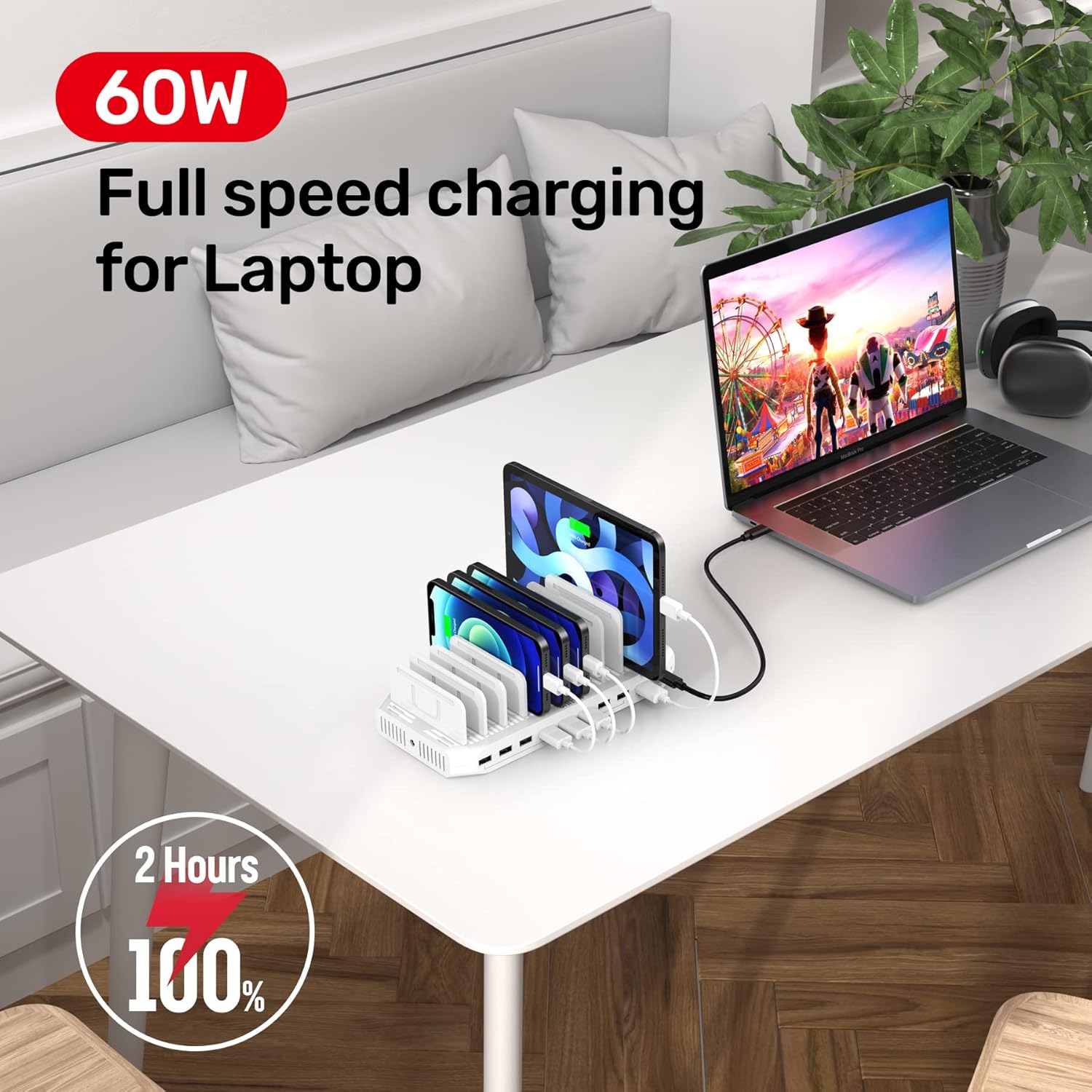
Figure 5.1: The charging station is shown on a desk, actively charging a laptop via its 60W USB-C PD port, alongside several smartphones and tablets. This illustrates the station's capability to handle various devices simultaneously, including high-power demanding ones.
6. Safety Information
- Ensure dividers are inserted firmly into slots. Loose dividers may cause devices to fall.
- The charging station is designed for tablets and smartphones up to 11 inches. Do not place laptops directly on the dividers; they should be placed in a manner where their weight is fully supported by the desk or surface.
- Avoid exposing the device to water or excessive moisture.
- Do not disassemble or attempt to repair the charging station. Contact customer service for assistance.
- Keep out of reach of children.

Figure 6.1: This image illustrates the superior charging safety features of the Unitek 160W 10-Port Charging Station, including short-circuit protection, overvoltage protection, overcurrent protection, overheat protection, Quick Charge 3.0, and PD 4.0 Agreement compliance.
7. Specifications
| Feature | Specification |
|---|---|
| Product Dimensions | 9.4 x 4.6 x 0.98 inches |
| Item Weight | 2.7 pounds |
| Model Number | FJ-SW202820008000 |
| Input Voltage | 160 Volts |
| Amperage | 2.4 Amps (per standard USB-A port) |
| Total USB Ports | 10 |
| USB-C PD Output | Up to 60W (20V/3A) |
| QC 3.0 Output | Up to 18W (Quick Charge 3.0) |
| Standard USB-A Output | 5V/2.4A |
| Compatible Devices | MacBook/MBP 13-in (2015+), iPad Pro, HP Spectre/XPS/Latitude, Nintendo Switch, iPhone (XS, XR, X, 8, 7, 6, 5), Samsung Galaxy (S8, S7, S6, S5, Note 5, Tab), Google Pixel, Nexus, LG, HTC, Sony, Motorola, Kindle, Fitbit, Apple Watch, PS4/PS3 Remote, Qi wireless pads, and other USB-based/Quick Charge devices. |
8. Maintenance
- Cleaning: Disconnect the power adapter before cleaning. Use a soft, dry cloth to wipe the surface of the charging station. Avoid liquid cleaners or abrasive materials.
- Storage: Store the charging station in a cool, dry place when not in use.
- Cable Management: Consider using short charging cables to minimize clutter and maintain an organized charging area.
9. Troubleshooting
- Device Not Charging:
- Ensure the power adapter is securely connected to both the charging station and the wall outlet.
- Verify the power switch is in the 'On' position.
- Check if the charging cable is properly connected to both the device and the charging station port.
- Try a different charging cable or port to rule out a faulty cable or port.
- Confirm your device is compatible with the selected charging port (e.g., USB-C PD for laptops, QC 3.0 for fast-charge phones).
- Slow Charging:
- Ensure you are using the correct port for your device's fast charging capabilities (e.g., USB-C PD or QC 3.0).
- Using multiple high-power devices simultaneously may distribute the total wattage, potentially slowing down individual charging speeds.
- Check the quality of your charging cable; low-quality cables can impede charging speed.
- Dividers Popping Out:
- Ensure the dividers are fully inserted and pushed down firmly into their slots.
- Adjust the spacing of the dividers to closely match the thickness of your device to provide better stability.
10. Warranty and Support
Unitek provides customer service and email support. For any issues or inquiries, please refer to the contact information provided with your product or visit the official Unitek website.
This product is covered by standard warranty terms. Please retain your proof of purchase for warranty claims.


