1. Introduction
Thank you for choosing the Vipack DEHSZ6014 Denver Bed Desk. This innovative furniture piece combines a comfortable bed with a functional desk, designed to optimize space in any room. This manual provides essential information for the safe assembly, operation, and maintenance of your new bed desk. Please read all instructions carefully before beginning assembly and retain this manual for future reference.
2. Safety Information
- Assembly: This product requires assembly. Ensure all parts are present and undamaged before starting. Follow the assembly instructions precisely. Incorrect assembly can lead to instability and injury.
- Weight Limit: The maximum recommended weight for the bed is 75 kg (165 lbs). Do not exceed this limit.
- Stability: Ensure the bed desk is placed on a flat, stable surface. Periodically check all fasteners and tighten them as necessary to maintain stability.
- Children: Supervise children around the bed desk, especially during transitions between bed and desk modes. Keep small parts away from young children.
- Ventilation: Ensure adequate ventilation around the product.
- Flammable Materials: Keep flammable materials away from the bed desk.
3. Package Contents
Before assembly, verify that all components listed in the separate assembly guide (not included in this manual) are present and undamaged. Typically, the package includes:
- Particle board panels for bed frame and desk structure
- Desk mechanism components
- Hardware pack (screws, dowels, cam locks, etc.)
- Assembly tools (often an Allen key, screwdriver may be required)
- Instruction manual (this document)
If any parts are missing or damaged, do not proceed with assembly. Contact Vipack customer support for assistance.
4. Setup and Assembly
Assembly of the Vipack DEHSZ6014 Denver Bed Desk requires two adults. Please follow the detailed step-by-step instructions provided in the separate assembly booklet that came with your product. Ensure you have sufficient space for assembly and that all tools are readily available.
- Unpack Components: Carefully unpack all components and lay them out on a clean, soft surface to prevent scratches. Verify against the parts list.
- Assemble Bed Frame: Begin by assembling the main bed frame structure according to the provided diagrams. Ensure all connections are secure.
- Install Desk Mechanism: Attach the desk mechanism to the bed frame. Pay close attention to the orientation of moving parts to ensure smooth operation.
- Attach Desk Surface: Secure the desk surface to the mechanism. Test the movement to ensure it transitions smoothly between bed and desk positions.
- Final Checks: Once assembled, double-check all screws, bolts, and fasteners to ensure they are tight. Do not overtighten.
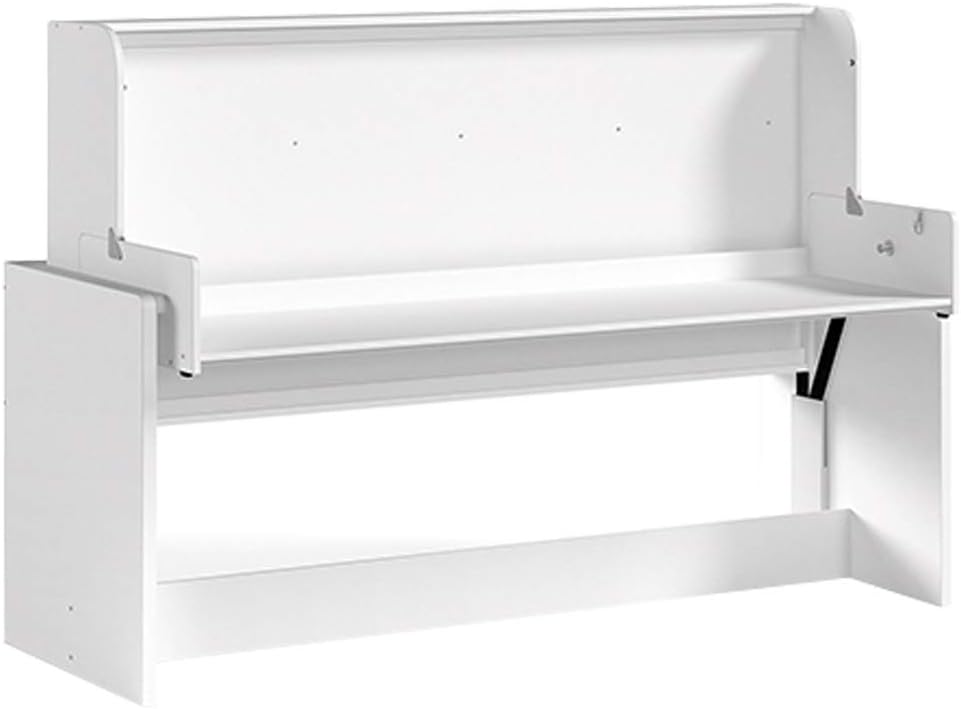
Image: The internal mechanism of the Vipack DEHSZ6014 Denver Bed Desk, showing the desk surface folded upwards, ready to be lowered for use. This view highlights the structural components and hinges involved in the transformation.
5. Operating Instructions
The Vipack DEHSZ6014 Denver Bed Desk is designed for easy transformation between a bed and a desk. Always ensure the area around the furniture is clear before transitioning.
5.1. Using as a Bed
When in bed mode, the desk surface is retracted, providing a full bed sleeping area. Ensure the desk is fully retracted and secured before using the bed.

Image: The Vipack DEHSZ6014 Denver Bed Desk configured as a bed, with a person comfortably seated. The desk component is fully retracted underneath, providing a clear and spacious sleeping area.
5.2. Using as a Desk
To transform the unit into a desk:
- Clear any items from the bed surface.
- Gently pull the desk surface outwards and downwards from its stored position.
- Ensure the desk is fully extended and locked into place before placing items on it or using it.
- The desk provides a stable work surface for studying, working, or other activities.

Image: The Vipack DEHSZ6014 Denver Bed Desk transformed into a functional desk, with a person using a laptop. The bed mattress is stored beneath the desk, and the desk surface is extended, providing ample workspace.
6. Maintenance and Care
- Cleaning: Wipe surfaces with a soft, damp cloth. Avoid abrasive cleaners or harsh chemicals, as these can damage the lacquered finish.
- Inspections: Periodically inspect all screws, bolts, and connections. Tighten any loose fasteners to ensure the structural integrity and safety of the bed desk.
- Moving: When moving the bed desk, lift it rather than dragging it to prevent damage to the frame and floor.
- Sunlight: Avoid prolonged exposure to direct sunlight to prevent fading or discoloration of the finish.
7. Troubleshooting
| Problem | Possible Cause | Solution |
|---|---|---|
| Desk mechanism is stiff or difficult to move. |
|
|
| Bed desk feels unstable or wobbly. |
|
|
| Parts are missing or damaged upon arrival. |
|
|
8. Specifications
| Model Number | DEHSZ6014 |
| Brand | Vipack |
| Product Dimensions (L x W x H) | 2.17 m x 1.1 m x 1.47 m (85.4 in x 43.3 in x 57.9 in) |
| Color | White |
| Finish Type | Lacquered |
| Material | Particle Board |
| Maximum Weight Recommendation (Bed) | 75 kg (165 lbs) |
| Item Weight | 129 kg (284.4 lbs) |
| Assembly Required | Yes |
9. Warranty and Support
Vipack products are manufactured to high-quality standards. For information regarding warranty coverage, please refer to the warranty card included with your purchase or visit the official Vipack website. For technical support, replacement parts, or any other inquiries, please contact your retailer or Vipack customer service directly. Have your model number (DEHSZ6014) and proof of purchase ready when contacting support.
Manufacturer: VIPACK


