
1. Product Overview
The Fastrack Analog-Digital Watch 38034NP01 is a versatile timepiece featuring both analog hands and a digital display. It is powered by a reliable Quartz movement and includes functions such as a second hand and a timer. Designed for durability, it features a stainless steel case, mineral glass crystal, and a comfortable rubber strap. This watch is water-resistant up to 50 meters.
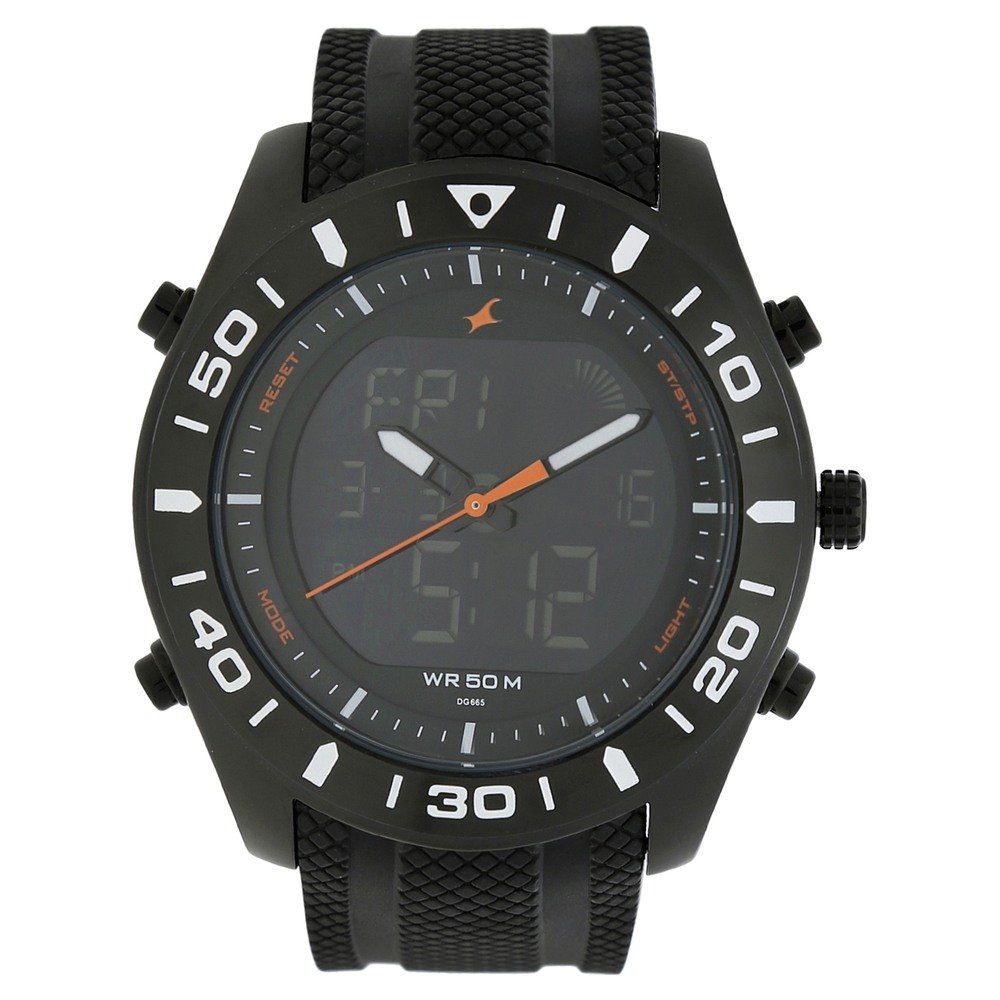
Figure 1: Front view of the Fastrack Analog-Digital Watch 38034NP01, showcasing the black dial with both analog and digital displays.
2. Initial Setup
2.1 Starting the Watch
To activate your watch, locate the plastic stopper near the crown (the knob on the side of the watch). Gently pull out and remove this plastic piece. The watch should then begin to operate.
2.2 Setting Analog Time
- Pull the crown out to the first or second click position (refer to specific model instructions if available, otherwise assume standard watch crown operation).
- Rotate the crown to adjust the hour and minute hands to the correct time.
- Push the crown back into its normal position to start the analog movement.
2.3 Adjusting the Strap
The watch features a rubber strap with a buckle clasp. Adjust the strap by inserting the buckle pin into the desired hole on the strap for a comfortable and secure fit on your wrist.

Figure 2: Side view of the watch, showing the crown and function buttons used for setting time and operating digital features.
3. Operating Instructions
Your Fastrack watch combines traditional analog timekeeping with modern digital functions. Familiarize yourself with the buttons on the side of the watch for digital display control.
3.1 Digital Time Display
The digital display shows time in a 12-hour or 24-hour format, along with date information. Use the MODE button to cycle through different digital display modes such as time, date, and timer.
3.2 Using the Timer Function
- Press the MODE button until the timer function is displayed.
- Press the START/STOP button (often the top right button) to begin the timer.
- Press the START/STOP button again to pause or stop the timer.
- Press the RESET button (often the bottom right button) to clear the timer.
3.3 Water Resistance
This watch is water-resistant up to 50 meters (5 ATM). This means it is suitable for everyday use and can withstand splashes, rain, and brief immersion in water. It is not suitable for swimming, diving, or showering with hot water, as steam and pressure changes can compromise the seals.
4. Care and Maintenance
4.1 Cleaning Your Watch
- Wipe the watch case and strap regularly with a soft, dry cloth to remove dust and dirt.
- For stubborn dirt, use a slightly damp cloth and mild soap, then wipe dry immediately.
- Avoid using harsh chemicals, solvents, or abrasive cleaners, as these can damage the watch's finish or rubber strap.
4.2 Battery Replacement
When the watch stops or the digital display fades, the battery may need replacement. It is recommended to have the battery replaced by an authorized service center to ensure proper sealing and maintain water resistance.
4.3 Water Resistance Care
- Ensure the crown is fully pushed in before any contact with water.
- Do not operate buttons while the watch is submerged in water.
- Avoid exposing the watch to extreme temperature changes, which can affect the water-resistant seals.

Figure 3: Back view of the watch, showing the stainless steel case back where battery replacement is performed.
5. Troubleshooting
| Problem | Possible Cause | Solution |
|---|---|---|
| Watch not running (Analog) | Plastic stopper still in crown, or depleted battery. | Remove plastic stopper. If still not running, replace battery at an authorized service center. |
| Digital display is blank or dim | Depleted battery. | Replace battery at an authorized service center. |
| Incorrect time displayed (Analog) | Crown not pushed in fully after setting, or accidental adjustment. | Reset the analog time as per Section 2.2. Ensure crown is fully pushed in. |
| Water inside the watch | Crown not fully pushed in, buttons operated underwater, or seals compromised. | Immediately take the watch to an authorized service center for inspection and repair to prevent further damage. |
6. Product Specifications
- Model Name: 38034NP01
- Display Type: Analog-Digital
- Movement Type: Quartz
- Special Features: Second Hand, Timer
- Power Source: Battery Powered
- Water Resistance Depth: 50 Metres (5 ATM)
- Band Material: Rubber
- Band Color: Black
- Dial Color: Black
- Case Material: Stainless Steel
- Crystal Material: Mineral Glass
- Case Diameter: 46.2 Millimetres
- Case Thickness: 15.3 Millimetres
- Band Width: 22 Millimetres
- Band Length: 25 Centimetres
- Clasp Type: Buckle
- Item Weight: 198.55 Grams
- Manufacturer: Fastrack (Titan Company Limited)
- Country of Origin: India
7. Warranty and Support
7.1 Manufacturer's Warranty
This Fastrack watch comes with a 24 Months Manufacturer Warranty from the date of purchase. The warranty covers manufacturing defects in materials and workmanship under normal use. It does not cover damage resulting from improper handling, accidents, unauthorized repairs, or normal wear and tear.
7.2 Customer Support
For warranty claims, service, or technical assistance, please contact Fastrack customer support or visit an authorized Fastrack service center. You may also refer to the official Fastrack website for more information.
- Manufacturer: Titan Company Limited
- Contact Information: Sipcot Industrial Complex, Hosur, Tamil Nadu - 635129, India
- Fastrack Store Link: Visit the Fastrack Store on Amazon.in