1. Introduction
Thank you for choosing the Airdog X5 Air Purifier. This manual provides essential information for the safe and efficient operation, maintenance, and troubleshooting of your device. The Airdog X5 is designed to provide superior air purification using its patented TPA technology, offering a healthier indoor environment by effectively removing airborne pollutants.
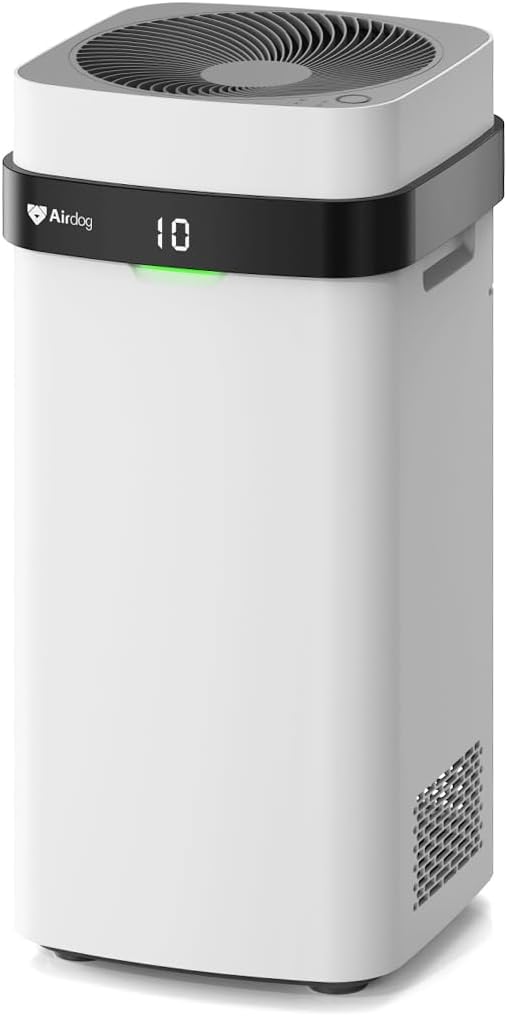
Figure 1.1: Airdog X5 Air Purifier
2. Product Features
-
Medical Grade Active Purification: The X5 utilizes a high-pressure ion air filter (TPA technology) to terminate harmful particles, rather than just collecting them. It filters 99.9% of particles down to 0.0146µm, significantly more effective than traditional HEPA filters.

Figure 2.1: TPA Technology Components
-
Patented Washable Filter: The durable, recyclable graphene filter is washable and reusable, eliminating the need for costly filter replacements and reducing waste.

Figure 2.2: Washable and Reusable Filter
-
Larger Purification Coverage: Designed with 360° air circulation, the X5 can purify a 1614 sq ft room per hour (CADR: 200 CFM/340m³/h), effectively clearing dust, pet dander, pollen, allergens, smoke, odors, and more.

Figure 2.3: Air Circulation in a Large Room
-
Real-time Air Quality Monitoring: A built-in sensor displays real-time Air Quality Index (AQI) via an indicator light. The Auto Mode adjusts fan speed based on the measured AQI for optimal efficiency.
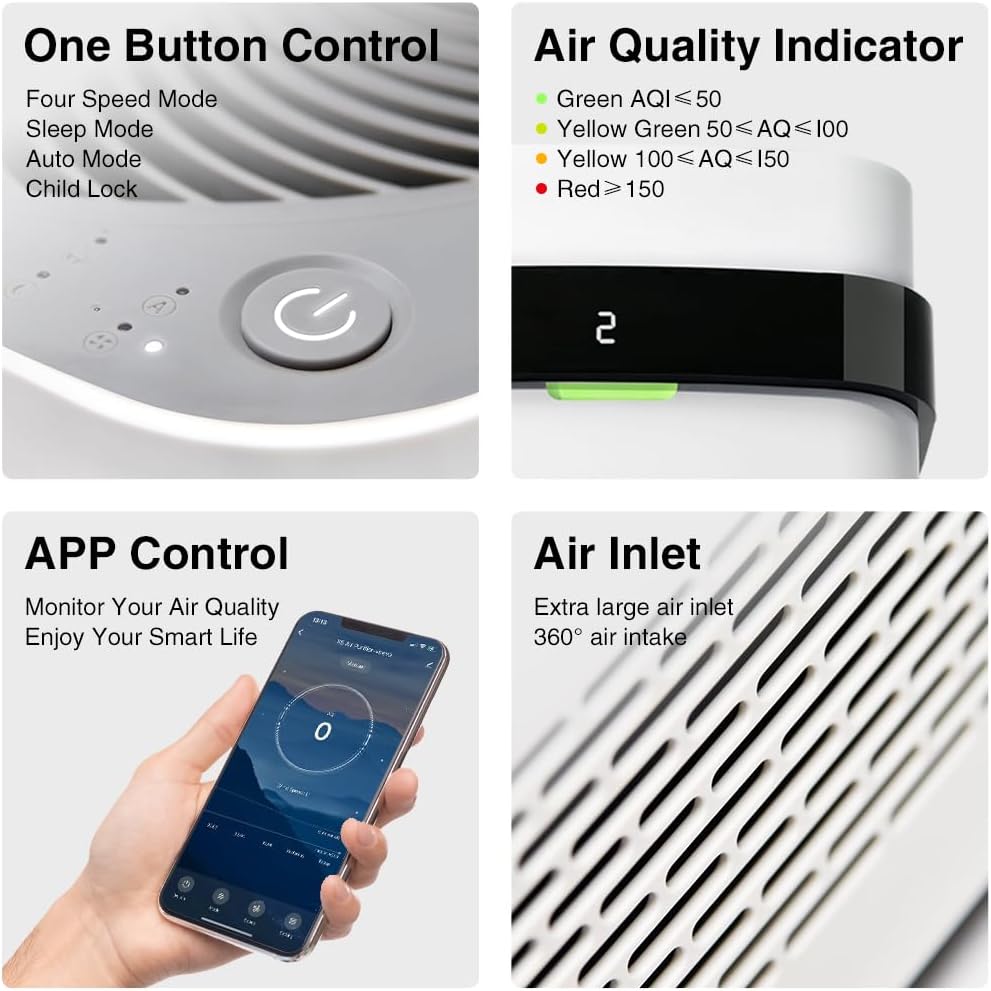
Figure 2.4: Control Panel and Air Quality Indicator
-
Whisper-Quiet Operation: The X5 operates with minimal noise, reaching only 22dB in Sleep Mode, ensuring undisturbed rest.

Figure 2.5: Quiet Operation in Sleep Mode
3. Setup
- Unboxing: Carefully remove the air purifier and all packaging materials from the box. Retain packaging for future transport or storage.
- Placement: Place the Airdog X5 on a flat, stable surface in the desired room. Ensure there is adequate space around the unit (at least 8 inches) for optimal air intake and circulation.
- Filter Preparation: The TPA filter components are pre-installed. Before first use, ensure all internal packaging materials or protective films are removed from the collecting plates and other filter elements. Refer to the quick start guide sticker on the unit for specific instructions.
- Power Connection: Plug the power cord into a standard electrical outlet. The unit will enter standby mode.
4. Operating Instructions
- Power On/Off: Press the power button on the top panel to turn the unit on or off. The display will illuminate, showing the current AQI.
- Fan Speed Adjustment: The Airdog X5 supports four purification speeds. Press the fan speed button to cycle through the available settings (Low, Medium, High, Turbo).
- Auto Mode: Press the 'Auto' button to activate Auto Mode. In this mode, the purifier automatically adjusts its fan speed based on the detected air quality, optimizing purification efficiency and energy consumption.
- Sleep Mode: Press the 'Sleep' button to enter Sleep Mode. The fan speed will reduce to its lowest setting (22dB), and the display lights will dim or turn off for undisturbed sleep.
-
Air Quality Indicator (AQI): The indicator light on the unit changes color to reflect the real-time air quality:
- Green: AQI ≤ 50 (Good Air Quality)
- Yellow Green: 50 < AQI ≤ 100 (Moderate Air Quality)
- Yellow: 100 < AQI ≤ 150 (Unhealthy for Sensitive Groups)
- Red: AQI > 150 (Unhealthy Air Quality)
- Child Lock: Activate the child lock feature to prevent accidental changes to settings. Refer to the specific button combination in the full user manual for activation/deactivation.
- APP Control: The Airdog X5 can be controlled via a mobile application. Download the official Airdog app from your device's app store and follow the in-app instructions for pairing and control.
5. Maintenance
Regular cleaning of the washable TPA filter is crucial for maintaining optimal performance and air quality. Unlike traditional HEPA filters, the Airdog X5's filter does not require replacement.
Cleaning the TPA Filter:
- Power Off and Unplug: Always turn off the air purifier and unplug it from the power outlet before performing any maintenance.
- Remove Filter Components: Carefully open the filter compartment and remove the collecting plates and other washable filter components. Refer to your full user manual for detailed instructions on component removal.
- Wash: Rinse the collecting plates and other washable components under running water. For stubborn dirt, use a soft brush and mild detergent. Ensure all dust and debris are thoroughly removed.
- Dry: Allow all washed components to air dry completely before re-installing them. Ensure no moisture remains, as this can affect performance and potentially damage the unit.
- Re-install: Once completely dry, carefully re-install the filter components into the air purifier, ensuring they are correctly seated.
The frequency of cleaning depends on the air quality in your environment and usage. Generally, it is recommended to clean the filter components every 1-3 months, or when the air quality indicator suggests a decrease in performance.
6. Troubleshooting
If you encounter issues with your Airdog X5 Air Purifier, please refer to the following common troubleshooting steps:
| Problem | Possible Cause | Solution |
|---|---|---|
| Unit does not power on. | No power supply; power cord not properly connected. | Ensure the power cord is securely plugged into both the unit and a working electrical outlet. Check the power switch. |
| Poor air purification performance. | Dirty collecting plates; blocked air inlets/outlets. | Clean the collecting plates as described in the Maintenance section. Ensure air inlets and outlets are not obstructed. |
| Unusual noise during operation. | Improperly installed filter components; foreign object inside. | Ensure all filter components are correctly seated. Power off and unplug the unit, then carefully check for any foreign objects. |
| App connectivity issues. | Incorrect Wi-Fi settings; network interference. | Ensure your Wi-Fi network is 2.4GHz. Restart your router and the air purifier. Re-attempt the pairing process in the app. |
If the problem persists after attempting these solutions, please contact Airdog customer support for further assistance.
7. Specifications
| Feature | Detail |
|---|---|
| Brand | Airdog |
| Model Number | X5 |
| Color | White |
| Product Dimensions (D x W x H) | 12.2"D x 12.2"W x 25.6"H |
| Item Weight | 23.6 pounds |
| Floor Area Coverage | 1614 Square Feet (per hour) |
| Noise Level | 22 dB (Sleep Mode) |
| Particle Retention Size | 0.0146µm (TPA Technology) |
| Controller Type | Touch Panel |
8. Warranty and Support
For detailed warranty information, please refer to the official Airdog X5 User Manual PDF available for download or contact Airdog customer support directly. Keep your purchase receipt as proof of purchase for warranty claims.
For further assistance, technical support, or to inquire about replacement parts, please visit the Airdog official website or contact their customer service team. You can often find contact details in the full user manual or on the product's official support page.
Official User Manual (PDF): Download Here


