
1. Introduction
Thank you for purchasing the World Tech Toys Elite Rogue Drone 33777. This 2.4GHz 4.5 Channel RC Quadcopter is designed for both new and experienced pilots, offering a stable and maneuverable flight experience. Its durable polymer body and internal gyro ensure smooth operation. This manual provides essential information for safe setup, operation, maintenance, and troubleshooting.
Package Contents:
- World Tech Toys Elite Rogue 2.4GHz 4.5Ch RC Drone
- 2.4GHz Transmitter (Remote Control)
- Four Rotor Guards
- USB Charger
- Two Spare Rotor Blades
- 3.7V 380mAh Rechargeable Lithium Battery (for drone)
2. Safety Guidelines
Always prioritize safety when operating the drone. Failure to follow these guidelines may result in injury or damage to property.
- Age Recommendation: This product is recommended for users 12 years and up.
- Flight Environment: Fly in open, clear areas away from people, animals, buildings, trees, power lines, and water. Do not fly indoors unless sufficient space is available and hazards are cleared.
- Weather Conditions: Do not fly in strong winds, rain, snow, or other adverse weather conditions.
- Line of Sight: Always maintain visual line of sight with the drone during flight.
- Battery Safety: Use only the provided charger and battery. Do not overcharge or short-circuit batteries. Do not leave charging batteries unattended.
- Rotor Blades: Keep fingers, hair, and loose clothing away from rotating rotor blades. They can cause injury.
- Interference: Ensure no other 2.4GHz devices are operating nearby that could cause interference.
- Pre-Flight Check: Before each flight, inspect the drone for any damage, especially to the rotor blades and guards.
3. Components Overview
Familiarize yourself with the main components of your Elite Rogue Drone and its transmitter.
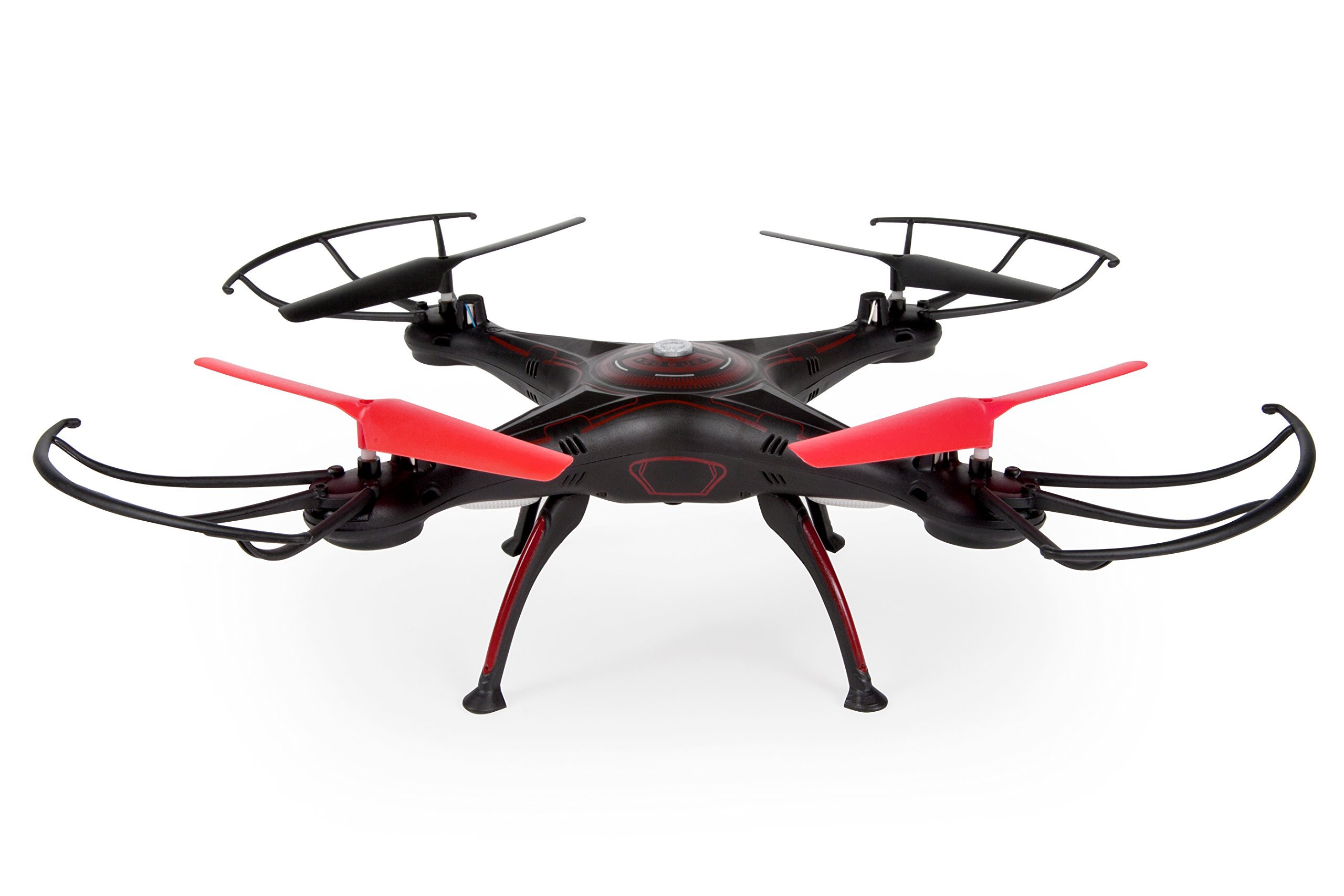
Image: The World Tech Toys Elite Rogue Drone 33777, showcasing its black and red design with rotor guards installed. This image provides a visual reference for the drone's overall appearance and key components.
Drone Components:
- Rotor Blades: Four main blades for lift and propulsion.
- Motors: Drive the rotor blades.
- Rotor Guards: Optional protective frames around the blades.
- Battery Compartment: Houses the rechargeable drone battery.
- LED Lights: Indicate drone status and orientation.
- Power Switch: Turns the drone on/off.
Transmitter (Remote Control) Components:
- Left Stick (Throttle/Yaw): Controls altitude (up/down) and rotation (left/right).
- Right Stick (Directional): Controls forward/backward and left/right strafing movement.
- Trim Buttons: Fine-tune drone stability.
- Speed Mode Button: Cycles through 3 speed modes.
- Flip Stunt Button: Initiates 360-degree flips.
- Power Switch: Turns the transmitter on/off.
- Battery Compartment: Houses AA batteries.
4. Setup
4.1. Drone Battery Installation and Charging
- Locate the battery compartment on the drone.
- Carefully insert the 3.7V 380mAh rechargeable Lithium battery into the compartment. Ensure the connector is securely plugged into the drone's power port.
- Close the battery compartment cover.
- To charge, connect the drone battery to the included USB charger.
- Plug the USB charger into a USB power source (e.g., computer USB port, USB wall adapter).
- The charging indicator on the USB charger will show the charging status (refer to charger instructions for specific light indications).
- Once fully charged, disconnect the battery from the charger. Do not overcharge.
4.2. Transmitter Battery Installation
- Open the battery compartment on the back of the 2.4GHz transmitter.
- Insert 4 new AA batteries (not included), ensuring correct polarity (+/-).
- Close the battery compartment cover securely.
4.3. Attaching Rotor Guards (Optional)
For added protection, especially during initial flights, you can attach the included rotor guards.
- Align each rotor guard with the corresponding arm of the drone.
- Gently snap or slide the guards into place until they are secure.
5. Operating Instructions
5.1. Pairing the Drone and Transmitter
- Place the drone on a flat, level surface.
- Turn on the drone's power switch. The drone's LED lights will flash.
- Turn on the transmitter's power switch.
- Push the left stick (throttle) all the way up, then pull it all the way down.
- The drone's LED lights will stop flashing and become solid, indicating successful pairing.
5.2. Basic Flight Controls
- Take-off: After pairing, you can either gently push the left stick up to take off, or use the 'Launch/Toss Take Off' feature by gently tossing the drone into the air and immediately applying throttle.
- Altitude (Left Stick Up/Down): Push the left stick up to ascend, pull down to descend.
- Yaw (Left Stick Left/Right): Push the left stick left or right to rotate the drone clockwise or counter-clockwise.
- Forward/Backward (Right Stick Up/Down): Push the right stick up to fly forward, pull down to fly backward.
- Strafing (Right Stick Left/Right): Push the right stick left to fly left, push right to fly right.
- Landing: Gently pull the left stick down until the drone lands. Once landed, pull the left stick all the way down and hold for a few seconds to stop the motors.
5.3. Flight Modes and Special Features
- 3 Speed Modes: Press the Speed Mode button on the transmitter to cycle through low, medium, and high-speed settings. Start with low speed for beginners.
- Easy Mode: This mode simplifies controls for new pilots, often by limiting speed and responsiveness. Refer to the transmitter diagram for the specific button.
- Flip Stunt Mode: To perform a 360-degree flip, press the Flip Stunt button. Then, quickly push the right directional stick in the desired flip direction (forward, backward, left, or right). Ensure sufficient altitude before attempting flips.
- Trim Adjustment: If the drone drifts in any direction when hovering, use the corresponding trim buttons on the transmitter to correct its flight path until it hovers stably.
6. Maintenance
Regular maintenance ensures the longevity and optimal performance of your drone.
6.1. Rotor Blade Replacement
If a rotor blade is damaged, it must be replaced to ensure stable flight. Use only genuine World Tech Toys spare parts.
- Turn off the drone's power.
- Carefully remove the damaged blade. Note the orientation and 'A' or 'B' marking on the blade.
- Install a new blade, ensuring it matches the original's 'A' or 'B' marking and orientation. Incorrect blade installation will prevent flight.
6.2. Cleaning
Use a soft, dry cloth to clean the drone. Do not use water or chemical cleaners, as they can damage electronic components.
6.3. Storage
When not in use, store the drone and transmitter in a cool, dry place away from direct sunlight. Remove batteries from the transmitter if storing for extended periods.
7. Troubleshooting
If you encounter issues with your drone, refer to the following common problems and solutions:
| Problem | Possible Cause | Solution |
|---|---|---|
| Drone does not respond to transmitter. | Not paired; low battery (drone/transmitter); power off. | Ensure drone and transmitter are on. Re-pair the drone. Charge drone battery. Replace transmitter batteries. |
| Drone drifts during flight. | Uneven surface at take-off; trim not adjusted; damaged rotor blade. | Ensure drone is on a level surface for take-off. Use trim buttons to adjust. Check and replace damaged rotor blades. |
| Drone cannot lift off or flies weakly. | Low drone battery; damaged rotor blades; incorrect blade installation. | Charge drone battery fully. Check and replace damaged rotor blades. Ensure 'A' and 'B' blades are in correct positions. |
| Loss of control/short range. | Interference; low transmitter battery. | Fly in an open area away from other 2.4GHz devices. Replace transmitter batteries. |
8. Specifications
| Feature | Detail |
|---|---|
| Model Number | 33777 |
| Brand | World Tech Toys |
| Model Name | Elite Rogue |
| Channels | 4.5 Channel |
| Frequency | 2.4GHz |
| Drone Battery | 3.7V 380mAh Rechargeable Lithium |
| Transmitter Battery | 4 x AA batteries (not included) |
| Body Material | Durable Polymer |
| Dimensions | 22.23 x 10.16 x 22.23 cm (approx. 8.75 x 4 x 8.75 inches) |
| Weight | 612 g (approx. 1.35 lbs) |
| Special Features | Built-in Gyro, 3 Speed Modes, Flip Stunt Mode, Easy Mode, Launch/Toss Take Off, Removable Rotor Guards |
| Video Capture Resolution | 480p (if equipped with camera) |
| Recommended Age | 12 years and up |
9. Warranty and Support
For warranty information and customer support, please refer to the official World Tech Toys website or contact their customer service directly. Keep your purchase receipt as proof of purchase.