
1. Introduction
This manual provides essential instructions for the safe and efficient operation of your SEVERIN MW 7893 2-in-1 Retro Microwave with Grill Function. Please read this manual thoroughly before using the appliance and keep it for future reference.
The SEVERIN MW 7893 combines microwave heating with a grill function, offering versatile cooking options. It features 5 power levels, 8 automatic cooking programs, and a defrost function. The digital display and quick start button enhance user convenience.

Image 1.1: Front view of the SEVERIN MW 7893 Retro Microwave Oven. This image displays the appliance's red and chrome exterior, the microwave door with a viewing window, and the control panel on the right side. A dish is visible inside the microwave.
2. Important Safety Instructions
When using electrical appliances, basic safety precautions should always be followed to reduce the risk of fire, electric shock, and injury to persons.
- Read all instructions before using the appliance.
- Ensure the voltage indicated on the rating label corresponds to your mains voltage.
- Do not operate the microwave if the door or door seals are damaged. Contact qualified service personnel.
- Do not heat liquids or other foods in sealed containers as they are liable to explode.
- Only use utensils suitable for microwave ovens.
- When heating food in plastic or paper containers, keep an eye on the oven due to the possibility of ignition.
- If smoke is observed, switch off or unplug the appliance and keep the door closed to stifle any flames.
- Do not overcook food.
- Clean the microwave regularly and remove any food deposits.
- Do not use harsh abrasive cleaners or sharp metal scrapers to clean the oven door glass since they can scratch the surface, which may result in shattering of the glass.
- This appliance is not intended for use by persons (including children) with reduced physical, sensory or mental capabilities, or lack of experience and knowledge, unless they have been given supervision or instruction concerning use of the appliance by a person responsible for their safety.
- Children should be supervised to ensure that they do not play with the appliance.
3. Components and Controls
Familiarize yourself with the various parts and controls of your SEVERIN MW 7893 microwave oven.
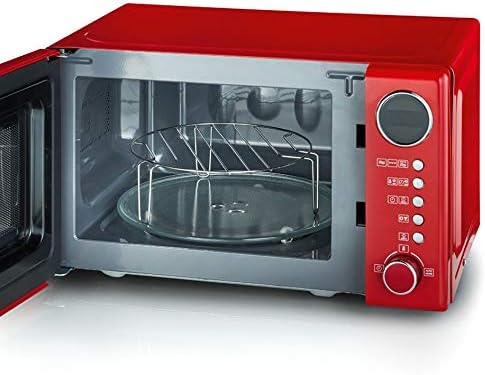
Image 3.1: Interior view of the SEVERIN MW 7893 microwave oven. This image shows the lacquered cooking chamber, the glass turntable, and the metal grill rack positioned on the turntable.
- Door: With viewing window and safety lock system.
- Cooking Chamber: Lacquered for easy cleaning.
- Glass Turntable: Ensures even cooking.
- Turntable Ring: Supports the glass turntable.
- Grill Rack: Used for grilling functions.
- Control Panel: Digital display, function buttons, and rotary knob.
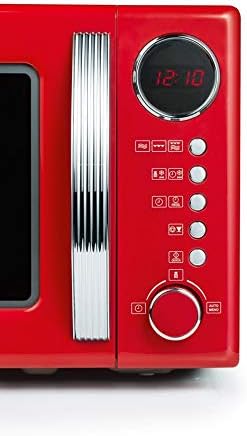
Image 3.2: Close-up of the SEVERIN MW 7893 control panel. This image highlights the digital display showing "12:10", various function buttons for microwave, grill, combination, defrost, and auto programs, and the central rotary knob for setting time and selecting options.
Control Panel Overview:
- Digital Display: Shows time, power level, and program settings.
- Function Buttons:
- Microwave Power (e.g., 100%, 80%, 60%, 40%, 20%)
- Grill Function
- Combination Cooking (Microwave + Grill)
- Defrost (by weight/time)
- Auto Programs (8 preset programs)
- Quick Start
- Rotary Knob: Used to adjust time, weight, or select automatic programs.
- Start/Pause Button: Initiates or pauses cooking.
- Stop/Clear Button: Stops cooking or clears settings.
4. Setup and Installation
4.1 Unpacking
Carefully remove the microwave oven and all packaging materials. Check the appliance for any damage. Do not operate if damaged. Remove any protective film from the exterior and interior surfaces.
4.2 Placement
- Place the microwave on a flat, stable surface strong enough to support its weight.
- Ensure adequate ventilation. Leave a minimum of 20 cm clearance above the oven, 10 cm at the rear, and 5 cm on each side.
- Do not block any ventilation openings.
- Keep the microwave away from heat sources, steam, or splashing liquids.
- Do not place the microwave near a radio or TV, as it may cause interference.
4.3 Electrical Connection
Plug the power cord into a grounded electrical outlet. Ensure the outlet specifications match the appliance's requirements (230V, 50Hz).
4.4 Initial Setup (Setting the Clock)
- When the microwave is first plugged in, the display will show "0:00".
- Press the "Clock" button (if available, otherwise refer to specific model instructions for clock setting).
- Rotate the rotary knob to set the hour. Press "Clock" again.
- Rotate the rotary knob to set the minutes. Press "Clock" again to confirm.
5. Operating Instructions
5.1 Microwave Cooking
- Place food in a microwave-safe container on the glass turntable.
- Close the door securely.
- Press the "Microwave" button repeatedly to select the desired power level (e.g., P100 for 100% power, P80 for 80% power).
- Rotate the rotary knob to set the cooking time.
- Press the "Start" button to begin cooking.
Quick Start Function:
Press the "Quick Start" button to immediately start cooking at full power for 30 seconds. Each subsequent press adds 30 seconds to the cooking time.
5.2 Grill Function
Use the grill function for browning and crisping food. Place food on the grill rack.
- Place food on the grill rack, which should be placed on the glass turntable.
- Close the door.
- Press the "Grill" button.
- Rotate the rotary knob to set the grilling time.
- Press the "Start" button.
5.3 Combination Cooking
The combination function allows simultaneous microwave and grill cooking for faster and more evenly cooked results.
- Place food in a suitable container on the grill rack/turntable.
- Close the door.
- Press the "Combi" button (e.g., C-1 for 55% microwave + 45% grill, C-2 for 36% microwave + 64% grill).
- Rotate the rotary knob to set the cooking time.
- Press the "Start" button.
5.4 Defrost Program
The defrost function allows defrosting food by weight or by time.
Defrost by Weight:
- Place frozen food in the microwave.
- Press the "Defrost by Weight" button.
- Rotate the rotary knob to select the food weight.
- Press the "Start" button.
Defrost by Time:
- Place frozen food in the microwave.
- Press the "Defrost by Time" button.
- Rotate the rotary knob to set the defrosting time.
- Press the "Start" button.
5.5 Automatic Programs
The microwave has 8 pre-set automatic programs for common food items.
- Place food in the microwave.
- Press the "Auto Menu" button repeatedly to select the desired program (e.g., P1 for Popcorn, P2 for Potato).
- Rotate the rotary knob to select the quantity/weight if prompted.
- Press the "Start" button.
6. Maintenance and Cleaning
Regular cleaning and maintenance will ensure the longevity and optimal performance of your microwave oven.
6.1 General Cleaning
- Always unplug the appliance from the power outlet before cleaning.
- Do not use abrasive cleaners, steel wool, or harsh chemicals, as these can damage surfaces.
- Wipe the exterior with a damp cloth and mild detergent. Dry thoroughly.
6.2 Interior Cleaning
- Clean the interior cavity after each use to prevent food residue from hardening.
- Wipe the interior with a soft, damp cloth and mild soap. For stubborn stains, place a bowl of water with lemon juice inside and microwave for a few minutes to loosen residue, then wipe clean.
- The glass turntable and turntable ring can be removed and washed in warm soapy water or a dishwasher. Ensure they are completely dry before placing them back in the oven.
- Clean the grill rack with warm soapy water.
6.3 Door and Door Seals
- Wipe the door, door seals, and adjacent parts frequently with a damp cloth to remove spills and splatters.
- Do not allow grease or food particles to build up on the door seals.
7. Troubleshooting
If you encounter problems with your microwave oven, refer to the following table for possible solutions. If the problem persists, contact customer support.
| Problem | Possible Cause | Solution |
|---|---|---|
| Oven will not start |
|
|
| Food not heating |
|
|
| Turntable not rotating |
|
|
| Light flickering or dimming |
|
|
8. Technical Specifications
| Model: | MW 7893 |
| Brand: | Severin |
| Capacity: | 20 litres |
| Microwave Power: | 700 W |
| Grill Power: | 1000 W |
| Voltage: | 230 V |
| Frequency: | 50 Hz |
| Product Dimensions (L x D x H): | 44.5 x 36 x 25.5 cm |
| Weight: | 10.77 kg |
| Material: | Stainless Steel (Inner), High Heat Resistant Varnish (Housing) |
| Color: | Red/Chrome |
| Included Components: | Microwave oven, glass turntable, turntable ring, grill rack, user manual |
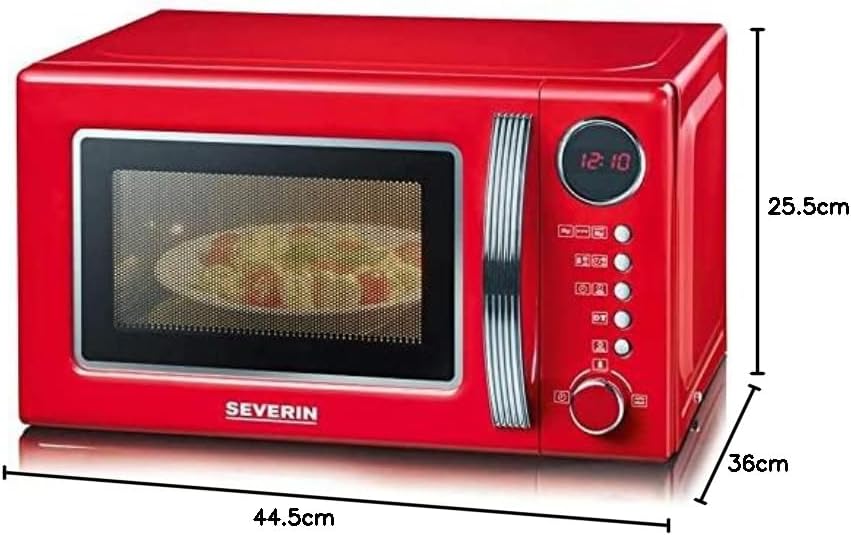
Image 8.1: SEVERIN MW 7893 microwave oven with key dimensions indicated. The image shows the length (44.5 cm), depth (36 cm), and height (25.5 cm) of the appliance.
9. Warranty and Customer Support
Your SEVERIN MW 7893 microwave oven comes with a manufacturer's warranty. Please refer to the warranty card included with your purchase for specific terms and conditions.
For technical assistance, spare parts, or warranty claims, please contact SEVERIN customer support. Contact details can typically be found on the official SEVERIN website or on your product's packaging.
Online Support: Visit the official Severin website for FAQs and support information.


