
1. Introduction
This user manual provides comprehensive instructions for the Smartby N2QAYB000485 replacement remote control. This remote is designed to function as a direct replacement for original Panasonic TV remotes, offering immediate usability without the need for complex programming. It is compatible with a wide range of Panasonic Plasma, Viera, LCD, and LED television models.
2. Product Overview
The Smartby N2QAYB000485 remote control features a standard layout for easy navigation and control of your Panasonic television. Below are images illustrating the remote's design and key buttons.

Figure 1: Front view of the Smartby N2QAYB000485 remote control, showing all buttons including Power, Input, Viera Tools, Menu, directional pad, volume, channel, number pad, and media playback controls.
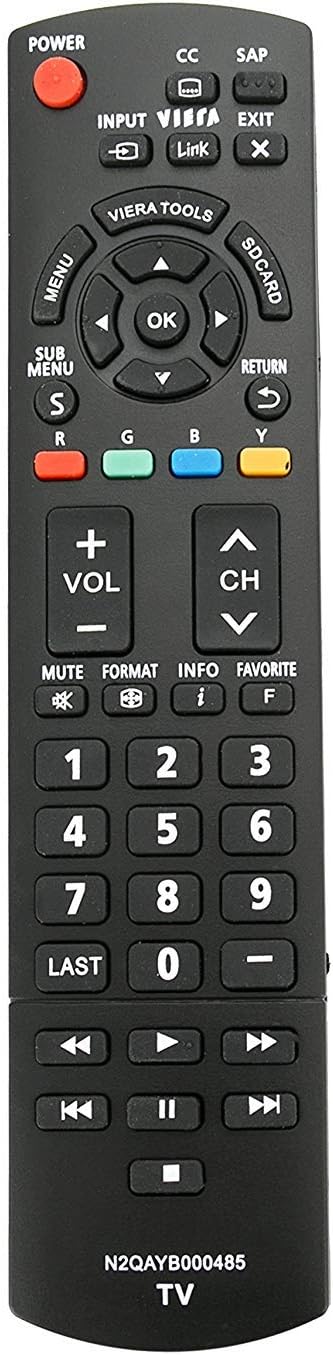
Figure 2: Side view of the Smartby N2QAYB000485 remote control, highlighting its ergonomic design and button profile.
3. Setup
The Smartby N2QAYB000485 remote control is designed for immediate use with compatible Panasonic televisions. No programming is required.
3.1. Battery Installation
- Locate the battery compartment cover on the back of the remote control.
- Slide the cover downwards or press the latch to open the compartment.
- Insert two AAA batteries (not included), ensuring the positive (+) and negative (-) terminals align correctly with the markings inside the compartment.
- Replace the battery compartment cover, ensuring it clicks securely into place.
Once batteries are installed, the remote is ready for operation.
4. Operating Instructions
This remote provides full functionality for your Panasonic TV. Key functions include:
- Power: Turns the TV on or off.
- Input: Selects video input sources (HDMI, AV, Component, etc.).
- Volume (+/-): Adjusts the sound level.
- Channel (CH ^/v): Changes TV channels.
- Mute: Silences the TV audio.
- Menu: Accesses the TV's main menu.
- Directional Pad (Up, Down, Left, Right, OK): Navigates through menus and confirms selections.
- Return: Goes back to the previous menu or screen.
- Exit: Closes the current menu or function.
- Number Pad (0-9): Directly enters channel numbers.
- Viera Tools: Accesses Panasonic's Viera Tools menu for smart features.
- Media Playback Controls: Includes Play, Pause, Stop, Fast Forward, Rewind, Next, and Previous track buttons for media playback.
5. Maintenance
5.1. Battery Replacement
When the remote control's performance degrades or it stops responding, replace the batteries with new ones. Always use fresh AAA batteries and ensure correct polarity during installation.
5.2. Cleaning
To clean the remote control, gently wipe its surface with a soft, dry cloth. Avoid using liquid cleaners or abrasive materials, as these can damage the remote's finish or internal components.
6. Troubleshooting
If the remote control does not function as expected, try the following troubleshooting steps:
- Check Batteries:
- Remove the batteries from the remote control.
- Press each button on the remote for approximately 3 seconds to drain any residual power. This also helps identify any stuck buttons.
- Insert new batteries, ensuring they are correctly installed with the positive (+) and negative (-) ends in the right direction.
- Reset the Television:
Sometimes, the issue may originate from the television itself. Perform a power cycle on your TV:
- Unplug the television from its power outlet.
- Locate and hold down the power button on the side or back of the TV for 15 seconds. This helps to drain any residual power from the TV's internal components.
- Plug the TV back into the power outlet and power it on.
- Line of Sight: Ensure there are no obstructions between the remote control and the TV's infrared sensor.
7. Compatible Panasonic TV Models
The Smartby N2QAYB000485 remote control is compatible with a wide range of Panasonic TV models, including but not limited to:
- TC-32LX24
- TC-42LD24
- TC-42LS24
- TC-42PX24
- TC-50PS24
- TC-50PX24
- TC-58PS24
- TC-65PS24
- TC-L22X2
- TC-L32C22
- TC-L32U22
- TC-L32X2
- TC-L37C22
- TC-L37D2
- TC-L37U22
- TC-L37X2
- TC-L42D2
- TC-L42U22
- TC-L42U25
- TC-P42C2
- TC-P42S2
- TC-P42U2
- TC-P46C2
- TC-P46S2
- TC-P50C2
- TC-P50S2
- TC-P50U2
- TC-P50X2
- TC-P54S2
- TC-P58S2
- TC-P65S2
- TC55DT50
- TCL42ET5
- TCL47DT50
- TCL47ET5
- TCL47WT50
- TCP50GT50
- TCP55GT50
- TCP55ST50
- TCP55VT50
- TCP60GT50
- TCP60ST50
- TCP65GT50
- TCP65ST50
- TCP65VT50
- TC-55LET64
- TC-L47ET60
- TC-L50ET60
- TC-L55ET60
- TC-P50ST60
- TC-P55ST60
- TC-P60ST60
- TC-P65ST60
- TC-L42ET60
- TC-39AS530U
- TC-50AS530U
- TC-50AS530UE
- TC-50ASU534
- TC-55AS530U
- TC-60AS530U
- TH37LRU50
- TH32LRU50
- TC50PS24
- TC58PS24
- TC65PS24
- TH32LRH30U
- TH32LRU5
- TH37LRU5
- TH37LRU30
- TH-42LRU20
- TH55LRU50
- TH42LRU50
- TH42LRU5
- TC-42PS14
- TC-54PS14
- TH-32LRU5
- TH-42LRU50
- TH-55LRU50
- TC-P50S30
This remote may also be compatible with other Panasonic models not listed. It replaces original remotes such as N2QAYB000321 and N2QAYB000570.
8. Specifications
| Feature | Detail |
|---|---|
| Brand | Smartby |
| Model Number | N2QAYB000485 |
| Compatible Devices | Panasonic Televisions (Plasma, Viera, LCD, LED) |
| Connectivity Technology | Infrared (IR) |
| Special Feature | Ergonomic design |
| Max Number of Supported Devices | 1 (Television) |
| Item Weight | 3.2 ounces |
| Package Dimensions | 8.19 x 2.09 x 0.91 inches |
9. Warranty and Support
For warranty information or further support regarding your Smartby N2QAYB000485 remote control, please refer to the seller's terms and conditions at the point of purchase. You may also visit the official Smartby store for additional product information and contact options: