
Introduction
Thank you for purchasing the ION Job Rocker Max. This wireless, all-weather, rugged 50-watt Bluetooth radio speaker is designed to provide high-quality audio and power outlets in various environments. This manual provides essential information for safe operation, setup, and maintenance of your device. Please read these instructions carefully before using the product.
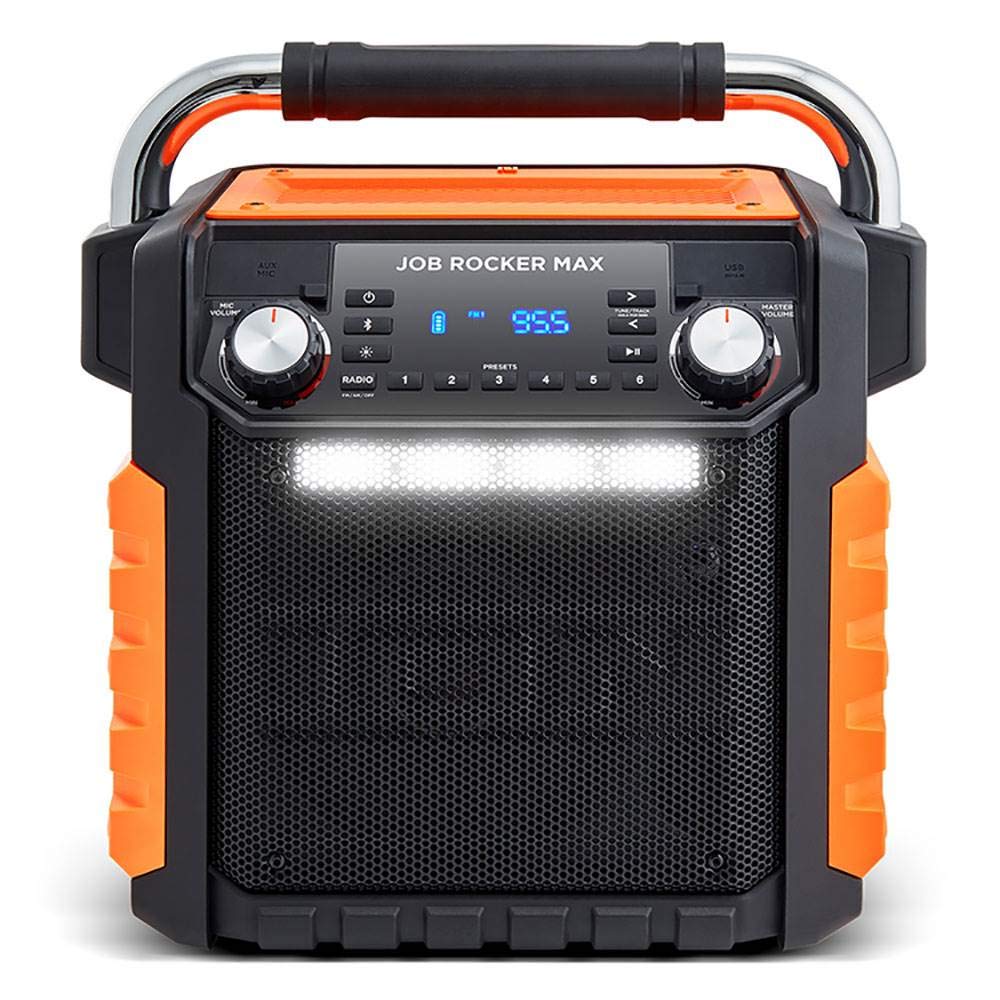
Image: Front view of the ION Job Rocker Max speaker, highlighting its robust design and central control panel.
Safety Information
- Water Resistance: The Job Rocker Max is IPX4 waterproof, meaning it is resistant to splashing water. Do not submerge the unit in water. Ensure all port covers are securely closed when exposed to moisture.
- Power Source: Use only the specified power adapter for charging. Do not use damaged power cords or adapters.
- Ventilation: Do not block any ventilation openings. Install in accordance with the manufacturer's instructions.
- Heat: Do not place near any heat sources such as radiators, heat registers, stoves, or other apparatus (including amplifiers) that produce heat.
- Cleaning: Clean only with a dry cloth. Avoid using harsh chemicals or solvents.
- Servicing: Refer all servicing to qualified service personnel. Servicing is required when the apparatus has been damaged in any way, such as power-supply cord or plug is damaged, liquid has been spilled or objects have fallen into the apparatus, the apparatus has been exposed to rain or moisture, does not operate normally, or has been dropped.
Package Contents
- Job Rocker Max Speaker
- Power Cable
- User Manual (this document)
Product Overview
Front Panel Controls

Image: Detailed view of the Job Rocker Max's front control panel, showing the display, power button, Bluetooth button, radio presets, tuning controls, and volume knobs.
- Power Button: Press to turn the unit on or off.
- Bluetooth Button: Press to enter Bluetooth pairing mode.
- Radio Button: Press to switch between AM/FM radio modes.
- Presets (1-6): Store and recall your favorite radio stations.
- Tune/Track Buttons: Use to tune radio stations or skip tracks in Bluetooth mode.
- Play/Pause Button: Play or pause audio in Bluetooth mode.
- Display: Shows current mode, radio frequency, and battery status.
- Mic/Aux Volume Knob: Adjusts the volume for the microphone and auxiliary inputs.
- Master Volume Knob: Controls the overall output volume of the speaker.
- LED Light Bar: Provides illumination for your workspace.
Rear Panel Connections

Image: Rear view of the Job Rocker Max, displaying the two AC power outlets, USB charging port, 12V input jack, and auxiliary input.
- AC Power Outlets (x2): For powering external devices (e.g., lights, tools). Ensure protective rubber dust covers are closed when not in use.
- USB Charging Port: For charging smartphones, tablets, and other USB-powered devices.
- 12V Input Jack: Connect to a 12V DC power source (e.g., car adapter) to power or charge the unit.
- Auxiliary Input (3.5mm): Connect external audio devices using a 3.5mm audio cable.
- Power Input: Connect the included power cable here to charge the internal battery or power the unit from an AC outlet.
Setup
Charging the Battery
Before first use, fully charge the Job Rocker Max for approximately 6 hours.
- Ensure the unit is powered off.
- Connect the included power cable to the Power Input on the rear panel and then to a standard AC power outlet.
- The battery indicator on the display will show charging status. It will indicate full charge when complete.
- The unit can be used while charging.
Note: The internal battery provides up to 50 hours of continuous use on a full charge, depending on volume and feature usage.
Powering On/Off
Press and hold the Power Button on the front panel for 2 seconds to turn the unit on or off.
Operating Instructions
Bluetooth Pairing
- Turn on the Job Rocker Max.
- Press the Bluetooth Button. The Bluetooth icon on the display will flash, indicating it is in pairing mode.
- On your Bluetooth device (e.g., smartphone, tablet), navigate to its Bluetooth settings.
- Select "Job Rocker Max" from the list of available devices.
- Once paired, the Bluetooth icon on the display will stop flashing and remain solid. You can now stream audio wirelessly.
- To disconnect, turn off Bluetooth on your device or press the Bluetooth Button on the Job Rocker Max.
Note: The Bluetooth range is approximately 10 meters (33 feet). Obstacles may reduce this range.
Using the Radio (AM/FM)
- Press the Radio Button to switch to AM or FM mode.
- Use the Tune/Track Buttons (< or >) to manually tune to a desired frequency.
- To auto-seek, press and hold the Tune/Track Buttons for 2 seconds. The radio will scan for the next strong station.
- Saving Presets: To save a station, tune to the desired frequency, then press and hold one of the Preset Buttons (1-6) until the display flashes. The station is now saved.
- Recalling Presets: To recall a saved station, simply press the corresponding Preset Button (1-6).
Using the Auxiliary Input
Connect an external audio device (e.g., MP3 player) to the Auxiliary Input (3.5mm) on the rear panel using a standard 3.5mm audio cable. The unit will automatically switch to Aux mode. Adjust the volume using the Mic/Aux Volume Knob and Master Volume Knob.
Using the USB Charging Port
Connect your USB-powered device (e.g., smartphone, tablet) to the USB Charging Port on the rear panel to charge it. This port provides 5V, 1A output.
Using the AC Power Outlets
The Job Rocker Max features two standard AC power outlets on the rear panel. These outlets can be used to power small tools, lights, or other electronic devices.
- Ensure the protective rubber dust covers are fully open before plugging in devices.
- Always close the covers when the outlets are not in use, especially in wet or dusty environments.
- Do not exceed the maximum power rating for these outlets (refer to specifications).
Using the LED Light Bar
The integrated LED light bar on the front panel can be turned on or off by pressing the dedicated light button (refer to the front panel diagram for location). This provides convenient illumination for your workspace.
Maintenance
Cleaning
Wipe the exterior of the Job Rocker Max with a soft, dry cloth. For stubborn dirt, a slightly damp cloth can be used, followed by a dry cloth. Do not use abrasive cleaners, solvents, or harsh chemicals, as these can damage the finish or internal components. Ensure all port covers are closed during cleaning.
Battery Care
- For optimal battery life, fully charge the unit before storing it for extended periods.
- Recharge the battery every 3 months if not in regular use to maintain its capacity.
- Avoid exposing the unit to extreme temperatures, which can degrade battery performance.
Storage
Store the Job Rocker Max in a cool, dry place away from direct sunlight and extreme temperatures. Ensure all port covers are securely closed to protect against dust and moisture.
Troubleshooting
| Problem | Solution |
|---|---|
| No power | Ensure the power cable is securely connected to both the unit and a working AC outlet. Check if the battery is charged. |
| No sound | Increase the Master Volume. Check the volume on your connected Bluetooth device or auxiliary source. Ensure the correct input mode is selected (Bluetooth, Radio, Aux). |
| Bluetooth not connecting | Ensure the Job Rocker Max is in Bluetooth pairing mode (flashing icon). Turn off and on Bluetooth on your device. Try forgetting "Job Rocker Max" in your device's Bluetooth settings and re-pairing. Move your device closer to the speaker. |
| Poor radio reception | Adjust the unit's position. Ensure there are no large metal objects or other electronic devices interfering with the signal. |
| AC outlets not working | Ensure the Job Rocker Max is powered on. Check if the connected device exceeds the maximum power rating of the outlets. |
Specifications
- Brand: ION
- Model Name: Job Rocker Max
- Speaker Maximum Output Power: 50 Watts
- Connectivity Technology: Bluetooth
- Audio Output Mode: Stereo
- Input Voltage: 12 Volts (DC)
- Mounting Type: Tabletop Mount
- Enclosure Material: Durable Composite, Metal, Rubber, Chrome-plated
- Speaker Type: Outdoor
- Additional Features: Waterproof (IPX4), Built-in LED Light Bar, AC Power Outlets, USB Charging Port
- Color: Black (with orange accents)
- Water Resistance Level: Waterproof (IPX4)
- Bluetooth Range: 10 Meters (33 feet)
- Battery Average Life: Up to 50 Hours
- Total USB 2.0 Ports: 1
- Power Source: Battery Powered / AC Powered
- Audio Driver Type: Dynamic Driver
- Item Dimensions (D x W x H): 19.09" x 17.4" x 14.76"
- Item Weight: 20 Pounds
- UPC: 812715019105
Warranty and Support
The ION Job Rocker Max comes with a limited warranty. For detailed warranty information, please refer to the warranty card included with your product or visit the official ION website.
For technical support, troubleshooting assistance, or to inquire about service, please contact ION customer support through their official website or the contact information provided in your product documentation.
Online Resources: For the latest information, product registration, and additional resources, please visit the ION website.
