
1. Introduction
This manual provides detailed instructions for the installation, operation, and maintenance of your Delta Faucet Trinsic 17 Series Dual-Function Shower Handle Valve Trim Kit, model T17059-BL. This trim kit is designed to complement modern European bath aesthetics, offering separate controls for water volume and temperature.

Image 1: Delta Trinsic 17 Series Dual-Function Shower Handle Valve Trim Kit in Matte Black. This image shows the complete trim kit with its round escutcheon plate and dual-function handle.
2. Important Safety Information
- Always turn off the main water supply before beginning any installation or maintenance.
- Wear appropriate personal protective equipment, such as safety glasses, during installation.
- If you are unsure about any part of the installation process, consult a qualified plumber.
- This product is designed for specific applications. Do not modify or use for purposes other than intended.
3. Before You Begin Installation
This product is a trim kit only. A Delta MultiChoice Universal Shower Valve (rough-in valve) is required for complete installation and functionality. Recommended rough-in valve models include R10000-UNBX or R10000-UNBXHF. Ensure you have purchased and installed the correct rough-in valve before proceeding with the trim kit installation.
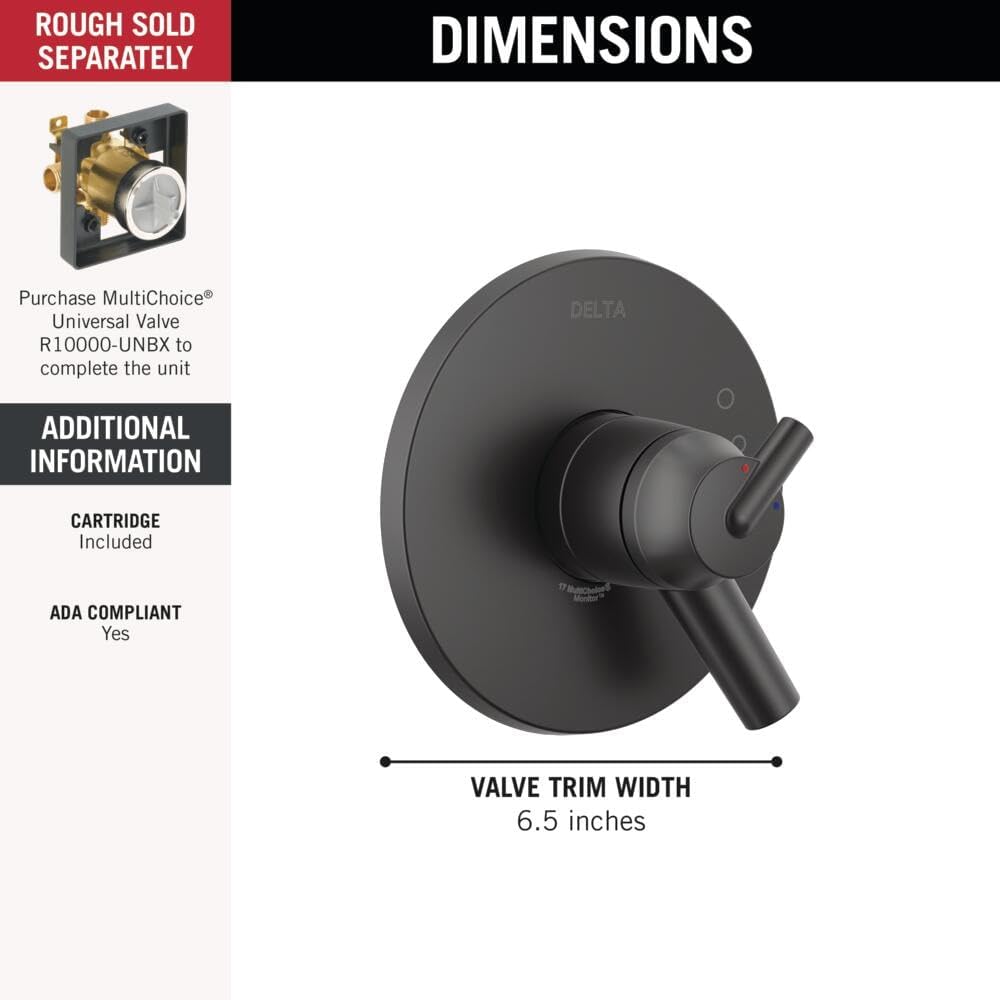
Image 2: This diagram illustrates that the rough-in valve is sold separately and provides key dimensions for the trim kit, including a valve trim width of 6.5 inches.
Installation may require access to plumbing behind the wall. If you do not have existing access, professional assistance may be necessary to avoid damage to your wall or plumbing system.

Image 3: A plumber is shown installing a Delta MultiChoice Universal Valve, highlighting the need for access to plumbing behind the wall for proper installation.
4. Setup and Installation
For detailed installation instructions, please refer to the official Installation Manual (PDF) provided by Delta Faucet. A digital copy can be accessed here.
Key Installation Steps (Summary):
- Prepare the Rough-In Valve: Ensure the Delta MultiChoice Universal Valve is correctly installed and secured within the wall, following its specific instructions.
- Install the Cartridge: Insert the Monitor Pressure-Balanced Valve Cartridge (included with this trim kit) into the rough-in valve body.
- Mount the Escutcheon: Secure the escutcheon plate to the wall over the valve body.
- Attach the Handle Assembly: Connect the dual-function handle components to the cartridge stem and escutcheon.
- Test for Leaks: Turn on the water supply and check all connections for leaks.

Image 4: Close-up view of hands installing a valve into a framed wall, illustrating a critical step in the rough-in process.
5. Operating Instructions
The Delta Trinsic 17 Series features a dual-function handle for precise control over your showering experience.
- Volume Control: The outer handle controls the water volume. Rotate it to increase or decrease the flow.
- Temperature Control: The inner handle controls the water temperature. Rotate it to adjust between hot and cold.
The integrated Monitor Pressure-Balanced Valve Cartridge maintains a consistent shower temperature by balancing hot and cold water pressure. This technology helps prevent sudden temperature changes caused by other household water usage.

Image 5: This diagram illustrates the Dual-Function Monitor Pressure-Balanced Valve Cartridge, showing how it controls temperature and pressure separately and maintains consistent water temperature within a safe range.

Image 6: A person enjoying a shower, with a graphic overlay demonstrating the stable temperature control provided by the pressure-balanced valve.
6. Maintenance and Cleaning
To maintain the appearance and performance of your Delta Faucet Trinsic trim kit, follow these cleaning guidelines:
- General Cleaning: Clean with a soft, damp cloth and mild soap. Avoid abrasive cleaners, harsh chemicals, or scouring pads, as these can damage the finish.
- SpotShield Finish: The Matte Black finish features SpotShield technology, which resists water spots and fingerprints. Wipe with a soft cloth to keep it clean.
- Touch-Clean Spray Holes: If your showerhead (sold separately) has Touch-Clean spray holes, you can easily wipe away calcium and lime buildup with a touch of a finger.
7. Troubleshooting
If you encounter issues with your shower trim kit, consider the following common troubleshooting steps:
- Low Water Flow:
- Check if the main water supply is fully open.
- Inspect the showerhead for mineral buildup and clean if necessary (especially if it has Touch-Clean features).
- Ensure the volume control handle is fully open.
- Inconsistent Water Temperature:
- Verify that the hot and cold water supplies are correctly connected to the rough-in valve.
- Ensure the temperature limit stop on the cartridge is set correctly (refer to the full installation manual for adjustment).
- If the issue persists, the pressure-balanced cartridge may need inspection or replacement.
- Leaks:
- Turn off the water supply immediately.
- Check all connections for tightness.
- Inspect O-rings and gaskets for proper seating and damage.
For more complex issues, it is recommended to consult the full installation manual or contact Delta Faucet customer support.
8. Specifications
| Feature | Detail |
|---|---|
| Brand | DELTA |
| Model Number | T17059-BL |
| Material | Brass |
| Exterior Finish | Matte Black |
| Product Dimensions (L x W x H) | 4.5 x 6.5 x 6.5 inches |
| Item Weight | 1 pound |
| Installation Method | Wall Mounted |
| Handle Style | Dual Handle |
| Included Components | Monitor 17 Series Valve Only Trim (Rough-in valve sold separately) |
| UPC | 034449838603 |
9. Warranty Information
This Delta Faucet shower handle trim kit is backed by Delta Faucet's Lifetime Limited Warranty. This warranty covers defects in materials and manufacturing for as long as the original consumer purchaser owns the home in which the faucet was first installed. For full terms and conditions, please refer to the official Delta Faucet warranty documentation.

Image 7: A shield icon symbolizing the Lifetime Limited Warranty provided with the product.
10. Customer Support
For further assistance, technical support, or warranty claims, please contact Delta Faucet customer service.
Phone: 1-800-345-3358
Delta Faucet Company is recognized for providing outstanding customer service. Our highly trained customer care team is ready to help.

Image 8: A customer service representative wearing a headset, smiling, with J.D. Power awards for customer service displayed, indicating Delta Faucet's commitment to support.


