
Introduction
The TYLT Portable Battery 4X with Power Dock is a compact and portable power solution designed to keep your mobile devices charged. It features a 7800 mAh internal battery, Quick Charge 3.0 technology for rapid charging, and Smart Detect technology for efficient power delivery. This manual provides essential information for the safe and effective use of your device.
Package Contents
Please verify that all items listed below are included in your package:
- TYLT Portable Battery 4X
- Power Dock
- Micro-USB Cable
- AC Adapter
- User Guide (this document)
- Warranty Insert
Product Overview
The TYLT Portable Battery 4X consists of two main components: the portable battery unit and the power dock. The portable battery features a built-in USB cable for convenience and LED indicators for battery status. The power dock provides a stable base for charging the portable battery.
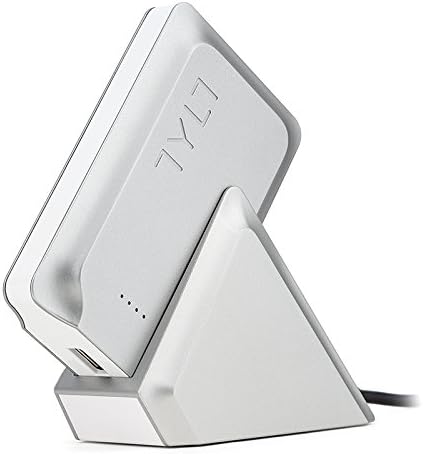
Figure 1: TYLT Portable Battery 4X securely placed in its Power Dock. The battery unit slides into the dock for charging.

Figure 2: A view of the TYLT Portable Battery 4X and Power Dock, highlighting the sleek design and connection points.
Setup and Initial Charging
- Connect the Power Dock: Use the provided Micro-USB cable and AC adapter to connect the Power Dock to a wall outlet.
- Charge the Portable Battery: Gently slide the TYLT Portable Battery 4X into the Power Dock. Ensure it is seated correctly. The LED indicators on the portable battery will illuminate to show charging status.
- Full Charge: Allow the portable battery to charge completely before first use. A full charge typically takes approximately 2.5 hours when using the Power Dock. The LED indicators will show a solid light when fully charged.
Operating Instructions
Charging Your Devices
- Connect Your Device: Use the built-in USB cable on the Portable Battery 4X or your device's own USB charging cable to connect your smartphone, tablet, or other USB-powered device to the portable battery.
- Initiate Charging: The portable battery will automatically detect your device and begin charging. The LED indicators on the portable battery will show its remaining charge level.
- Quick Charge 3.0: For devices equipped with Qualcomm Quick Charge 3.0 technology, the Portable Battery 4X will deliver up to 4 times faster charging speeds.
- Smart Detect Technology: The portable battery utilizes Smart Detect technology to identify your device's power requirements and deliver the optimal charging current, ensuring safe and efficient charging.
Checking Battery Level
Press the power button on the portable battery to illuminate the LED indicators, which display the current charge level. Each illuminated LED typically represents a portion of the total battery capacity.
Care and Maintenance
- Cleaning: Use a soft, dry cloth to clean the device. Do not use liquid cleaners or aerosols.
- Storage: Store the Portable Battery 4X and Power Dock in a cool, dry place away from direct sunlight and extreme temperatures.
- Battery Life: To prolong battery life, fully charge the portable battery at least once every three months, even if not in regular use.
- Avoid Damage: Do not drop, disassemble, or attempt to repair the device yourself. This may void the warranty and cause damage.
Troubleshooting
- Device not charging from Portable Battery:
- Ensure the portable battery is sufficiently charged.
- Verify that the connection cable between the portable battery and your device is securely plugged in at both ends.
- Try using a different charging cable to rule out a faulty cable.
- Portable Battery not charging in Power Dock:
- Check that the Power Dock's AC adapter is securely plugged into a working wall outlet.
- Ensure the portable battery is correctly seated in the Power Dock.
- Confirm that the Micro-USB cable is properly connected to the Power Dock and AC adapter.
- Slow charging speed:
- Ensure your device supports Quick Charge 3.0 for optimal speeds.
- Close unnecessary applications on your device to reduce power consumption during charging.
- Avoid using your device heavily while it is charging.
Specifications
| Model Number | DPB4XSLT |
| Battery Capacity | 7800 mAh (Lithium Ion) |
| Charging Technology | Quick Charge 3.0, Smart Detect |
| Power Dock Recharge Time | Approx. 2.5 hours |
| Product Dimensions | 7 x 3 x 4 inches |
| Item Weight | 15.2 ounces |
| Color | Silver |
| Manufacturer | Tylt |
Warranty and Support
For detailed warranty information, please refer to the warranty insert included in your package. If you require technical support or have questions not covered in this manual, please visit the official TYLT website or contact their customer service department.