
Introduction
The BOSS ME-80 is a versatile guitar multiple effects processor designed for live performance and studio use. It combines an intuitive user interface with advanced COSM amplifier models and a selection of high-quality BOSS effects. Featuring eight newly designed footswitches, the ME-80 allows for quick and efficient switching between effects and patches. This unit also offers USB connectivity for audio interface capabilities and access to the BOSS TONE CENTRAL site for additional patches.
Product Overview
The ME-80 is constructed with a durable metal chassis, ensuring reliability and longevity for frequent use and transport. Its robust build quality is designed to withstand the rigors of live performances and travel.

Figure 1: Front view of the BOSS ME-80, showing the control knobs, footswitches, and expression pedal.
Inputs and Outputs
The rear panel of the ME-80 provides various connectivity options:
- GUITAR INPUT: Standard 1/4-inch jack for connecting your guitar.
- OUTPUT (L/MONO, R): 1/4-inch stereo output jacks for connecting to an amplifier, mixer, or other audio equipment.
- REC OUT/PHONES: Stereo mini-jack for direct recording or headphone monitoring.
- AUX IN: Stereo mini-jack for connecting external audio players (e.g., smartphone, MP3 player) for practice.
- USB COMPUTER: USB port for connecting to a computer, enabling audio recording, MIDI control, and access to BOSS TONE STUDIO software.
- DC IN: Power input for the included 9V DC power adapter.
- POWER Switch: On/Off switch for the unit.
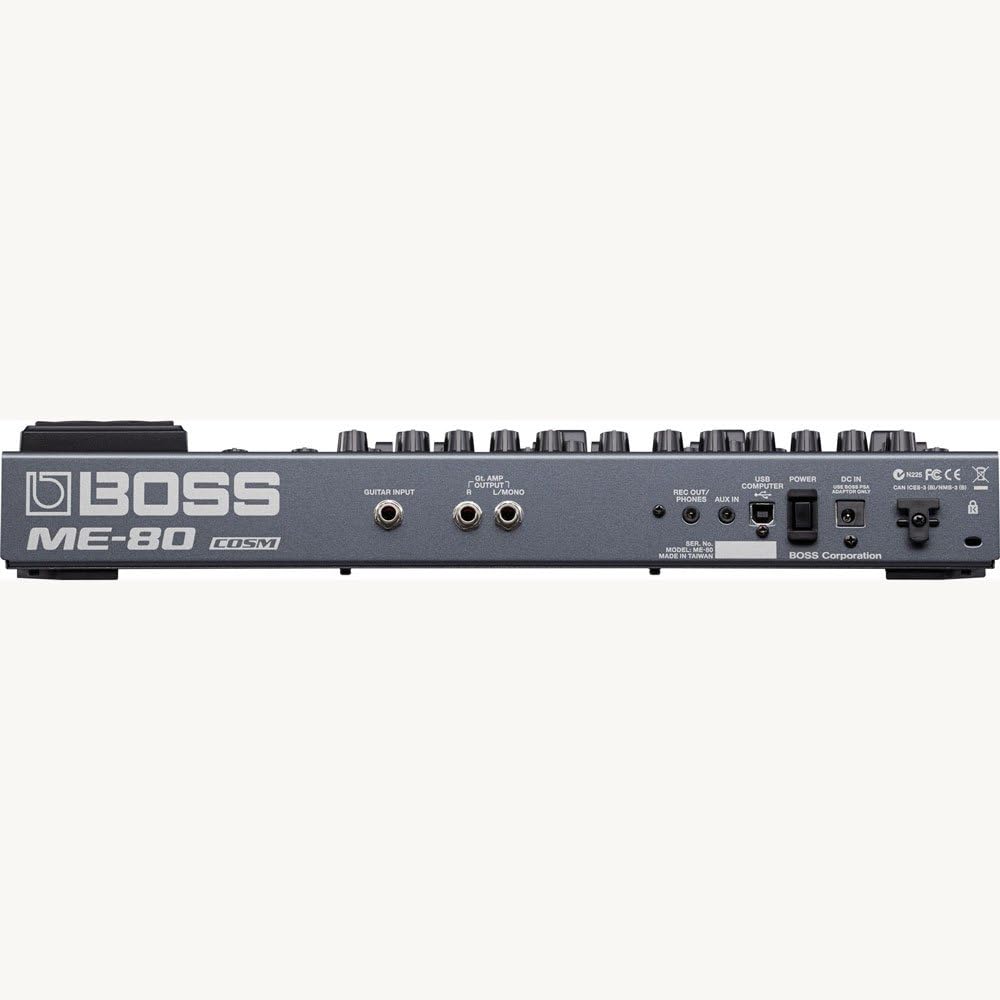
Figure 2: Rear view of the BOSS ME-80, highlighting the various input and output ports.
Setup
- Power Connection:
- For AC power, connect the included 9V DC 1000mA power adapter to the DC IN jack and then to a wall outlet.
- Alternatively, the ME-80 can be powered by six AA batteries. Open the battery compartment on the underside of the unit and insert the batteries, observing correct polarity.
- Guitar Connection: Connect your guitar to the GUITAR INPUT jack using a standard 1/4-inch instrument cable.
- Output Connection:
- Connect the OUTPUT (L/MONO, R) jacks to your guitar amplifier, PA system, or audio interface. Use both L and R for stereo output, or only L/MONO for mono.
- For silent practice or direct recording, connect headphones or a recording device to the REC OUT/PHONES stereo mini-jack.
- Auxiliary Input: If desired, connect an external audio player to the AUX IN jack to play along with backing tracks.
- USB Connection (Optional): Connect the USB COMPUTER port to your computer using a USB cable for recording, re-amping, or using the BOSS TONE STUDIO software for patch management and editing.
- Power On: Once all connections are made, press the POWER switch to turn on the ME-80.
Operating the ME-80
The ME-80 features a straightforward, knob-based interface for intuitive control over its effects. It operates in two primary modes: Manual Mode and Memory Mode.
Manual Mode
In Manual Mode, the ME-80 functions like a traditional pedalboard, with each footswitch directly activating or deactivating individual effects sections. The knobs on the panel directly control the parameters of the active effects.
- Effect Sections: The ME-80 is divided into several effect sections: PREAMP, COMP/FX1, OD/DS, MOD, DELAY, EQ/FX2, and REVERB. Each section has dedicated knobs for parameter adjustment.
- Footswitches: The four main footswitches (1-4) can be assigned to turn individual effects on/off within a patch. The BANK UP/DOWN footswitches allow you to navigate through different banks of effects.
- Expression Pedal: The integrated expression pedal can be assigned to control various parameters, such as volume, wah, or other effect levels.
Memory Mode
In Memory Mode, you can store and recall complete effect setups (patches). The ME-80 comes with 30 pre-programmed sound opportunities, and you can create and save your own custom patches.
- Patch Selection: Use the BANK UP/DOWN footswitches to select different banks, and then use footswitches 1-4 to select specific patches within that bank.
- Saving Patches: After adjusting effects in Manual Mode or modifying an existing patch, you can save your settings to a memory location using the WRITE button.
Key Features and Effects
- COSM Preamps: Offers a range of classic and modern amplifier sounds.
- Effects Categories: Includes a wide array of effects such as Compressor, Overdrive/Distortion, Modulation (Chorus, Flanger, Phaser, Tremolo, etc.), Delay (Digital, Analog, Tape Echo, Reverse), Reverb (Hall, Room, Spring), and EQ.
- Phrase Looper: An internal looper allows for up to 38 seconds of recording, enabling you to create layered performances or practice with backing loops.
- USB Audio/MIDI Interface: Connect to a computer for direct recording, re-amping, and using the ME-80 as a MIDI controller.
- BOSS TONE STUDIO: Access the BOSS TONE STUDIO software via USB to edit, organize, and download new patches.
Maintenance
- Cleaning: Wipe the unit with a soft, dry cloth. Avoid using abrasive cleaners or solvents.
- Battery Replacement: If using batteries, replace all six AA batteries when the "BATTERY LOW" indicator appears on the display. Ensure correct polarity when inserting new batteries.
- Software Updates: Periodically check the BOSS website for firmware updates for your ME-80 to ensure optimal performance and access to new features.
- Storage: When not in use for extended periods, disconnect the power adapter and remove batteries to prevent leakage. Store the unit in a cool, dry place away from direct sunlight.
Troubleshooting
- No Sound:
- Check all cable connections (guitar, amplifier, power).
- Ensure the ME-80 is powered on and the volume levels on the unit and your amplifier are appropriately set.
- Verify that no effects are bypassed or set to a minimum level.
- Distorted or Unwanted Noise:
- Check for loose cable connections.
- Adjust gain and level settings on the ME-80 to prevent clipping.
- Ensure you are using the correct power adapter (9V DC, 1000mA, center negative).
- Unit Not Powering On:
- If using the AC adapter, ensure it is securely connected to both the unit and a working power outlet.
- If using batteries, check if they are correctly inserted and have sufficient charge. Replace if necessary.
- USB Connection Issues:
- Ensure the correct USB drivers are installed on your computer.
- Try a different USB port or cable.
Specifications
| Brand | BOSS |
| Model Name | ME-80 |
| Style | Multi-effects, Looper |
| Color | Black and Silver |
| Voltage | 9 Volts |
| Amperage | 1000 Milliamps |
| Audio Output Effects | Multi-Effect |
| Controls Type | Knob |
| Power Source | Battery Powered |
| Hardware Interface | USB |
| Signal Format | Analog |
| Connector Type | USB |
| Manufacturer Part Number | ME-80 |
| Included Components | Power Supply |
| Item Dimensions | 9.13 x 17.63 x 3.63 inches |
Warranty and Support
For warranty information, product registration, and technical support, please refer to the official BOSS website or contact your local BOSS distributor. Keep your proof of purchase for warranty claims.
Online resources, including updated manuals, drivers, and the BOSS TONE CENTRAL library, are available on the official BOSS website.


