
1. Introduction
Thank you for choosing the BBC Jadel K100 Gaming Keyboard. This manual provides essential information for setting up, operating, maintaining, and troubleshooting your new keyboard. The Jadel K100 is designed for gaming, office, and daily home use, featuring multimedia keys and a mechanical suspension design for a responsive typing experience.
Please read this manual thoroughly before using the product to ensure proper function and longevity.
2. Package Contents
Upon unpacking, please ensure all items are present:
- BBC Jadel K100 Gaming Keyboard
- User Manual (this document)
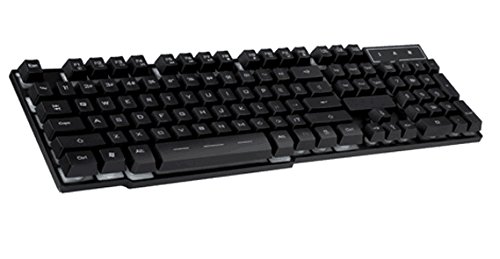
Image 1: The BBC Jadel K100 Gaming Keyboard, showcasing its design and packaging.
3. Setup
Follow these steps to connect your BBC Jadel K100 Gaming Keyboard to your computer:
- Unpack the Keyboard: Carefully remove the keyboard from its packaging.
- Connect to Computer: Locate an available USB port on your laptop or desktop computer. Insert the USB connector of the keyboard firmly into the USB port.
- Driver Installation: The keyboard is plug-and-play. Your operating system (Windows, macOS, Linux) should automatically detect and install the necessary drivers. This process may take a few moments.
- Verify Connection: Once drivers are installed, the keyboard should be ready for use. Test by typing in a text editor or browser.
Note: This keyboard is compatible with laptops and desktop computers running standard operating systems.
4. Operating Instructions
The Jadel K100 keyboard features a standard 104-key layout, including a numeric keypad and function keys. It also incorporates multimedia functions accessible via the FN key.
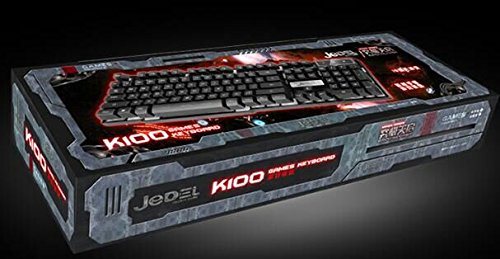
Image 2: Close-up view of the BBC Jadel K100 keyboard's main keys, including Esc, Tab, Caps Lock, Shift, Ctrl, and Alt.
4.1. Standard Key Functions
All standard alphanumeric, symbol, and navigation keys operate as expected on a typical keyboard.
4.2. Multimedia Functions (FN Key)
The Jadel K100 includes an FN (Function) key, similar to those found on laptops, to access multimedia controls. To use these functions, press and hold the FN key, then press the corresponding function key (F1-F12) or other designated keys.
Common multimedia functions typically include:
- FN + F1-F12: Control media playback (play/pause, stop, previous/next track), volume (mute, volume up/down), and other system functions (e.g., open default browser, email client, calculator). Refer to the keycap legends for specific functions.
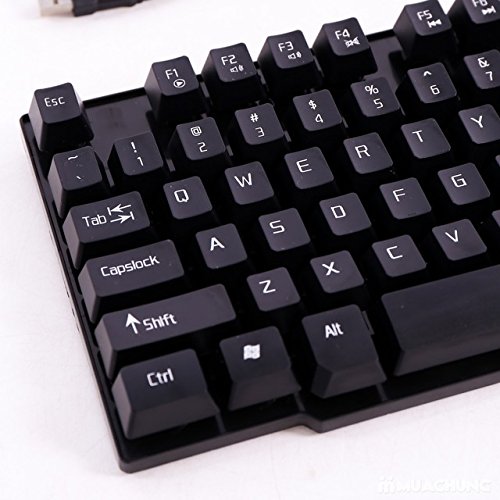
Image 3: Detailed view of the BBC Jadel K100 keyboard's F-keys, which often include multimedia shortcuts when combined with the FN key.
4.3. Gaming Experience
The mechanical suspension design provides a tactile and responsive feel, enhancing the gaming experience. The keyboard is designed for durability and comfort during extended gaming sessions.
5. Maintenance
Proper maintenance ensures the longevity and optimal performance of your keyboard.
- Cleaning:
- Disconnect the keyboard from your computer before cleaning.
- Use a soft, lint-free cloth slightly dampened with water or a mild cleaning solution to wipe the keycaps and surface.
- For dust and debris between keys, use compressed air.
- Avoid using harsh chemicals, abrasive cleaners, or spraying liquids directly onto the keyboard.
- Storage: Store the keyboard in a cool, dry place away from direct sunlight and extreme temperatures when not in use for extended periods.
- Handling: Avoid dropping the keyboard or exposing it to excessive force, which can damage internal components or key mechanisms.
6. Troubleshooting
If you encounter issues with your BBC Jadel K100 keyboard, refer to the following common problems and solutions:
| Problem | Possible Cause | Solution |
|---|---|---|
| Keyboard not responding | Loose USB connection, faulty USB port, driver issue. |
|
| Specific keys not working | Debris under keycap, physical damage, software conflict. |
|
| Multimedia keys not functioning | Incorrect usage of FN key, software conflict. |
|
7. Specifications
| Feature | Detail |
|---|---|
| Brand | BBC |
| Model Number | Jadel K100 |
| Keyboard Description | Gaming |
| Number of Keys | 104 |
| Key Type | Mechanical Suspension |
| Colour | BLACK |
| Compatible Devices | Laptop, Desktop PC |
| Connectivity | USB |
| Style | Modern |
| Hand Orientation | Ambidextrous |
| Manufacturer | bbc |
8. Warranty and Support
Specific warranty details for the BBC Jadel K100 Gaming Keyboard are not provided in this manual. For warranty information, please refer to the product packaging or contact your retailer at the point of purchase.
For technical support or further assistance, please contact the manufacturer or your retailer. Keep your purchase receipt as proof of purchase for any warranty claims.