
Introduction
This manual provides detailed instructions for the installation, operation, and maintenance of the Anderic FAN10R Ceiling Fan Receiver. This receiver is designed as a direct replacement for the original Hampton Bay FAN-10R receiver, enhancing your ceiling fan's control capabilities.
The Anderic FAN10R Receiver allows for control over fan direction (reverse), downlight (without dimming functionality), and adjustable fan speeds (off, low, medium, high).
Important Compatibility Notes
Crucial: The Anderic FAN10R Receiver is specifically intended to replace a receiver that was originally installed with your ceiling fan. This receiver cannot be added to any fan that does not already have this specific type of receiver pre-installed. Please verify your existing setup and compatibility before proceeding with installation.
This product includes the receiver only. If a compatible remote control is needed, the Anderic FAN-9T remote with reverse function is recommended for use with this receiver.
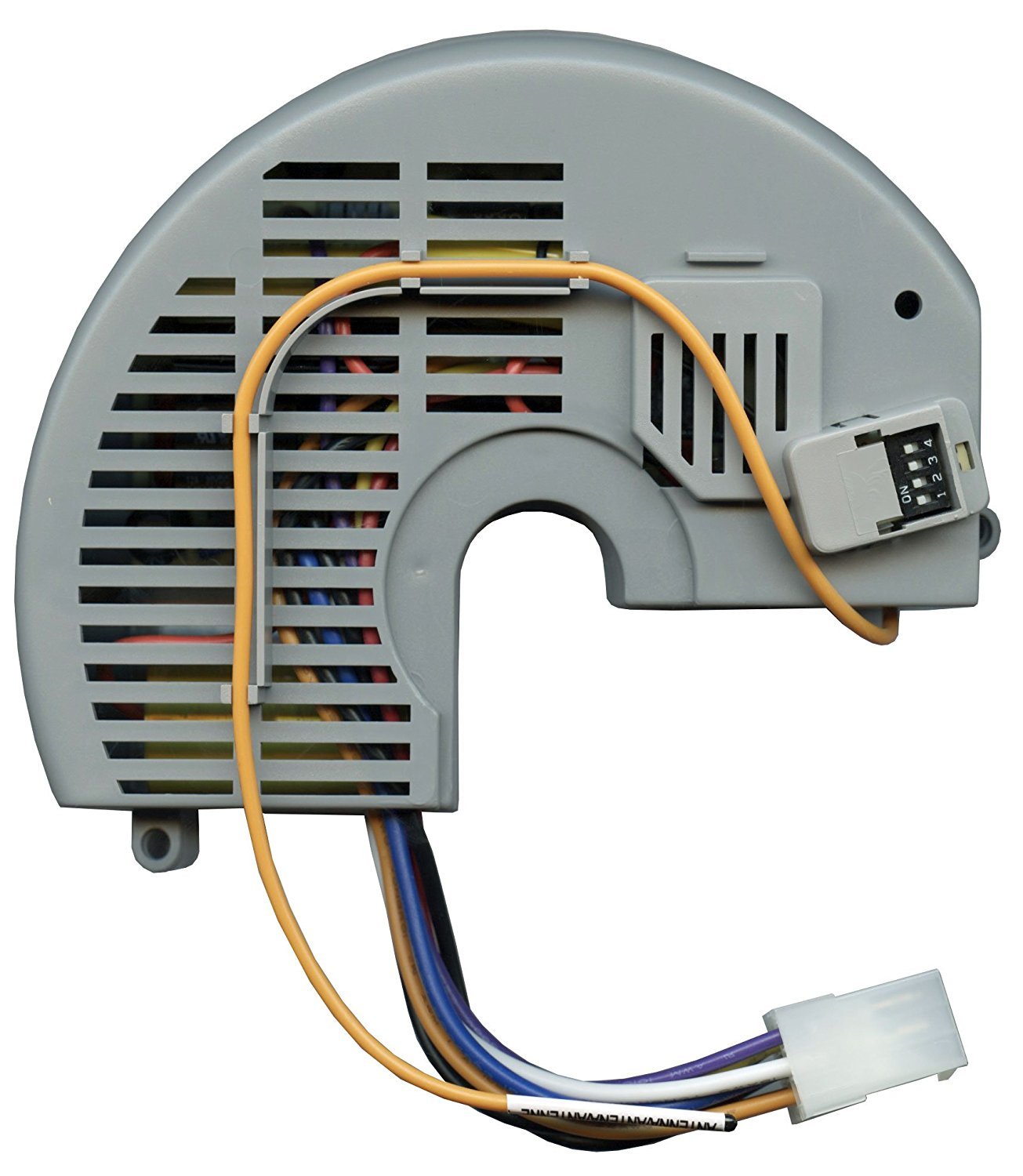
Image: The Anderic FAN10R Ceiling Fan Receiver, a compact electronic module designed for integration into ceiling fan housings.
Setup and Installation
The FAN10R Receiver measures approximately 5.5" long, 4.25" wide, and 1.5" thick, designed for easy installation within your ceiling fan's light housing.
Safety Precautions:
- Always turn off power at the circuit breaker before beginning any installation or maintenance.
- Ensure all electrical connections are secure and comply with local electrical codes.
- If you are unsure about any step, consult a qualified electrician.
Installation Steps:
- Disconnect Power: Turn off the power to the ceiling fan at the main circuit breaker.
- Access Receiver: Carefully lower the ceiling fan canopy or light housing to access the existing receiver.
- Remove Old Receiver: Disconnect all wires from the old receiver. Note the wiring configuration for reference.
- Prepare Antenna Wire: The antenna wire on the new receiver should be stripped and securely connected (wire-nutted) to the fan housing. This connection is crucial for optimal signal reception.
- Connect New Receiver: Identify the AC wires (typically the edge middle black and white wires inside the plug) and connect them to the corresponding terminals on the Anderic FAN10R Receiver. Connect all other fan and light wires as per the original setup.
- Set Dip Switches (if applicable): If your remote control uses dip switches for frequency matching, ensure the dip switches on the new receiver are set to match your remote control's settings.
- Secure Receiver: Carefully place the new receiver inside the fan's light housing or canopy, ensuring no wires are pinched.
- Restore Power: Once all connections are secure and the receiver is properly housed, restore power at the circuit breaker.
- Test Functionality: Test all fan speeds, light control, and reverse functions using your compatible remote control.
Operating Instructions
The Anderic FAN10R Receiver is controlled via a compatible remote control, such as the Anderic FAN-9T.
- Fan Speed Control: Use the designated buttons on your remote to cycle through fan speeds: Off, Low, Medium, High.
- Light Control: Use the light button on your remote to turn the downlight On or Off. Note that this receiver does not support dimming functionality.
- Reverse Fan Direction: Use the reverse button on your remote to change the fan's blade direction. This feature is useful for optimizing airflow for different seasons (e.g., downward airflow for cooling in summer, upward airflow for circulating warm air in winter).
Maintenance
The Anderic FAN10R Receiver is designed for long-term, maintenance-free operation once installed correctly.
- Cleaning: Ensure the receiver remains free from dust and debris. If cleaning is necessary, disconnect power and gently wipe the exterior with a dry, soft cloth.
- Environmental Conditions: Avoid exposing the receiver to excessive moisture or extreme temperatures, as this can affect its performance and lifespan.
- Periodic Checks: Periodically check the wiring connections for any signs of loosening or corrosion, especially if you experience intermittent issues. Always disconnect power before inspecting connections.
Troubleshooting
| Problem | Possible Cause | Solution |
|---|---|---|
| Fan or Light does not respond to remote. |
|
|
| Fan operates slowly or reverse function does not work. |
|
|
| Intermittent control. |
|
|
Specifications
- Model Name: FAN10R
- Brand: Anderic
- Product Dimensions: 5.5" (L) x 4.25" (W) x 1.5" (H)
- Item Weight: Approximately 8 ounces (0.5 Pounds)
- Power Source: AC
- Voltage: 120 Volts (AC)
- Wattage: 300 watts
- Control Method: Remote Control
- Number of Power Levels: 4 (Off, Low, Medium, High)
- Indoor/Outdoor Usage: Indoor
- Installation Type: Permanent, Inside Light Housing
- Compatible Remote: Anderic FAN-9T (sold separately)
Warranty Information
Specific warranty details for the Anderic FAN10R Receiver should be obtained directly from the manufacturer, Anderic, or the authorized seller at the time of purchase. Please retain your proof of purchase for any warranty claims.
Support and Contact
For further assistance, technical support, or inquiries regarding the Anderic FAN10R Receiver, please contact Anderic directly.
- Manufacturer: Dan's Electronics Etc., Inc. (Anderic)
- Online Store: Visit the Anderic Store on Amazon for more products and information.


