
Introduction
This manual provides essential information for the safe and efficient installation, operation, and maintenance of your APC Metered Rack Power Distribution Unit (PDU), Model AP7801B. Please read this manual thoroughly before installation and operation to ensure proper use and to prevent damage to the unit or connected equipment.
Important Safety Information
Observe the following safety precautions to reduce the risk of electric shock, fire, or injury:
- This PDU is intended for indoor use only.
- Connect the PDU to a properly grounded branch circuit outlet.
- Do not attempt to open or service the PDU. There are no user-serviceable parts inside. Refer all servicing to qualified service personnel.
- Do not use the PDU in environments with excessive moisture or extreme temperatures.
- Ensure that the total current draw of connected equipment does not exceed the PDU's maximum current rating (20 Amps).
- Always disconnect the PDU from the power source before performing any maintenance or installation procedures.
Product Overview
The APC Metered Rack PDU (Model AP7801B) is a 1U rack-mountable power distribution unit designed to provide reliable power distribution and real-time current monitoring for IT equipment in data centers and server rooms. It features eight NEMA 5-20R outlets.
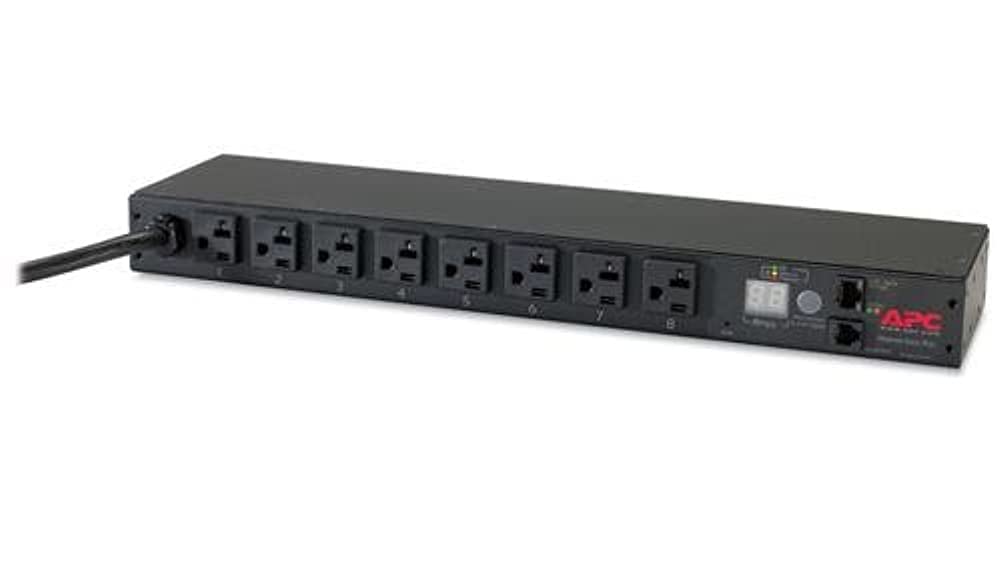
Image: A black 1U rack-mountable Power Distribution Unit (PDU) with eight NEMA 5-20R outlets numbered 1 through 8 on the front. The unit also features a digital display showing current draw, status indicators, and a network port on the right side.
Front Panel Features
- NEMA 5-20R Outlets (x8): Provide power connections for IT equipment. Each outlet is numbered for easy identification.
- Digital Display: Shows real-time current draw (Amps) for the PDU.
- Status Indicators: LEDs indicating power status, network activity, and alarm conditions.
- Network Port (RJ-45): For connecting the PDU to a network for remote monitoring and management.
- Input Power Cord: Permanently attached cord for connecting the PDU to the facility's power source.
Setup
1. Unpacking
Carefully remove the PDU and all accessories from its packaging. Inspect the unit for any signs of shipping damage. If damage is found, contact your dealer or APC customer support immediately.
2. Mounting the PDU
The AP7801B is designed for 1U rack mounting. Use the provided mounting hardware to secure the PDU horizontally in a standard 19-inch equipment rack. Ensure adequate airflow around the unit.
3. Connecting Input Power
Connect the PDU's input power cord to a dedicated 20A, 120V NEMA 5-20R wall receptacle or an appropriate upstream power source. Ensure the power source is properly grounded.
4. Connecting Equipment
Plug your IT equipment's power cords into the NEMA 5-20R outlets on the front of the PDU. Distribute the load evenly across the outlets if possible, and ensure the total current draw does not exceed 20 Amps.
5. Network Connection (Optional)
For remote monitoring, connect a standard Ethernet cable from the PDU's network port to your network switch or router. Refer to the network management card documentation for initial network configuration.
Operating
Powering On
Once the PDU is connected to a power source and equipment is plugged in, the PDU will automatically power on. The digital display will illuminate, showing the total current draw in Amps.
Monitoring Current
The front panel digital display provides a real-time readout of the total current being drawn by all connected equipment. Monitor this value to ensure it remains below the PDU's maximum capacity of 20 Amps.
Remote Monitoring (via Network)
If connected to a network, the PDU's embedded network management card allows for remote monitoring of current, environmental conditions (with optional sensors), and event logging through a web browser interface or network management system. Consult the network management card user guide for detailed instructions on accessing and configuring these features.
Maintenance
The APC Metered Rack PDU is designed for minimal maintenance. However, regular inspection and cleaning can help ensure optimal performance and longevity.
- Cleaning: Periodically clean the exterior of the PDU with a soft, dry cloth. Do not use liquid or aerosol cleaners. Ensure the unit is powered off and disconnected before cleaning.
- Cable Management: Ensure all power cords are neatly routed and secured to prevent accidental disconnections or damage.
- Environmental Check: Verify that the operating environment remains within the specified temperature and humidity ranges to prevent overheating or condensation.
- Load Monitoring: Regularly check the current draw on the digital display or via remote monitoring to ensure it does not approach or exceed the PDU's rated capacity.
Troubleshooting
This section provides solutions to common issues you may encounter with your PDU.
| Problem | Possible Cause | Solution |
|---|---|---|
| PDU has no power. | Input power cord is disconnected or upstream circuit breaker is tripped. | Ensure the input power cord is securely connected. Check and reset the upstream circuit breaker if necessary. |
| Digital display shows 'OL' or an overload alarm. | Total current draw exceeds the PDU's 20A capacity. | Reduce the load by disconnecting some equipment or redistributing it to another PDU. |
| Connected equipment is not receiving power. | Equipment power cord is loose or faulty. PDU may be overloaded. | Check equipment power cords. Verify PDU is not overloaded. Test equipment with a known good power source. |
| Cannot access PDU via network. | Incorrect network settings, cable issue, or network problem. | Verify Ethernet cable connection. Check network settings (IP address, subnet mask, gateway). Consult network management card documentation for reset procedures if needed. |
Technical Specifications
The following table details the technical specifications for the APC Metered Rack PDU, Model AP7801B:
| Specification | Value |
|---|---|
| Brand | APC |
| Model Number | AP7801B |
| Form Factor | Rack (1U) |
| Input Voltage | 120 Volts (AC) |
| Input Amperage | 20 Amps |
| Output Voltage | 120 Volts (AC) |
| Output Current | 20 Amps |
| Number of Outlets | 8 |
| Connector Type | NEMA 5-20R |
| Power Plug Type | NEMA 5-20P (Type L) |
| Wattage | 2400 watts |
| Frequency Range | 50/60 Hz |
| Item Dimensions (L x W x H) | 19.5 x 13.4 x 2.9 inches |
| Item Weight | 6.4 Pounds |
| Color | Black |
| UPC | 731304331469 |
| ASIN | B06XG2TY7H |
Warranty and Support
Warranty Information
APC products typically come with a standard manufacturer's warranty. Please refer to the warranty card included with your product or visit the official APC website for detailed warranty terms and conditions specific to the AP7801B model.
Customer Support
For technical assistance, troubleshooting, or product inquiries, please contact APC customer support. Contact information can usually be found on the APC website or in the product packaging. When contacting support, please have your model number (AP7801B) and serial number readily available.