
GYROCOPTERS Prime
Gyrocopters PRIME 2025 All Terrain Hoverboard User Manual
Model: Prime | Brand: GYROCOPTERS
1. Introduction
This manual provides essential information for the safe and effective operation, maintenance, and care of your Gyrocopters PRIME 2025 All Terrain Hoverboard. Please read this manual thoroughly before first use and retain it for future reference.

Image: The Gyrocopters PRIME 2025 All Terrain Hoverboard, showcasing its design and illuminated wheels.
2. Safety Information
Your safety is paramount. Adhere to all instructions and warnings to prevent injury or damage.
2.1 UL 2272 Certification
The Gyrocopters Prime Hoverboard is UL 2272 certified, meeting government-mandated safety standards for electrical and fire safety. This includes cUL certification for the charger, battery, and hoverboard components. The UL-certified battery features an intelligent battery management system (BMS).
2.2 No-Fall Technology
Equipped with advanced gyro sensors, this hoverboard ensures automatic alignment to maintain rider balance, providing a stable and smooth experience.
2.3 General Safety Guidelines
- Always wear appropriate safety gear, including a helmet, knee pads, and elbow pads.
- Operate the hoverboard in safe environments, away from traffic and pedestrians.
- Do not ride on wet, uneven, or slippery surfaces.
- Maintain a minimum rider weight of 15 kg (33 lbs) and a maximum of 75 kg (165 lbs).
- Avoid sudden movements or excessive leaning, especially at high speeds.
- Do not attempt stunts or jumps.
- Ensure the hoverboard is fully charged before each use.
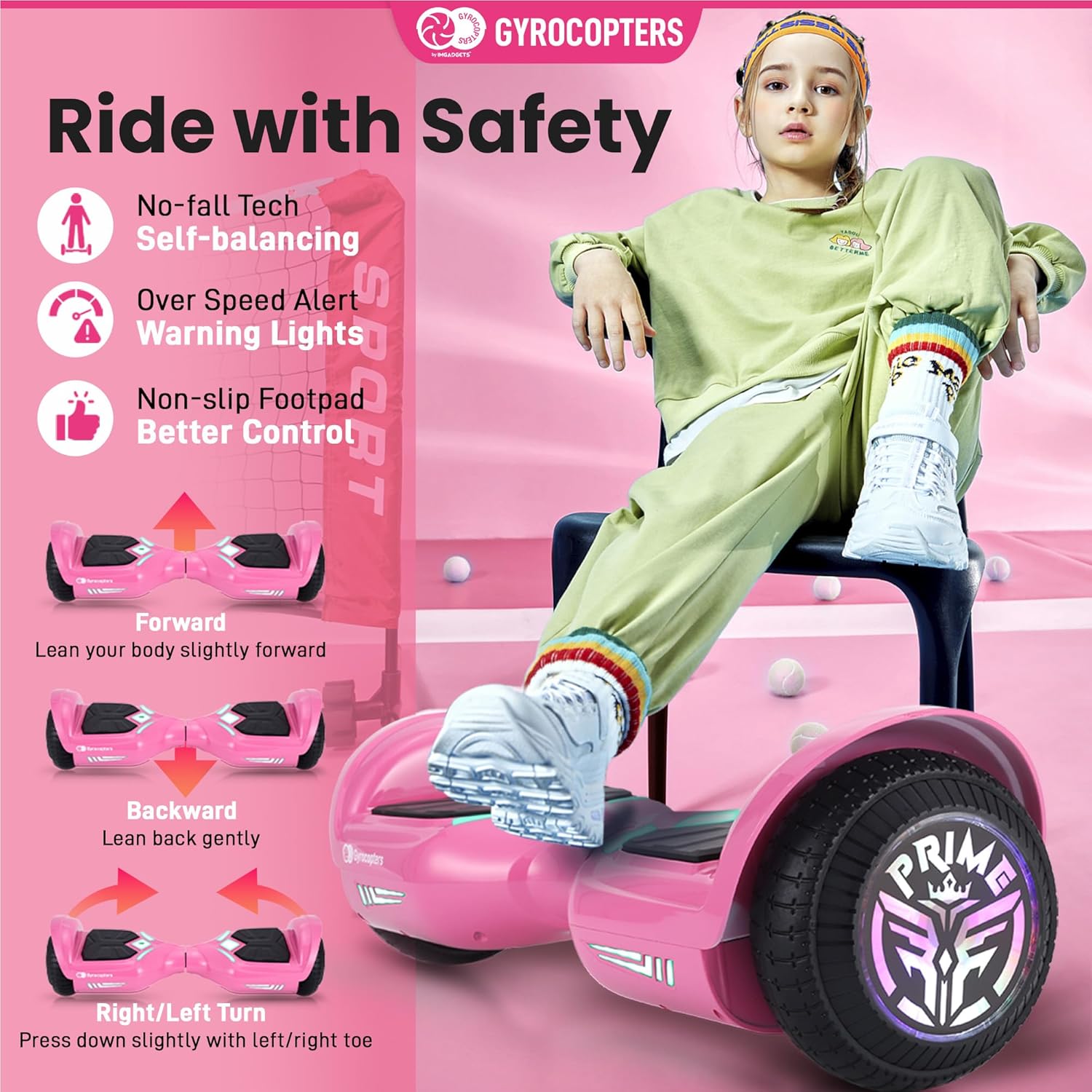
Image: Visual representation of safety features: No-fall Technology, Over Speed Alert, and Non-slip Footpad for enhanced control.
3. Product Features
The Gyrocopters PRIME 2025 Hoverboard is designed with several features to enhance its functionality and user experience.
3.1 Powerful Motor and Battery
Equipped with a dual 300W motor, the hoverboard provides reliable power. The 50.4Wh Lithium-ion battery offers a range of up to 8 km (5 miles) and a run time of up to 60 minutes on a full charge. Actual range and run time may vary based on terrain and rider weight.
3.2 LED Wheels and Lights
The 6.5-inch wheels feature built-in LED lights that illuminate during operation. Front LED lights are also integrated for visibility.
3.3 Bluetooth Speaker
A built-in Bluetooth speaker allows for audio playback during use. Connect your device to the hoverboard via Bluetooth to stream music.

Image: The hoverboard highlighting its front LED lights, colorful LED wheels, and integrated Bluetooth speaker.

Image: Illustration of the hoverboard's all-terrain capabilities, including 10-degree maximum climbing ability and dual 300W motor power.
4. Setup
4.1 Unpacking
Carefully remove the hoverboard and all accessories from the packaging. Verify that all components listed in the packaging contents are present.
4.2 Initial Charging
Before first use, fully charge the hoverboard. Connect the UL-certified charger to the charging port on the hoverboard and then to a power outlet. The indicator light on the charger will change to signal a full charge. Charging typically takes several hours.

Image: Details on the hoverboard's battery, including Lithium-ion technology, fast charging, and the protective Battery Management System (BMS).
5. Operating Instructions
5.1 Power On/Off
To power on, press the power button located on the hoverboard. To power off, press and hold the power button.
5.2 Mounting and Dismounting
- Mounting: Place one foot on a footpad, ensuring the hoverboard is level. Once stable, quickly place the other foot on the second footpad. Maintain balance by keeping your body upright.
- Dismounting: Step off the hoverboard one foot at a time, preferably backward.
5.3 Riding Controls
- Forward: Lean your body slightly forward.
- Backward: Lean back gently.
- Turning: Press down slightly with your left toe to turn right, or your right toe to turn left.
The hoverboard's gyro sensors will respond to your body's weight shifts to control movement.
5.4 Bluetooth Pairing
Turn on the hoverboard. Activate Bluetooth on your mobile device and search for available devices. Select 'Gyrocopters Prime' (or similar name) to pair. Once connected, audio will play through the hoverboard's speaker.
6. Maintenance
6.1 Cleaning
Wipe the hoverboard with a damp cloth. Do not use harsh chemicals or abrasive cleaners. Ensure the charging port is dry before charging.
6.2 Storage
Store the hoverboard in a cool, dry place away from direct sunlight and extreme temperatures. If storing for an extended period, charge the battery to approximately 50% every 3 months to prolong battery life.
6.3 Battery Care
The integrated Battery Management System (BMS) protects against overload, short circuit, overcurrent, undervoltage, over temperature, and overvoltage. Do not attempt to open or modify the battery pack.
7. Troubleshooting
If you encounter issues with your hoverboard, refer to the following common solutions:
- Hoverboard not turning on: Ensure the battery is charged. Check the power button for proper function.
- Difficulty balancing: Ensure you are on a flat, stable surface. Practice mounting and dismounting. The No-Fall Technology assists with balance, but initial practice is required.
- Bluetooth not connecting: Ensure the hoverboard is powered on and your device's Bluetooth is enabled. Try restarting both devices.
- Reduced range/speed: Battery performance can be affected by rider weight, terrain, and temperature. Ensure the battery is fully charged.
- Unusual noises: Power off the hoverboard immediately and contact customer support.
8. Specifications
| Feature | Specification |
|---|---|
| Model Name | Prime |
| Product Dimensions | 59L x 19W x 17.5H Centimetres |
| Net Weight | 5.7 kg (12.6 lbs) |
| Wheel Size | 16.5 cm (6.5 inches) |
| Battery Type | Lithium-ion |
| Battery Capacity | 50.4 Wh |
| Max Speed | 15 km/h (9.3 mi/h) |
| Max Range | 8 km (5 miles) |
| Full Charge Run Time | Up to 60 minutes |
| Max Load Capacity | 75 kg (165 lbs) |
| Min Load Capacity | 15 kg (33 lbs) |
| Motor Power | Dual 300W |
| Max Climbing Angle | 10 degrees |
| Certification | UL 2272 |
| Material | Plastic |
| Included Components | Hoverboard, Charger, Manual |

Image: Detailed product dimensions and a table summarizing key specifications of the hoverboard.
9. Warranty and Support
9.1 Warranty Information
For warranty details, please refer to the warranty card included with your product or contact customer support. Warranty coverage typically applies to manufacturing defects and does not cover damage from misuse, accidents, or unauthorized modifications.
9.2 Customer Support
For technical assistance, troubleshooting, or warranty inquiries, please contact Gyrocopters customer support:
- Phone: +1 647-797-3804
- Email: customercare@imgadgets.com
Ask a question about this manual
Ask about setup, troubleshooting, compatibility, parts, safety, or missing instructions. Manuals+ will review the question and use this page’s manual context to help answer it.