
ZdalaMit NS-RC4NA-16-ZDLMT
User Manual
NS-RC4NA-16 Replacement Remote Control
Product Overview
The ZdalaMit NS-RC4NA-16 is a replacement remote control designed for various Insignia HDTV LED TV models. This remote is engineered for immediate use without the need for complex programming or pairing procedures. Simply insert the required batteries, and it is ready to operate your compatible television.
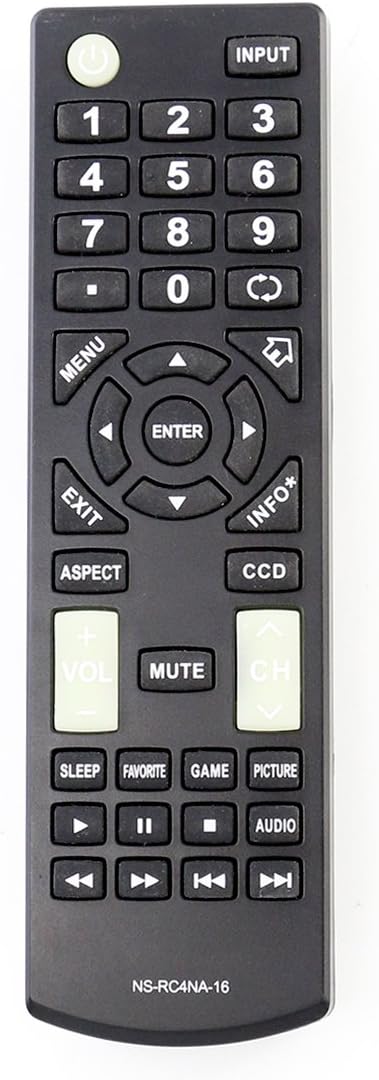
Figure 1: Front view of the NS-RC4NA-16 remote control. This image displays the ergonomic design and the layout of all functional buttons, including the power button, input selection, numeric keypad, directional navigation, volume and channel controls, and media playback buttons. The model number "NS-RC4NA-16" is printed at the bottom.

Figure 2: Back view of the NS-RC4NA-16 remote control with the battery compartment open. This view illustrates the location of the battery cover and the two slots for AAA batteries. The battery cover, labeled "ZdalaMit", is shown detached next to the remote.
Setup and Battery Installation
The NS-RC4NA-16 remote control is designed for ease of use, requiring no complex setup or pairing. Follow these simple steps to begin using your remote:
- Locate the Battery Compartment: Turn the remote control over to its back side. The battery compartment is located at the bottom section of the remote.
- Open the Battery Cover: Gently press down on the latch of the battery cover and slide it downwards to remove it.
- Insert Batteries: Insert two (2) 1.5V AAA alkaline batteries into the compartment. Ensure that the positive (+) and negative (-) terminals of the batteries align correctly with the markings inside the compartment. Incorrect insertion can prevent the remote from functioning.
- Close the Battery Cover: Slide the battery cover back into place until it clicks securely.
Note: Batteries are not included with the remote control and must be purchased separately. Always use new alkaline batteries for optimal performance.
Operating Instructions
Once batteries are installed, the NS-RC4NA-16 remote is ready to operate your compatible Insignia HDTV LED TV. Point the remote directly at the television's infrared sensor for best results.
Key Functions:
- Power (●): Turns the television on or off.
- Input: Cycles through available input sources (e.g., HDMI 1, HDMI 2, AV).
- Number Pad (0-9): Directly selects channels.
- Menu: Accesses the television's main menu for settings and options.
- Navigation Buttons (▲ ◀ ▼ ▶): Navigates through menu options.
- Enter: Confirms selections within menus.
- Exit: Exits the current menu or on-screen display.
- Info*: Displays information about the current program or input.
- Vol (+/-): Adjusts the volume level.
- CH (▲/▼): Changes the television channel up or down.
- Mute: Toggles sound on or off.
- Aspect: Adjusts the screen aspect ratio.
- CCD: Activates Closed Captioning.
- Sleep: Sets a timer for the television to turn off automatically.
- Favorite: Accesses favorite channels list.
- Game: Switches to game mode (if supported by TV).
- Picture: Adjusts picture settings.
- Audio: Adjusts audio settings.
- Media Playback Controls (▶, ▌▌, ■, ◀◀, ▶▶): Controls playback of media (e.g., pause, play, stop, rewind, fast forward) if the TV has media playback capabilities.
Compatible Insignia TV Models:
This remote control is compatible with a wide range of Insignia HDTV LED TV models, including but not limited to:
- NS-19D220MX16
- NS-19D220NA16
- NS-24D220MX16
- NS-24D220NA16
- NS-24D420NA16
- NS-28D220NA16
- NS-32D220NA16
- NS-32D420NA16
- NS-32D421NA16
- NS-32DD220NA16C
- NS-39D220NA16
- NS-40D420MX16
- NS-40D420NA16
- NS-43D420NA16
- NS-48D420NA16
- NS-50D420MX16
- NS-50D420NA16
- NS-50D421NA16
- NS-55D420NA16
- NS-55D421NA16
Maintenance
Proper maintenance ensures the longevity and optimal performance of your remote control.
- Cleaning: Wipe the remote control regularly with a soft, dry cloth. For stubborn dirt, a slightly damp cloth can be used, but ensure no moisture enters the remote. Do not use abrasive cleaners or solvents.
- Battery Replacement: Replace batteries when the remote's responsiveness decreases or it stops functioning. Always replace both batteries at the same time with new 1.5V AAA alkaline batteries.
- Storage: If the remote will not be used for an extended period, remove the batteries to prevent leakage, which can damage the remote. Store in a cool, dry place away from direct sunlight and extreme temperatures.
- Avoid Drops and Impacts: Protect the remote from physical shocks, as internal components can be damaged.
Troubleshooting
If you experience issues with your NS-RC4NA-16 remote control, refer to the following common troubleshooting steps:
| Problem | Possible Cause | Solution |
|---|---|---|
| Remote is not responding. | Dead or incorrectly installed batteries. | Replace both AAA batteries with new ones, ensuring correct polarity (+/-). |
| Remote only works intermittently. | Weak batteries; Obstruction between remote and TV; Remote too far from TV. | Replace batteries. Ensure a clear line of sight to the TV's IR sensor. Move closer to the TV. |
| Certain buttons do not work. | Dirt or debris under the button; Internal malfunction. | Clean the remote surface. If the issue persists, the remote may be faulty and require replacement. |
| Remote does not control the TV. | Incompatible TV model; TV's IR sensor is blocked or faulty. | Verify your TV model is listed in the compatible models section. Ensure nothing is blocking the TV's IR sensor. Test with another remote if available to rule out TV sensor issues. |
Specifications
- Model Number: NS-RC4NA-16-ZDLMT
- Brand: ZdalaMit
- Compatible Devices: Insignia HDTV LED Televisions
- Power Supply: 2 x 1.5V AAA Alkaline Batteries (not included)
- Color: Black
- Dimensions (L x W x H): Approximately 5 x 2 x 1 inches (12.7 x 5.08 x 2.54 cm)
- Weight: Approximately 2.08 ounces (59 grams) without batteries
- Special Feature: Ergonomic design
Warranty and Support
This product is manufactured by ZdalaMit Factory. For product support or inquiries, please refer to the contact information provided by your retailer or the manufacturer's official channels.
While specific warranty details are not provided in this manual, it is recommended to retain your purchase receipt for any potential warranty claims. For general support, you may visit the manufacturer's website or contact their customer service department.
For product support, you may also refer to the information often found on the back of the remote control itself, which might include a website or phone number for the original product manufacturer (e.g., Insignia for the TVs this remote is compatible with).
Note: This is a replacement remote control. Support for the original TV functionality should be directed to the TV manufacturer.
Ask a question about this manual
Ask about setup, troubleshooting, compatibility, parts, safety, or missing instructions. Manuals+ will review the question and use this page’s manual context to help answer it.