
1. Product Overview
The Starrett 770BXTZ-2 is an electronic digital internal bore micrometer designed for precise internal measurements. This instrument features built-in Bluetooth technology for data output and offers an IP67 level of protection against coolant, water, dirt, and dust, making it suitable for demanding shop environments. Its extended travel design reduces the need for frequent anvil exchanges, and ground contact points ensure faster and more accurate seating compared to spherical contacts.
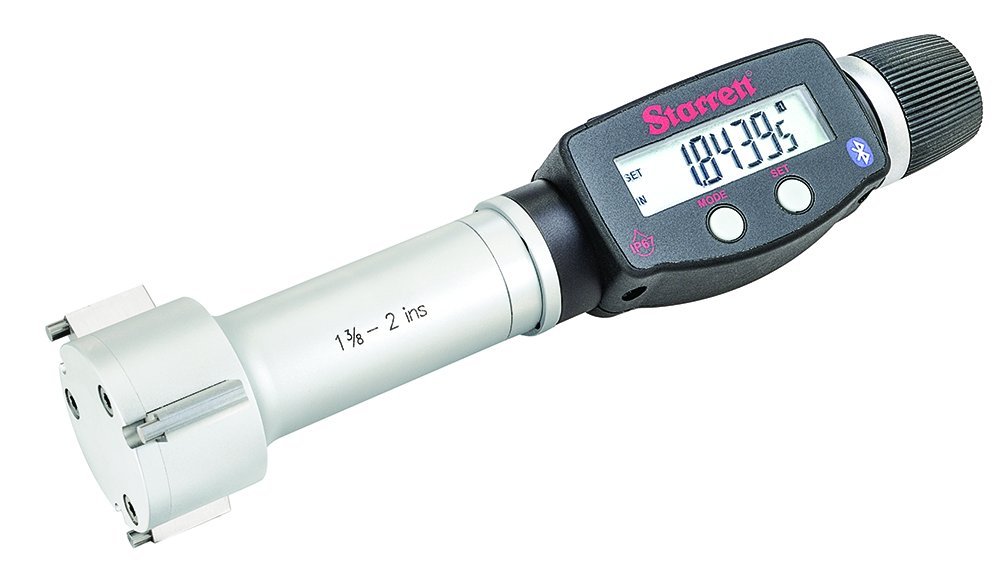
Image 1.1: The Starrett 770BXTZ-2 Electronic Digital Internal Bore Micrometer shown in its protective wooden case, alongside a setting ring, spare battery, and adjusting wrench.
Key Features:
- IP67 Protection: Resistant to coolant, water, dirt, and dust.
- Bluetooth Connectivity: For wireless data output.
- Inch/Millimeter Conversion: Instant unit conversion.
- Preset Functions: Includes preset + and - capabilities.
- Precision Ratchet Stop: Ensures consistent contact pressure for accurate readings.
- Extended Travel: Minimizes the need for anvil changes.
2. What's in the Box
Upon unpacking, verify that all components are present:
- Starrett 770BXTZ-2 Electronic Digital Internal Bore Micrometer head
- Protective wooden case
- Setting ring for calibration
- Contact points
- Adjusting wrench
- Spare battery (Lithium Ion)
- Instruction manual (this document)
3. Setup
3.1 Battery Installation
- Locate the battery compartment on the micrometer.
- Using the provided adjusting wrench or a suitable tool, carefully open the battery compartment cover.
- Insert the Lithium Ion battery, ensuring correct polarity (+/-).
- Securely close the battery compartment cover.
3.2 Initial Calibration (Zero Setting)
Before first use and periodically thereafter, calibrate the micrometer using the provided setting ring:
- Clean the measuring faces of the micrometer and the setting ring thoroughly.
- Turn on the micrometer by pressing the ON/OFF button.
- Gently insert the micrometer's measuring contacts into the setting ring.
- Rotate the thimble or use the ratchet stop until the contacts firmly seat against the inner diameter of the setting ring. The precision ratchet stop ensures consistent measuring force.
- Press the ZERO button to set the display to zero.
- Remove the micrometer from the setting ring. The instrument is now calibrated and ready for use.
4. Operating Instructions
4.1 Taking a Measurement
- Ensure the micrometer is clean and properly calibrated (zeroed).
- Gently insert the micrometer's measuring contacts into the bore to be measured.
- Rotate the thimble or use the ratchet stop until the contacts firmly seat against the internal surface of the bore. The ratchet stop will click when the correct measuring force is applied.
- Read the measurement directly from the digital display.
- For consistent results, take multiple readings and average them, especially for critical dimensions.
4.2 Inch/Millimeter Conversion
To switch between inch and millimeter units, press the IN/MM button. The display will instantly convert the current reading to the selected unit.
4.3 Preset Functions
The micrometer includes preset + and - functions for comparative measurements or setting a reference point. Refer to the detailed instructions in the full manual for specific procedures on using these functions.
4.4 Bluetooth Data Output
The built-in Bluetooth functionality allows for wireless data transmission to compatible devices or software for data collection and analysis. Consult the manufacturer's website or the full manual for instructions on pairing the device and utilizing the SPC (Statistical Process Control) output feature.
5. Maintenance
5.1 Cleaning
- Regularly clean the micrometer, especially the measuring faces, with a clean, lint-free cloth.
- For stubborn dirt or oil, use a mild cleaning solution or isopropyl alcohol. Avoid harsh solvents.
- Despite its IP67 rating, avoid submerging the entire instrument in liquids for extended periods.
- Ensure the instrument is dry before storage.
5.2 Storage
- Store the micrometer in its protective wooden case when not in use.
- Store in a dry environment, away from extreme temperatures and direct sunlight.
- Avoid storing the micrometer with the measuring faces in contact, as this can cause wear.
5.3 Battery Replacement
When the battery indicator appears on the display or the micrometer fails to power on, replace the battery following the instructions in Section 3.1. Dispose of used batteries responsibly.
6. Troubleshooting
- Display Not Working:
Possible Cause: Dead or improperly installed battery.
Solution: Check battery polarity, replace battery if necessary. - Inaccurate Readings:
Possible Cause: Micrometer not zeroed, dirty measuring faces, incorrect measuring technique.
Solution: Re-zero the micrometer, clean measuring faces, ensure proper use of the ratchet stop. - Bluetooth Connection Issues:
Possible Cause: Device not paired, out of range, interference.
Solution: Ensure micrometer is in pairing mode, check device compatibility, reduce distance to receiving device, minimize interference sources. - Sticky Thimble/Ratchet:
Possible Cause: Dirt or debris.
Solution: Clean the mechanism thoroughly. If the issue persists, contact Starrett support.
7. Specifications
| Model Number | 770BXTZ-2 |
| Range | 1-3/8 - 2 inches (34.925 - 50.8 mm) |
| Resolution | 0.00005 inches / 0.001 mm |
| Protection Level | IP67 (Coolant, Water, Dirt, Dust Resistant) |
| Output | Bluetooth, SPC Output |
| Battery Type | 1 Lithium Ion battery (included) |
| Item Weight | 3.95 pounds |
| Package Dimensions | 11.2 x 7 x 2.4 inches |
| Manufacturer | Starrett |
8. Warranty Information
For detailed warranty information regarding your Starrett 770BXTZ-2 Electronic Digital Internal Bore Micrometer, please refer to the warranty card included with your product or visit the official Starrett website. Warranty terms and conditions may vary by region and product.
9. Support
If you require technical assistance, have questions about operation, or need to arrange for service, please contact Starrett customer support. You can find contact information, FAQs, and additional resources on the official Starrett website:
Please have your product model number (770BXTZ-2) and purchase date available when contacting support.