
1. Introduction
The Tendak Optical SPDIF Toslink to Coaxial Bi-Directional Digital Audio Converter is designed to convert digital audio signals between Optical (Toslink) and Coaxial formats. This device allows for flexible audio connectivity, enabling you to use either an Optical or Coaxial input and output the signal simultaneously to both Optical and Coaxial ports. It supports various audio formats including LPCM2.0, DTS, and DOLBY-AC3, with a sampling rate up to 192 KHz, ensuring high-definition audio transmission without noise.
2. Safety Information
- Ensure the power adapter used is 5V 1A. Using an incorrect power supply may damage the device.
- Do not expose the device to water, moisture, or extreme temperatures.
- Avoid disassembling the unit. Refer all servicing to qualified personnel.
- Keep the device away from sources of interference.
- Handle optical cables with care to prevent damage to the fiber optic core.
3. Package Contents
- Tendak Optical SPDIF Toslink to Coaxial Bi-Directional Digital Audio Converter (Model: AV-141-BK)
- USB Power Cable
- User Manual
4. Product Overview
The converter features clearly labeled input and output ports for easy identification and connection.

Image 1: Front and rear view of the Tendak Bi-Directional Audio Converter, showing all input and output ports. The top view displays the Toslink Output, Coaxial Output, and Power Input. The bottom view shows the Coaxial Input, Input Select Switch, and Toslink Input.

Image 2: A close-up view of the Tendak Bi-Directional Audio Converter with various audio cables connected, illustrating its compact design and port accessibility.
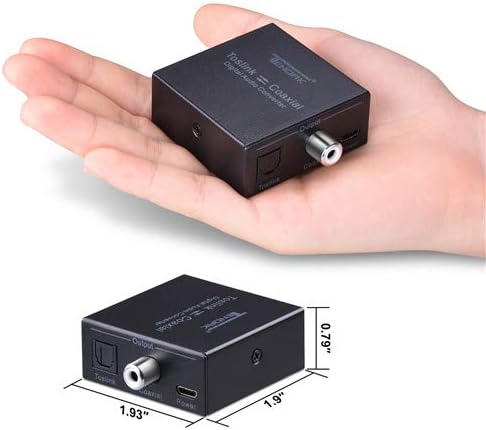
Image 3: The Tendak Bi-Directional Audio Converter held in a hand for size comparison, highlighting its compact and portable dimensions (1.93" x 1.9" x 0.79").
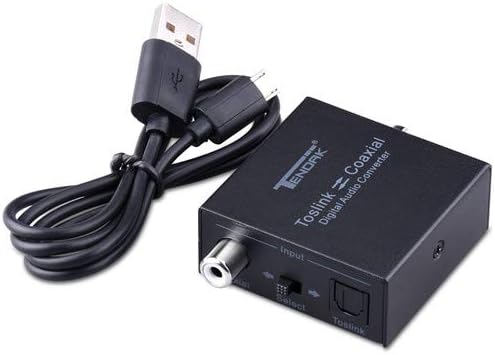
Image 4: The Tendak Bi-Directional Audio Converter shown alongside its USB power cable, demonstrating the included power solution.
5. Setup
Follow these steps to set up your Tendak Bi-Directional Digital Audio Converter:
- Connect Power: Connect the provided USB power cable to the 'Power Input' port on the converter. Plug the USB end into a 5V USB power source (e.g., a phone adapter, TV USB port, or other USB device). The power indicator LED will illuminate.
- Select Input Source: Identify whether your audio source (e.g., TV, Blu-ray player, game console) uses an Optical (Toslink) or Coaxial output.
- Connect Input:
- If using an Optical source, connect an Optical Toslink cable from your source device's Optical output to the 'Toslink Input' port on the converter.
- If using a Coaxial source, connect a Coaxial cable from your source device's Coaxial output to the 'Coaxial Input' port on the converter.
- Set Input Switch: Use the 'Select Switch' on the converter to choose the active input (either 'Toslink' or 'Coaxial') that matches your connected source.
- Connect Output Devices: Connect your audio receiving devices (e.g., soundbar, amplifier, speakers) to the converter's output ports.
- Connect an Optical Toslink cable from the 'Toslink Output' port on the converter to your receiving device's Optical input.
- Connect a Coaxial cable from the 'Coaxial Output' port on the converter to your receiving device's Coaxial input.

Image 5: A diagram illustrating typical connection scenarios for the Tendak Bi-Directional Audio Converter, showing a Blu-ray player connected via Coaxial input and a sound system connected via Toslink and Coaxial outputs, with the converter powered by a USB adapter.
Video 1: This video demonstrates the unboxing and setup process for a bi-directional coaxial optical converter, including connecting power, input, and output cables, and using the bi-directional switching feature. It highlights noise-free transmission and support for 192 KHz 24-bit sampling rate.
6. Operating Instructions
Once all connections are made and the power is supplied, the converter operates automatically based on the selected input. Ensure the 'Select Switch' is set to the correct input type (Toslink or Coaxial) for your source device. The converter will then output the audio signal to both its Toslink and Coaxial output ports simultaneously.

Image 6: The Tendak Bi-Directional Audio Converter integrated into a home entertainment setup, connecting a TV to external speakers, demonstrating its role in achieving high-definition audio output.
7. Troubleshooting
- No Audio Output:
- Verify all cables are securely connected to the correct input/output ports.
- Ensure the power adapter is connected and the power indicator LED on the converter is lit.
- Check the 'Select Switch' on the converter is set to the correct input source (Optical or Coaxial).
- Confirm your source device's audio output settings are configured to output via Optical/Coaxial.
- Ensure your receiving device (soundbar, amplifier) is set to the correct input channel.
- Test with different audio cables if possible, as faulty cables can prevent signal transmission.
- Distorted or Intermittent Audio:
- Ensure audio cables are not excessively long. Optical fiber cables should ideally be less than 30 meters (98 feet) and coaxial cables less than 10 meters (32 feet) to avoid signal degradation.
- Check for any kinks or damage in the optical fiber cable.
- Verify the audio format supported by your receiving device matches the output from the source. The converter supports LPCM2.0, DTS, and DOLBY-AC3.
- Ensure the power supply is stable.
- Device Not Powering On:
- Confirm the USB power cable is fully inserted into the converter and the power source.
- Try a different USB power source or adapter to rule out a faulty power supply.
8. Specifications
| Feature | Description |
|---|---|
| Model Number | AV-141-BK |
| Input | 1x Optical (Toslink), 1x Coaxial |
| Output | 1x Optical (Toslink), 1x Coaxial |
| Audio Format Support | LPCM2.0 / DTS / DOLBY-AC3 |
| Sampling Rate | Up to 192 KHz |
| Power Supply | 5V DC (via USB) |
| Optical Cable Length | Up to 30 meters (98 feet) |
| Coaxial Cable Length | Up to 10 meters (32 feet) |
| Dimensions | 6.2 x 6 x 2 cm (2.44 x 2.36 x 0.79 inches) |
| Weight | 109 g (0.24 lbs) |
9. Maintenance
- Clean the device with a soft, dry cloth. Do not use liquid cleaners or aerosols.
- Keep the optical ports covered with their protective caps when not in use to prevent dust and debris from entering.
- Store the device in a cool, dry place when not in use for extended periods.
10. Warranty and Support
For warranty information or technical support, please refer to the documentation provided with your purchase or contact Tendak customer service. Keep your proof of purchase for warranty claims.