
Introduction
Thank you for choosing the Symphonized NXT 2.0 Portable Bluetooth Speaker. This manual provides essential information for setting up, operating, and maintaining your speaker to ensure optimal performance and longevity. Please read this manual thoroughly before using the product.
What's in the Box
- Symphonized NXT 2.0 Portable Bluetooth Speaker
- USB Charging Cable
- User Manual
Product Overview
The Symphonized NXT 2.0 speaker features a durable ABS plastic construction with elegant wood accents, providing both robust protection and a natural aesthetic. It is designed for portability and delivers a well-balanced, powerful sound experience.

Front view of the Symphonized NXT 2.0 Portable Bluetooth Speaker, showcasing its dual speaker grilles and wood-grain finish.
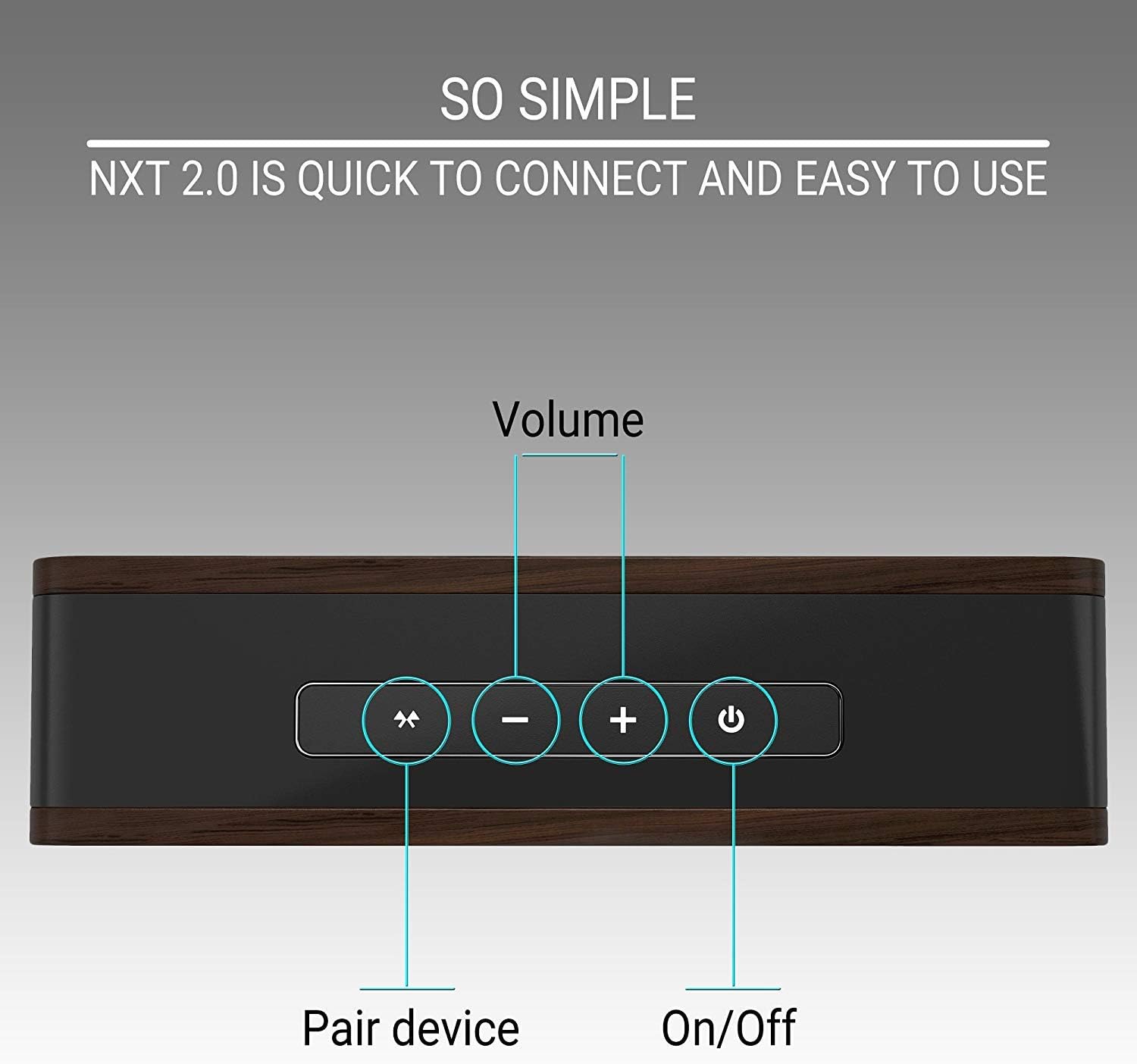
Top panel of the speaker showing the control buttons: Pair Device, Volume Down, Volume Up, and Power On/Off.
Setup
Charging the Speaker
- Connect the micro USB end of the charging cable to the charging port on the speaker.
- Connect the USB-A end of the charging cable to a compatible USB power adapter (not included) or a computer's USB port.
- The charging indicator light will illuminate. A full charge typically takes approximately 6 hours.
- Once fully charged, the indicator light may change color or turn off, depending on the model. Disconnect the charging cable.
A fully charged speaker provides up to 6 hours of playtime.
Bluetooth Pairing
- Ensure the speaker is fully charged.
- Press and hold the Power On/Off button on the speaker until you hear an audible prompt or see an indicator light flashing, indicating it's in pairing mode.
- On your device (smartphone, tablet, laptop), enable Bluetooth and search for available devices.
- Select "Symphonized NXT 2.0" from the list of available devices.
- Once connected, you will hear a confirmation sound, and the indicator light will typically stop flashing and remain solid.
The speaker has a Bluetooth working distance of approximately 10 meters (32 feet).
Wired Connection (AUX Input)
For devices without Bluetooth capability, or if you prefer a wired connection:
- Connect one end of a 3.5mm auxiliary cable (not included) to the AUX input port on the speaker.
- Connect the other end of the 3.5mm auxiliary cable to the audio output jack of your device.
- The speaker will automatically switch to AUX mode, or you may need to select it manually if there is a mode button.
Operating Instructions
Power On/Off
- To power on: Press and hold the Power On/Off button until the indicator light illuminates.
- To power off: Press and hold the Power On/Off button until the indicator light turns off.
Volume Control
- To increase volume: Press the '+' button.
- To decrease volume: Press the '-' button.
Bluetooth Device Pairing Button
- To initiate pairing mode or reconnect to a previously paired device, press the 'Pair Device' button.
Maintenance
Cleaning
- Wipe the speaker with a soft, dry cloth.
- Do not use abrasive cleaners, solvents, or strong chemicals, as these may damage the finish or internal components.
Storage
- Store the speaker in a cool, dry place away from direct sunlight and extreme temperatures.
- If storing for an extended period, ensure the battery is partially charged (around 50%) to preserve battery health.
Troubleshooting
| Problem | Possible Cause | Solution |
|---|---|---|
| Speaker does not turn on | Low battery | Charge the speaker fully. |
| Cannot pair via Bluetooth | Speaker not in pairing mode; Device Bluetooth off; Out of range | Ensure speaker is in pairing mode. Turn on Bluetooth on your device. Move device closer to speaker (within 10m/32ft). |
| No sound or low volume | Volume too low on speaker or device; Incorrect input mode | Increase volume on both speaker and connected device. Ensure correct input mode (Bluetooth/AUX) is selected. |
| Sound distortion at high volume | Volume too high | Reduce the volume on the speaker or your connected device. |
Specifications
| Feature | Detail |
|---|---|
| Brand | Symphonized |
| Model Name | NXT 2.0 |
| Speaker Maximum Output Power | 25 Watts |
| Frequency Response | 80 Hz - 20 kHz |
| Connectivity Technology | Auxiliary, Bluetooth, USB |
| Audio Output Mode | Stereo |
| Enclosure Material | ABS plastic |
| Speaker Type | Outdoor |
| Additional Features | Portable |
| Color | Black |
| Is Waterproof | FALSE |
| Control Method | Button |
| Battery Average Life | 6 Hours |
| Number of Audio Channels | 2.0 |
| Wireless Technology | Bluetooth |
| Connectivity Protocol | Bluetooth |
| Battery Charge Time | 6 Hours |
| Item Weight | 0.68 Kilograms |
| Compatible Devices | Smartphone, Tablet, Laptop, Television |
| Power Source | Battery Powered |
Warranty Information
The Symphonized NXT 2.0 Portable Bluetooth Speaker comes with a Limited Warranty. For specific details regarding warranty coverage, duration, and claims process, please refer to the warranty card included with your product or contact Symphonized customer support.
Support
If you encounter any issues not covered in the troubleshooting section or require further assistance, please contact Symphonized customer support. Contact information can typically be found on the product packaging, the official Symphonized website, or your purchase documentation.