
FIFINE K669B
FIFINE K669B USB Condenser Microphone
User Instruction Manual
Introduction
Thank you for choosing the FIFINE K669B USB Condenser Microphone. This manual provides detailed instructions to help you set up, operate, and maintain your microphone for optimal performance. Designed for versatility, the K669B is ideal for recording vocals, voice-overs, streaming, online meetings, gaming, and YouTube videos on various platforms including PC, Mac, PS4, and PS5.
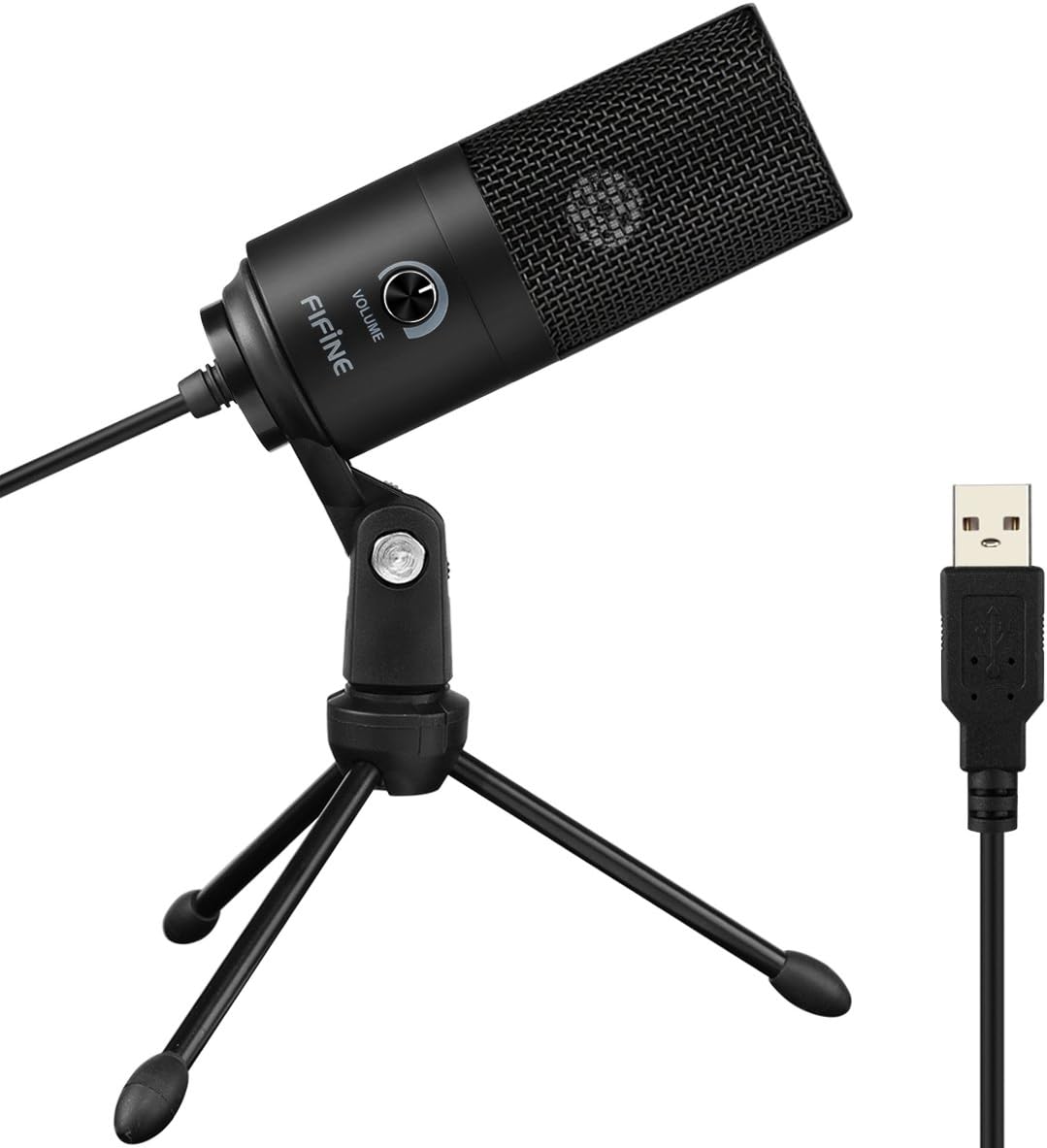
The FIFINE K669B USB Condenser Microphone, featuring a sleek black design, comes with a stable tripod stand and a USB cable for direct connection to your computer.
Setup
The FIFINE K669B microphone offers a convenient plug-and-play setup, requiring no additional drivers or software installation for most operating systems. Simply connect it to a compatible USB-A port on your device.
What's in the Box
- Condenser Microphone with USB Cable
- Tripod Stand
- User's Manual
Connection Steps
- Unpack the microphone and its components.
- Attach the microphone to the included tripod stand. Ensure it is securely fastened.
- Connect the USB cable from the microphone directly to an available USB-A port on your computer (PC, Mac), PS4, or PS5.
- Your operating system should automatically detect and install the necessary drivers. The microphone will be ready for use once detected.
Note: This microphone is not compatible with Xbox or mobile phones. If your MacBook only has USB-C ports, a USB-A to USB-C adapter (not included) will be required.

Instant setup: The FIFINE K669B connects directly via USB for immediate use with various devices and applications.
Operating Instructions
The FIFINE K669B is designed for ease of use, providing clear audio capture for a variety of applications.
Volume Control
The microphone features a built-in volume knob for convenient audio level adjustment. Rotate the knob clockwise to increase volume and counter-clockwise to decrease it. You can also turn the knob completely counter-clockwise to mute the microphone, protecting your privacy during calls or recordings.

Easily fine-tune your audio levels with the integrated volume knob.
Cardioid Pickup Pattern
The K669B utilizes a cardioid pickup pattern, which means it primarily captures sound from the front of the microphone, while minimizing sound from the sides and rear. This design is effective in isolating your voice and reducing unwanted background noise, making it ideal for single-person recordings, streaming, and voice-overs.

The cardioid pickup pattern ensures clear vocal capture by focusing on the sound source directly in front of the microphone.
Optimal Microphone Placement
For the best sound quality, position the microphone approximately 7 inches (18 cm) from your mouth. Ensure you are speaking into the front of the microphone (the side with the volume knob) to fully utilize its cardioid pickup pattern and minimize ambient noise.

Always speak into the front of the microphone for optimal sound capture.
Software Settings
While the K669B is plug-and-play, you may need to select it as your default input device in your computer's sound settings or within specific applications (e.g., Discord, OBS, Zoom, Audacity). For applications like Zoom, it is recommended to disable features such as "Automatically adjust microphone volume" to prevent unexpected volume fluctuations during use.
Maintenance
Proper care will extend the life and performance of your FIFINE K669B microphone.
- Cleaning: Use a soft, dry cloth to wipe down the microphone body and stand. Avoid using liquid cleaners or abrasive materials, as they can damage the finish or internal components.
- Storage: When not in use, store the microphone in a clean, dry place away from extreme temperatures and humidity.
- Handling: Handle the microphone with care. Avoid dropping it or subjecting it to strong impacts, which can affect its internal condenser element.
Troubleshooting
If you encounter issues with your FIFINE K669B microphone, please refer to the following common solutions:
| Problem | Possible Cause | Solution |
|---|---|---|
| No sound or low volume | Incorrect input device selected; Microphone volume too low; Loose connection. | Check your computer's sound settings to ensure the FIFINE K669B is selected as the default input device. Adjust the microphone's volume knob. Ensure the USB cable is securely connected. |
| Excessive background noise | Microphone too far from source; High gain setting; Ambient noise. | Position the microphone closer to your mouth (approx. 7 inches). Lower the microphone's volume knob. Record in a quieter environment. Consider using software-based noise reduction if available. |
| Intermittent audio or driver issues | Software conflict; Temporary system glitch. | Try disconnecting and reconnecting the microphone. Restart your computer. Ensure your operating system is up to date. Disable any conflicting audio enhancement software. |
| Microphone not recognized | Faulty USB port; Incompatible device. | Try a different USB port. Test the microphone on another compatible computer if possible. Confirm your device (e.g., Xbox, phone) is not listed as incompatible. |
Specifications
| Feature | Specification |
|---|---|
| Brand | FIFINE |
| Model Name | K669B |
| Connectivity Technology | USB |
| Connector Type | USB Type-A |
| Polar Pattern | Unidirectional (Cardioid) |
| Microphone Form Factor | Desktop Microphone |
| Material | Metal |
| Item Weight | 5.6 ounces |
| Frequency Range | 20Hz-20kHz |
| Signal-to-Noise Ratio | 78 dB |
| Noise Level | 16 dB |
| Compatible Devices | Laptop/Desktop, Personal Computer, PS4/PS5 |
| Power Source | Corded Electric |
Warranty and Support
FIFINE products are manufactured to high-quality standards. For warranty information, technical support, or any inquiries regarding your FIFINE K669B microphone, please visit the official FIFINE store or contact their customer service directly.
Official FIFINE Store: FIFINE Store on Amazon
Related documentsK669B


Ask a question about this manual
Ask about setup, troubleshooting, compatibility, parts, safety, or missing instructions. Manuals+ will review the question and use this page’s manual context to help answer it.