
GPX IJMB587B
GPX iLive Bluetooth Karaoke Machine Model iJMB587B User Manual
Model: iJMB587B | Brand: GPX
Important Safety Instructions
Please read and follow these instructions carefully to ensure safe operation and prevent damage to the unit. Keep these instructions for future reference.
- Read these instructions.
- Keep these instructions.
- Heed all warnings.
- Follow all instructions.
- Do not use this apparatus near water.
- Clean only with a dry cloth.
- Do not block any ventilation openings. Install in accordance with the manufacturer’s instructions.
- Do not install near any heat sources such as radiators, heat registers, stoves, or other apparatus (including amplifiers) that produce heat.
- Do not defeat the safety purpose of the polarized or grounding-type plug. A polarized plug has two blades with one wider than the other. A grounding type plug has two blades and a third grounding prong. The wide blade or the third prong are provided for your safety. If the provided plug does not fit into your outlet, consult an electrician for replacement of the obsolete outlet.
- Protect the power cord from being walked on or pinched particularly at plugs, convenience receptacles, and the point where they exit from the apparatus.
- Only use attachments/accessories specified by the manufacturer.
- Use only with the cart, stand, tripod, bracket, or table specified by the manufacturer, or sold with the apparatus. When a cart is used, use caution when moving the cart/apparatus combination to avoid injury from tip-over.
- Unplug this apparatus during lightning storms or when unused for long periods of time.
- Refer all servicing to qualified service personnel. Servicing is required when the apparatus has been damaged in any way, such as power-supply cord or plug is damaged, liquid has been spilled or objects have fallen into the apparatus, the apparatus has been exposed to rain or moisture, does not operate normally, or has been dropped.
Features
- Portable Bluetooth karaoke machine with microphone and holder.
- Wireless Bluetooth range: 60 feet.
- Top-load player supports CD+G, CD, and CD-R/RW Discs.
- 7-inch TFT LCD monitor for displaying CD+G graphics and lyrics.
- Automatic Voice Control (AVC) and Echo Control.
- Two microphone inputs.
- LED light effects.
- Programmable tracks.
- Master volume control.
Package Contents
Verify that all items listed below are included in your package:
- iLive Bluetooth Karaoke Machine (iJMB587B)
- Microphone
- Microphone Holder
- AC Power Adapter
- User Manual
Controls and Indicators
This section provides an overview of the main controls and indicators on your karaoke machine. Refer to the diagram below for visual reference.
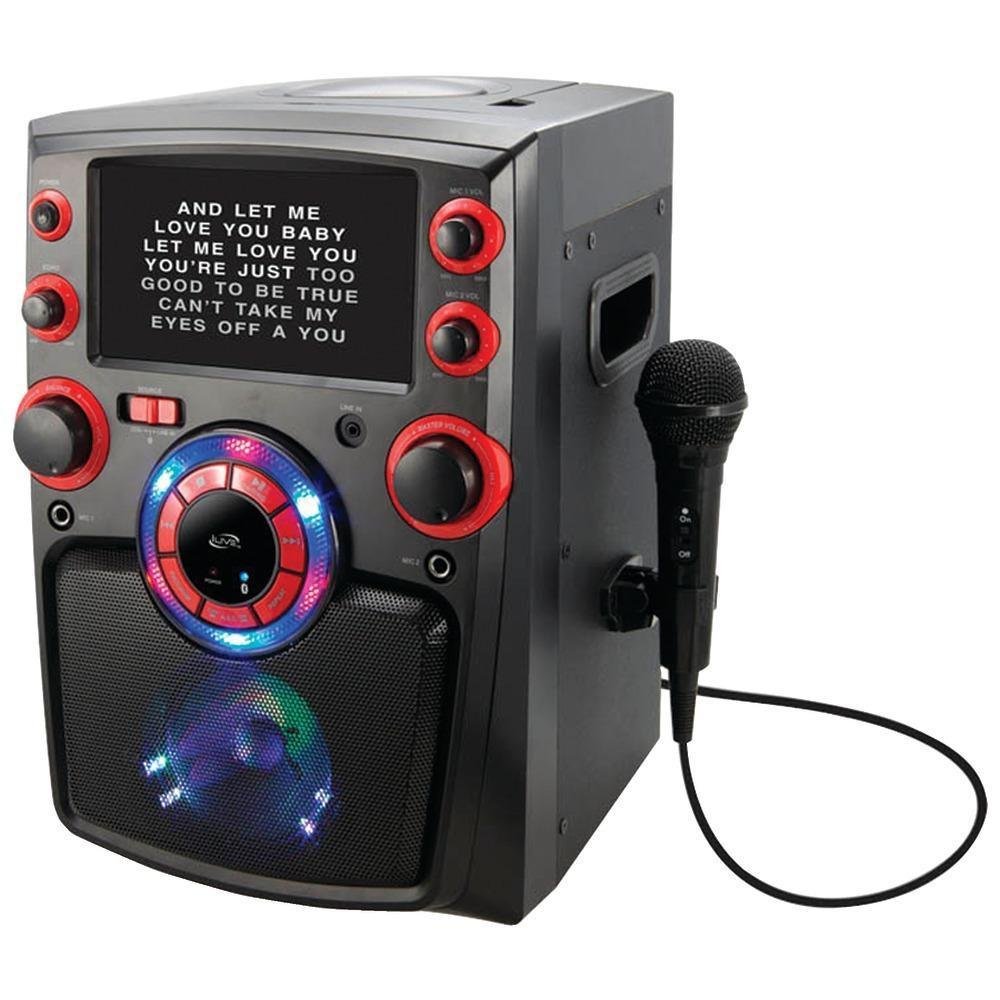
Figure 1: Front view of the iLive Bluetooth Karaoke Machine.
The image above displays the front of the iLive Bluetooth Karaoke Machine, highlighting the central 7-inch TFT LCD monitor, the control panel located below it, and the microphone input jacks. The top-loading CD+G player is located on the top surface, not visible in this front view.
Front Panel Controls:
- Power Button: Turns the unit on or off.
- Source/Mode Button: Switches between CD+G, Bluetooth, and AUX input modes.
- Play/Pause Button: Starts or pauses CD playback.
- Stop Button: Stops CD playback.
- Skip/Search Buttons (<< / >>): Skips tracks or fast forwards/rewinds during CD playback.
- Master Volume Knob: Adjusts the overall sound output volume.
- Microphone Volume Knob: Adjusts the volume of the connected microphones.
- Echo Control Knob: Adjusts the echo effect applied to microphone audio.
- AVC (Automatic Voice Control) Knob: Adjusts the level at which the main vocal track is reduced when a microphone is used.
- LED Light Button: Toggles the multi-color LED light effects.
- Microphone Input Jacks (MIC 1, MIC 2): Connects microphones.
- AUX Input Jack: Connects external audio devices.
- 7-inch TFT LCD Monitor: Displays CD+G lyrics and graphics.
Setup
1. Power Connection
- Ensure the unit is placed on a stable, flat surface.
- Connect the supplied AC power adapter to the DC IN jack on the back of the karaoke machine.
- Plug the other end of the AC power adapter into a standard wall outlet (AC 100-240V, 50/60Hz).
- The unit can also be powered by batteries (not included). Refer to the battery compartment for correct battery type and insertion.
2. Microphone Connection
- Insert the microphone plug into either the MIC 1 or MIC 2 input jack on the front panel.
- Place the microphone into the microphone holder if desired.
3. Initial Power On
- Press the Power button to turn on the unit.
- The 7-inch monitor will illuminate.
Operating Instructions
1. CD+G Playback
- Press the Source/Mode button repeatedly until "CD" or "CD+G" mode is selected.
- Open the CD compartment cover located on the top of the unit.
- Carefully place a CD+G or audio CD onto the spindle with the label side facing up.
- Close the CD compartment cover.
- Press the Play/Pause button to begin playback. Lyrics and graphics will appear on the 7-inch monitor if a CD+G disc is used.
- Use the Skip/Search buttons to navigate between tracks.
- Press the Stop button to end playback.
2. Bluetooth Pairing
- Press the Source/Mode button repeatedly until "Bluetooth" mode is selected. The unit will enter pairing mode, indicated by a flashing Bluetooth indicator (if present, or an on-screen message).
- Enable Bluetooth on your mobile device (smartphone, tablet, etc.).
- Search for Bluetooth devices and select "iLive iJMB587B" (or similar name) from the list.
- Once paired, the unit will confirm the connection, and you can stream audio wirelessly from your device.
3. Auxiliary Input
- Connect a 3.5mm audio cable (not included) from the headphone jack or line-out of your external audio device to the AUX Input jack on the karaoke machine.
- Press the Source/Mode button repeatedly until "AUX" mode is selected.
- Start playback on your external audio device. Audio will be routed through the karaoke machine.
4. Microphone Usage and Effects
- Ensure microphones are connected to the MIC input jacks.
- Adjust the Microphone Volume Knob to control the microphone's output level.
- Turn the Echo Control Knob to add an echo effect to your vocals.
- Adjust the AVC (Automatic Voice Control) Knob. When AVC is active, the main vocal track on a CD+G disc will be reduced in volume when you sing into the microphone, allowing your voice to be more prominent.
5. LED Light Effects
- Press the LED Light Button to activate or deactivate the multi-color light effects.
- The lights will synchronize with the music, enhancing the karaoke experience.
Maintenance
1. Cleaning the Unit
- Always unplug the unit from the power source before cleaning.
- Use a soft, dry cloth to wipe the exterior surfaces. Do not use abrasive cleaners, waxes, or solvents.
- For the LCD screen, use a soft, lint-free cloth specifically designed for electronics screens. Do not spray liquid directly onto the screen.
- Keep the CD compartment clean and free of dust. Use a CD lens cleaner disc periodically if playback issues occur.
2. Storage
- When not in use for extended periods, unplug the unit and store it in a cool, dry place, away from direct sunlight and extreme temperatures.
- If using batteries, remove them before long-term storage to prevent leakage.
Troubleshooting
| Problem | Possible Cause | Solution |
|---|---|---|
| No power | Power adapter not connected properly. Batteries are depleted or incorrectly inserted. | Ensure AC adapter is securely plugged into the unit and a working outlet. Check battery orientation and replace if necessary. |
| No sound from speakers | Master Volume is too low. Incorrect source selected. | Increase Master Volume. Press the Source/Mode button to select the correct input (CD, Bluetooth, AUX). |
| No sound from microphone | Microphone not connected. Microphone Volume is too low. | Ensure microphone is securely plugged into a MIC input. Increase Microphone Volume. |
| CD+G lyrics not displayed | Disc is not a CD+G format. Disc is dirty or scratched. | Ensure you are using a CD+G disc. Clean the disc with a soft cloth or try another disc. |
| Bluetooth pairing fails | Unit is not in pairing mode. Bluetooth device is too far away. | Ensure the unit is in Bluetooth mode and flashing (indicating pairing mode). Move your Bluetooth device closer to the karaoke machine. Try unpairing and re-pairing. |
Specifications
- Model: iJMB587B
- Power Source: AC 100-240V, 50/60Hz (via adapter) / Battery Powered
- Display: 7-inch TFT LCD Monitor
- Disc Compatibility: CD, CD-R/RW, CD+G
- Bluetooth Version: (Information not specified in product data)
- Bluetooth Range: Up to 60 feet (18 meters) line of sight
- Audio Inputs: 2 x Microphone (6.3mm), 1 x AUX (3.5mm)
- Dimensions (L x W x H): 17.5 x 12.4 x 12.3 inches (44.45 x 31.5 x 31.24 cm)
- Weight: 8.93 pounds (4.05 kg)
Warranty and Support
For warranty information and customer support, please refer to the warranty card included with your product or visit the official GPX website. Do not attempt to service this unit yourself. Refer all servicing to qualified service personnel.
Manufacturer: GPX, Inc.
Related documentsIJMB587B


Ask a question about this manual
Ask about setup, troubleshooting, compatibility, parts, safety, or missing instructions. Manuals+ will review the question and use this page’s manual context to help answer it.