
MYMAHDI M220-Black-8GB
MYMAHDI 8GB MP3 Player User Manual
Model: M220-Black-8GB
1. Introduction
Welcome to the user manual for your new MYMAHDI 8GB MP3 Player. This guide provides detailed instructions on how to set up, operate, maintain, and troubleshoot your device. Please read this manual thoroughly to ensure optimal performance and longevity of your MP3 player.
The MYMAHDI MP3 Player is a versatile device featuring a smooth Android OS, 4-inch touch screen, Bluetooth 5.0, Wi-Fi connectivity for streaming, HiFi sound quality, and expandable storage up to 1TB. It supports a wide range of audio and video formats, making it an ideal companion for music, videos, and e-books.
2. What's in the Box
Upon unboxing your MYMAHDI MP3 Player, please ensure all the following items are present:
- MYMAHDI 8GB MP3 Player (Model: M220-Black-8GB)
- Earphone
- USB Cable
- User Manual (this document)
3. Product Overview
3.1 Key Features
- Smooth Android OS: Built-in 2GB RAM and 8GB ROM, with an 8-core CPU for fast and smooth operation. Supports external storage expansion up to 1TB via a card slot.
- Smart Wi-Fi Wireless Connection: Allows downloading, uploading, and streaming music and videos online. Pre-installed apps include Amazon Music, Apple Music, Spotify, Audible, Deezer, Pandora, and more.
- Bluetooth 5.0: Features two-way connection technology for faster and more stable pairing with Bluetooth headsets, speakers, and car systems. Supports automatic connection and file transfer.
- HiFi Shock Sound Quality: Integrated lossless sound speaker for direct audio playback without earphones. Supports synchronous display of LRC lyrics and FM radio recording.
- 4-inch 1080P HD Touch Display: Full-screen touch operation for a sensitive and smooth user experience. Supports one-key lock screen.
- Super Battery Life: 2000 mAh aluminum battery provides up to 20 hours with Bluetooth earbuds, 35 hours with wired earbuds, and 5-6 hours of video watching. Standby time up to 3-5 months.
- Wide Format Support: Supports full-format lossless audio (MP3, WMA, OGG, APE, FLAC, WAV, AAC-LC, ACELP) and 720P/1080P HD video (RM, RMVB, AVI, MKV, WMV, VOB, MOV, FLV, ASF, DAT, MP4, 3GP, MPG, MPEG).
3.2 Device Layout and Components

Figure 3.2.1: Front and Back View of the MP3 Player. The front features the 4-inch touch screen and navigation controls. The back includes the microphone (MIC), TF card slot, DC 5V-1A input, USB port, ON-OFF switch, and headphone jack.

Figure 3.2.2: Large Memory Capacity. The player comes with 8GB internal storage and supports external expansion up to 1TB via a TF (Micro SD) card, allowing for thousands of songs and media files.

Figure 3.2.3: 4-inch Touch Screen. The device features a responsive touch screen for intuitive navigation through menus and applications, including a one-key lock screen function.

Figure 3.2.4: Bluetooth 5.0 Connectivity. The player supports stable and fast wireless connections to various Bluetooth audio devices, such as headphones, speakers, and car audio systems.
4. Setup
4.1 Initial Charging
Before first use, fully charge your MP3 player. Connect the provided USB cable to the player's USB port and the other end to a USB power adapter (not included) or a computer's USB port. The charging indicator will show the charging status. A full charge takes approximately 1.5 hours.
4.2 Powering On/Off
- To Power On: Slide the ON-OFF switch to the 'ON' position. The screen will light up, and the device will boot.
- To Power Off: Slide the ON-OFF switch to the 'OFF' position. The device will shut down.
4.3 Inserting a Micro SD Card
To expand storage, locate the TF card slot on the side of the device. Gently insert a Micro SD card (up to 1TB) into the slot until it clicks into place. To remove, push the card in slightly until it springs out.
4.4 Connecting to Wi-Fi
- From the home screen, tap on the 'Settings' icon.
- Select 'Network & Internet' or 'Wi-Fi'.
- Toggle Wi-Fi 'On'.
- Select your desired Wi-Fi network from the list.
- Enter the network password if prompted, then tap 'Connect'.
4.5 Connecting Bluetooth Devices
- From the home screen, tap on the 'Settings' icon.
- Select 'Connected devices' or 'Bluetooth'.
- Toggle Bluetooth 'On'.
- Ensure your Bluetooth headset or speaker is in pairing mode.
- The player will scan for available devices. Select your device from the list to pair.
5. Operating Instructions
5.1 Navigating the Touch Screen
The MYMAHDI MP3 Player operates primarily through its 4-inch touch screen. Swipe left/right or up/down to navigate between screens and menus. Tap icons to open applications or select options. Use the back arrow or gesture navigation to return to the previous screen.
5.2 Playing Music
- Tap the 'Music' icon on the home screen.
- Browse your music library by Artist, Album, Songs, or Playlists.
- Tap on a song to begin playback.
- Use the on-screen controls for Play/Pause, Skip Forward/Backward, and Volume adjustment.

Figure 5.2.1: Music Playback Interface. The player supports HiFi lossless audio and displays album art and lyrics (LRC) during playback.
5.3 Watching Videos
- Tap the 'Movie' or 'Videos' icon.
- Select a video file from your storage.
- The video will begin playing. Use on-screen controls for playback options.
5.4 Using FM Radio
- Tap the 'Radio' icon.
- Ensure earphones are connected as they act as the antenna. You can also listen via the built-in speaker.
- Use the scan function to find available stations.
5.5 Using the Voice Recorder
- Tap the 'Record' or 'Sound Recorder' icon.
- Tap the record button to start recording.
- Tap the stop button to end and save the recording.
5.6 Downloading/Streaming Apps
With Wi-Fi connected, you can access pre-installed streaming apps like Spotify, Audible, Deezer, and more. Simply tap the app icon and log in with your account credentials to start streaming content.
5.7 File Transfer
- Via USB: Connect the player to your computer using the USB cable. The player will appear as a removable disk drive, allowing you to drag and drop files.
- Via Bluetooth: You can transfer files from your phone to the player using the Bluetooth function. Ensure both devices are paired and support file transfer profiles.
6. Maintenance
Proper maintenance ensures the longevity and optimal performance of your MYMAHDI MP3 Player.
6.1 Cleaning the Device
- Use a soft, lint-free cloth to wipe the screen and body of the player.
- For stubborn smudges, slightly dampen the cloth with water or a screen cleaner. Do not spray liquids directly onto the device.
- Avoid using abrasive cleaners, alcohol, or solvents, as these can damage the finish.
6.2 Battery Care
- Avoid exposing the device to extreme temperatures (hot or cold), as this can degrade battery performance.
- For long-term storage, charge the battery to about 50% and store the device in a cool, dry place.
- Do not attempt to replace the battery yourself. Contact customer support if battery issues arise.
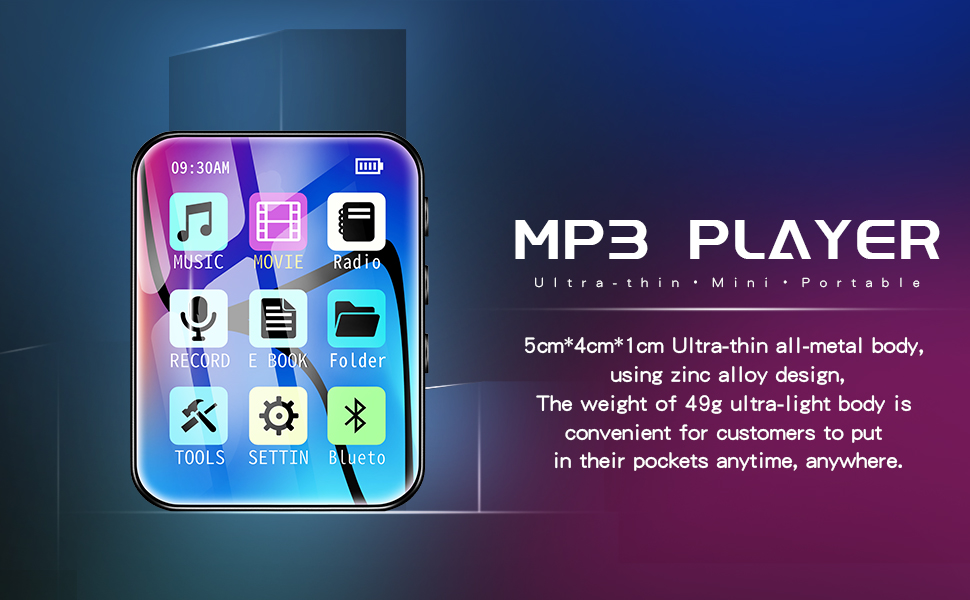
Figure 6.2.1: Battery Life Overview. The player features a 2000 mAh battery, offering extended playback and standby times. Proper charging and storage practices help maintain battery health.
6.3 Storage Tips
- Store the player in a protective case or pouch to prevent scratches and minor impacts.
- Keep the device away from dust, moisture, and direct sunlight.
7. Troubleshooting
If you encounter issues with your MYMAHDI MP3 Player, refer to the following common problems and solutions:
| Problem | Possible Cause | Solution |
|---|---|---|
| Device won't turn on. | Low battery; device frozen. | Charge the device for at least 30 minutes. If still unresponsive, try sliding the ON-OFF switch rapidly a few times or hold the power button (if applicable) for 10-15 seconds to force a restart. |
| No sound from headphones/speaker. | Volume too low; faulty headphones; incorrect audio output. | Increase volume. Test with different headphones. Check audio output settings (e.g., ensure Bluetooth is connected if using wireless headphones). |
| Cannot connect to Wi-Fi. | Incorrect password; out of range; router issue. | Double-check Wi-Fi password. Move closer to the Wi-Fi router. Restart your Wi-Fi router. |
| Bluetooth device won't pair. | Device not in pairing mode; too far apart; interference. | Ensure the Bluetooth device is in pairing mode. Bring devices closer. Turn off other Bluetooth devices nearby. |
| Files not transferring via USB. | Incorrect USB mode; faulty cable/port. | On the player, ensure USB connection mode is set to 'File Transfer' or 'MTP'. Try a different USB cable or port on your computer. |
If the problem persists after trying these solutions, please contact MYMAHDI customer support for further assistance.
8. Specifications
| Feature | Detail |
|---|---|
| Brand | MYMAHDI |
| Model Name | mp3 player with bluetooth (M220-Black-8GB) |
| Product Dimensions | 3.54 x 1.54 x 0.19 inches |
| Item Weight | 2.03 ounces |
| Screen Size | 4 Inches |
| Memory Storage Capacity | 8 GB (Expandable up to 1TB via Micro SD) |
| Connectivity Technology | Bluetooth, Wi-Fi |
| Special Features | FM Radio, Touch Screen, Voice Recorder, Android OS, Streaming Apps |
| Battery | 1 Lithium Ion battery required (2000 mAh) |
| Supported Audio Formats | MP3, WMA, OGG, APE, FLAC, WAV, AAC-LC, ACELP |
| Supported Video Formats | 720P/1080P HD (RM, RMVB, AVI, MKV, WMV, VOB, MOV, FLV, ASF, DAT, MP4, 3GP, MPG, MPEG) |
| Manufacturer | Weisa Technology Co., Ltd |
| Date First Available | February 27, 2017 |
9. Warranty and Support
Your MYMAHDI MP3 Player comes with a 1-year warranty from the date of purchase. This warranty covers manufacturing defects and ensures timely service.
For any questions, technical support, or warranty claims, please contact MYMAHDI customer service. We offer 12-hour after-sales correspondence to address your concerns promptly.
You can also visit the official MYMAHDI Store on Amazon for more information and support resources: MYMAHDI Amazon Store
Ask a question about this manual
Ask about setup, troubleshooting, compatibility, parts, safety, or missing instructions. Manuals+ will review the question and use this page’s manual context to help answer it.