
Mastervolt 81400500
Mastervolt DC Master 12V to 24V Converter - 7A User Manual
Model: 81400500
1. Introduction
This user manual provides essential information for the safe and efficient installation, operation, and maintenance of your Mastervolt DC Master 12V to 24V Converter, 7A model. Please read this manual thoroughly before using the product to ensure proper functionality and to prevent damage or injury.
2. Safety Information
Always observe the following safety precautions to prevent personal injury or damage to the product and connected equipment:
- Installation must be performed by qualified personnel in accordance with all applicable electrical codes and regulations.
- Ensure the power supply is disconnected before performing any installation, maintenance, or troubleshooting.
- Do not expose the converter to water, excessive moisture, or extreme temperatures.
- Verify correct polarity when connecting input and output cables. Incorrect wiring can cause severe damage.
- Do not open the converter casing. There are no user-serviceable parts inside. Opening the casing will void the warranty.
- Ensure adequate ventilation around the unit to prevent overheating.
- This product is designed for DC voltage conversion. Do not connect to AC power sources.
Proposition 65 Warning:
This product can expose you to chemicals including lead and lead compounds, which are known to the State of California to cause cancer and birth defects or other reproductive harm. For more information go to www.P65Warnings.ca.gov.
3. Package Contents
Upon unpacking, please verify that all items are present and undamaged:
- Mastervolt DC Master 12V to 24V Converter (7A)
- User Manual (this document)
- Mounting hardware (if applicable, check packaging)
4. Product Features
The Mastervolt DC Master 12V to 24V Converter is designed to efficiently convert a 12V DC input voltage to a stable 24V DC output voltage, suitable for powering 24V equipment from a 12V battery bank. Key features include:
- Input Voltage Range: 8 - 15.5V DC
- Output Voltage: +27.2V DC (nominal 24V)
- Continuous Load: 7 Amps
- Maximum Load: 9 Amps (intermittent)
- Compact and durable plastic housing.
- Designed for marine and mobile applications.

Figure 4.1: Mastervolt DC Master 12V to 24V Converter (7A model). This image displays the front label of the converter, indicating "DC Master 12/24 7-9A", "Max. Load 9A", and "Continuous Load 7A". It also shows the input voltage range (8-15.5V) and output voltage (+27.2V) terminals.
5. Setup and Installation
Follow these steps for proper installation of the DC Master converter:
- Mounting Location: Choose a dry, well-ventilated location away from direct sunlight, heat sources, and flammable materials. Ensure sufficient space around the unit for air circulation. The unit can be mounted horizontally or vertically.
- Secure Mounting: Use appropriate screws and fasteners to securely mount the converter to a stable surface.
- Wiring - Input (12V DC):
- Connect the positive (+) terminal of your 12V DC power source (e.g., battery bank) to the "IN +" terminal on the converter.
- Connect the negative (-) terminal of your 12V DC power source to the "IN -" (0V) terminal on the converter.
- Ensure all connections are tight and secure to prevent voltage drop and overheating. Use appropriately sized cables for the current draw.
- Wiring - Output (24V DC):
- Connect the positive (+) terminal of your 24V DC load to the "OUT +" (+27.2V) terminal on the converter.
- Connect the negative (-) terminal of your 24V DC load to the "OUT -" (0V) terminal on the converter.
- Double-check all output connections for correct polarity before applying power.
- Power On: Once all connections are verified, apply power to the 12V input. The converter should begin operating.
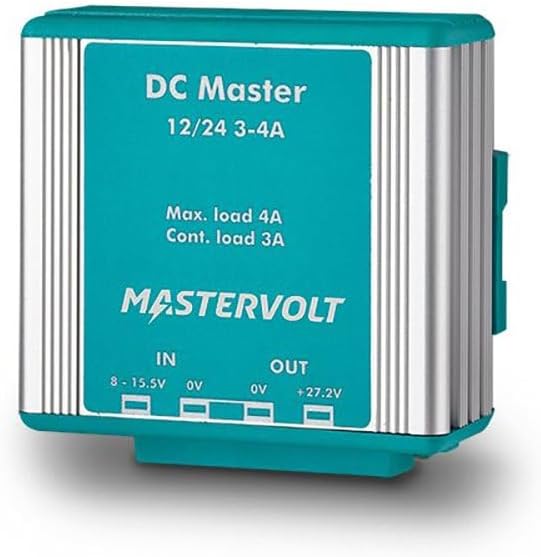
Figure 5.1: Mastervolt DC Master 12V to 24V Converter (example showing terminals). While this image shows a 3-4A model, the terminal layout for input (IN) and output (OUT) connections is similar to the 7A model, illustrating where to connect 12V input and 24V output wiring.
6. Operating Instructions
The Mastervolt DC Master converter operates automatically once connected to a valid 12V DC input source. It will provide a stable 24V DC output to your connected devices.
- Normal Operation: The converter will continuously supply 24V DC power as long as the 12V input is within the specified range (8-15.5V).
- Load Management: Ensure that the total current draw of your 24V devices does not exceed the converter's continuous load rating of 7 Amps. Brief peak loads up to 9 Amps are permissible.
- Overload Protection: The unit is equipped with internal protection mechanisms to prevent damage from excessive current draw. If an overload occurs, the unit may temporarily shut down. Reduce the load and cycle the input power to reset.
7. Maintenance
The Mastervolt DC Master converter requires minimal maintenance. Follow these guidelines to ensure long-term performance:
- Cleaning: Periodically clean the exterior of the unit with a soft, dry cloth. Do not use abrasive cleaners or solvents. Ensure no dust or debris accumulates in ventilation openings.
- Connections: Annually inspect all electrical connections for tightness and corrosion. Loose connections can lead to overheating and poor performance.
- Ventilation: Ensure that the area around the converter remains clear and unobstructed to allow for proper airflow and heat dissipation.
- Storage: If storing the unit for an extended period, disconnect it from all power sources and store it in a dry, temperature-controlled environment.
8. Troubleshooting
Refer to the table below for common issues and their potential solutions:
| Problem | Possible Cause | Solution |
|---|---|---|
| No 24V output. | No 12V input power. Incorrect input polarity. Blown fuse on input line (if applicable). Converter in overload protection. | Check 12V input power source and connections. Verify input wiring polarity. Check and replace fuse if necessary. Reduce load, disconnect input power for 30 seconds, then reconnect. |
| Output voltage is unstable or low. | Loose connections. Input voltage too low. Overload condition. | Check and tighten all input and output connections. Ensure 12V input voltage is within 8-15.5V range. Reduce connected load. |
| Unit is hot to the touch. | Insufficient ventilation. Excessive load. | Ensure adequate airflow around the unit. Clear any obstructions. Reduce the connected load to stay within continuous rating. |
9. Specifications
| Parameter | Value |
|---|---|
| Model Name | 81400500 |
| Input Voltage Range | 8 - 15.5V DC |
| Output Voltage (Nominal) | 24V DC (+27.2V) |
| Continuous Output Current | 7 Amps |
| Maximum Output Current (Intermittent) | 9 Amps |
| Dimensions (LxWxH) | 7 x 3.5 x 2 inches |
| Weight | 1.06 Pounds |
| Material | Plastic |
| UPC | 816882020841 |
10. Warranty and Support
Mastervolt products are manufactured to high quality standards and come with a warranty. For specific warranty terms and conditions, please refer to the documentation provided with your purchase or visit the official Mastervolt website. For technical support, service, or to inquire about replacement parts, please contact Mastervolt customer service or an authorized dealer.
Manufacturer: Mastervolt
Website: www.mastervolt.com
Related documents81400500


Ask a question about this manual
Ask about setup, troubleshooting, compatibility, parts, safety, or missing instructions. Manuals+ will review the question and use this page’s manual context to help answer it.