
Introduction
This manual provides comprehensive instructions for the setup, operation, and maintenance of your AcuRite 13019W2 5.4-inch Intelli-Time Alarm Clock. Please read these instructions thoroughly before using the device to ensure proper function and longevity.
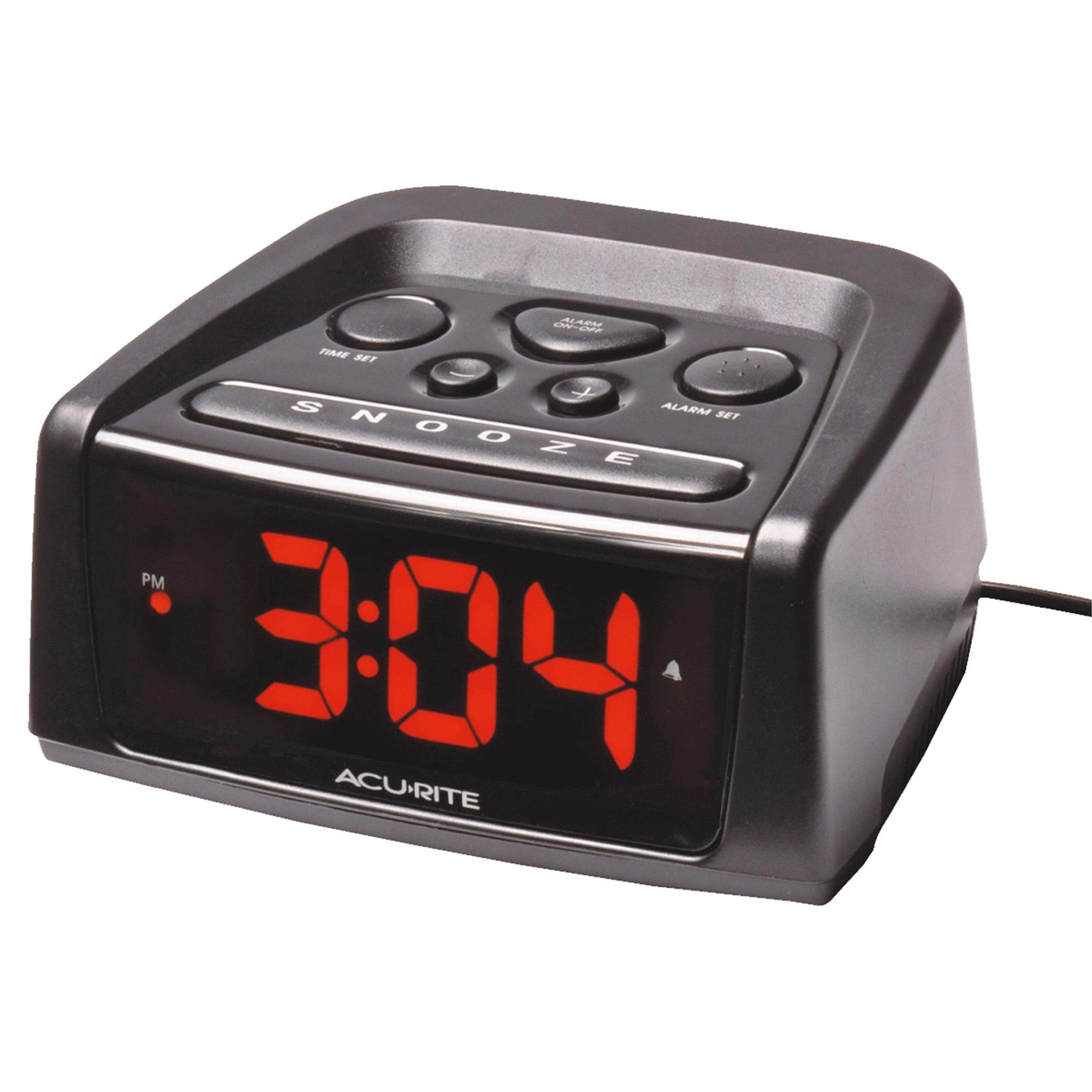
Image: Front view of the AcuRite 13019W2 alarm clock, displaying red LED digits and control buttons on top. The clock is black with a rectangular shape.
Key Features
- Intelli-Time Technology: Automatically sets time and date, and remembers settings after power interruptions.
- Automatic Daylight Saving Time (DST) Adjustment: The clock adjusts itself for DST changes.
- Large LED Display: Features big, easy-to-read digits with adjustable brightness.
- Audible Alarm: Loud alarm (84 dBm) with high and low volume controls.
- Large Snooze Button: Conveniently located for easy access.
- Battery Backup: Maintains time and alarm settings during power outages (display will not be lit).
Setup
1. Powering the Unit
- AC Power: Plug the AC adapter into a standard electrical outlet. The clock will power on and the display will illuminate.
- Battery Backup (Optional): For backup during power outages, insert 2 AAA alkaline batteries (not included) into the battery compartment located on the bottom of the unit. This will preserve time and alarm settings, but the display will not be visible without AC power.
2. Initial Intelli-Time Setup
Upon initial power-up, the Intelli-Time technology will automatically set the correct time. This may take a few moments. Ensure the time zone switch (located on the bottom) is set to your local time zone.
3. Daylight Saving Time (DST) Switch
Locate the DST switch on the bottom of the clock. Set it to ON for automatic DST adjustments or OFF if your region does not observe DST.
Operation
1. Setting the Time Manually
- Press and hold the TIME SET button (located on the top of the clock) until the hour digits begin to flash.
- Use the + or - buttons to adjust the hour. Pay attention to the PM indicator.
- Press the TIME SET button again to confirm the hour and move to the minute setting.
- Use the + or - buttons to adjust the minutes.
- Press the TIME SET button one last time to save the time and exit time setting mode.
2. Setting the Alarm
- Press and hold the ALARM SET button (located on the top of the clock) until the alarm hour digits begin to flash.
- Use the + or - buttons to adjust the alarm hour. Observe the PM indicator for the alarm time.
- Press the ALARM SET button again to confirm the alarm hour and move to the alarm minute setting.
- Use the + or - buttons to adjust the alarm minutes.
- Press the ALARM SET button one last time to save the alarm time.
3. Turning the Alarm On/Off
Press the ALARM ON/OFF button (located on the top of the clock) to toggle the alarm function. An alarm icon (bell symbol) will appear on the display when the alarm is active.
4. Snooze Function
When the alarm sounds, press the large SNOOZE button (front top) to temporarily silence the alarm. The alarm will sound again after approximately 9 minutes.
5. Display Brightness
The clock features an adjustable display brightness. Locate the brightness switch (often labeled "DIMMER" or "BRIGHTNESS") on the back or side of the unit. Toggle between High and Low settings to suit your preference.
6. Alarm Volume
The alarm volume can be adjusted between High and Low settings using the volume switch, typically located on the back or side of the clock.
Maintenance
- Cleaning: Wipe the clock with a soft, damp cloth. Do not use abrasive cleaners or chemicals.
- Battery Replacement: Replace backup batteries annually or when the clock fails to retain settings during a power outage.
- Placement: Avoid placing the clock in direct sunlight, near heat sources, or in areas with high humidity.
Troubleshooting
| Problem | Possible Solution |
|---|---|
| Clock display is blank. | Ensure the AC adapter is securely plugged into a working outlet. If using battery backup, the display will only illuminate with AC power. |
| Alarm does not sound. | Verify the alarm is activated (bell icon visible). Check alarm time settings. Ensure alarm volume is not set to minimum or off. |
| Time is incorrect. | Check the time zone switch on the bottom of the unit. Ensure the DST switch is set correctly for your region. If Intelli-Time fails, manually set the time. |
| Settings lost after power outage. | Replace the backup batteries. Ensure they are inserted correctly with the correct polarity. |
Specifications
- Model: 13019W2
- Display Type: Digital LED
- Dimensions: 5.4"W x 5.4"H (Product Dimensions)
- Power Source: AC Adapter (main), 2x AAA Batteries (backup, not included)
- Alarm Volume: 84 dBm (High setting)
- Material: Plastic
- Color: Black
Warranty and Support
This AcuRite product is covered by a one-year limited warranty. For detailed warranty information or technical support, please refer to the official AcuRite website or contact their customer service department. Keep your purchase receipt as proof of purchase.
For further assistance, visit the AcuRite Store on Amazon.


